Where does a general photo editor fall short for Indian sellers?
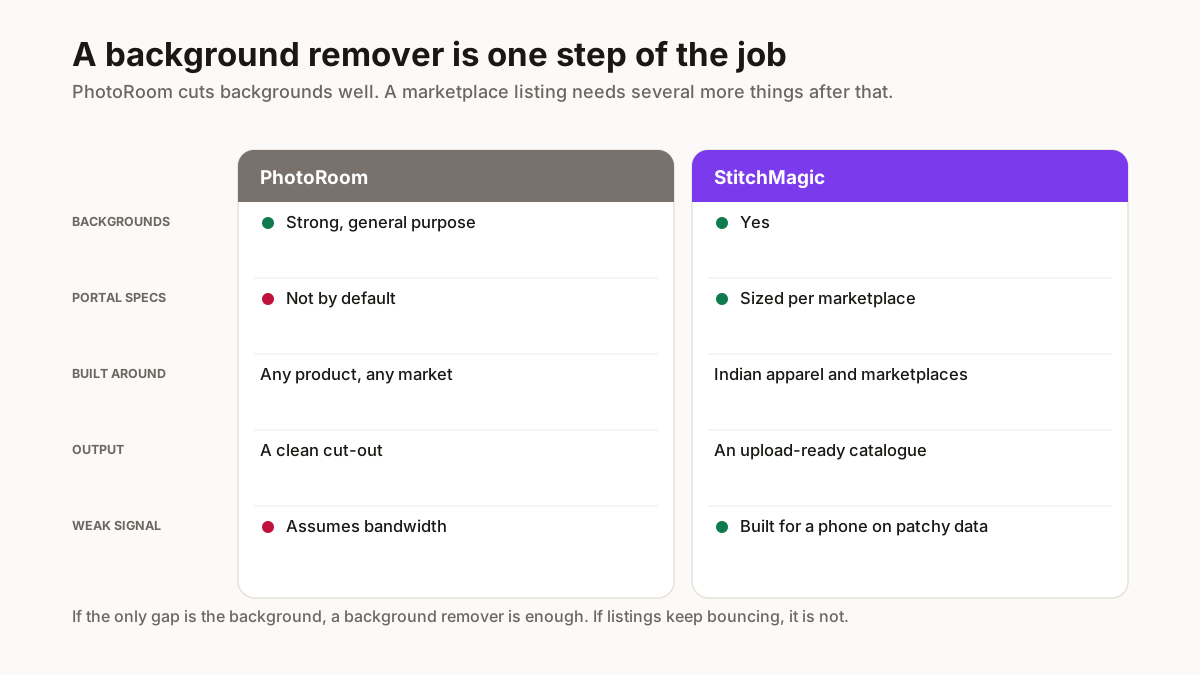
Not on the editing. PhotoRoom removes backgrounds well and its output is good. The gap is everything that happens after: an image that looks clean still gets rejected if it carries a logo on the primary catalog shot, or arrives at the wrong ratio for the marketplace.
Meesho, Flipkart and Amazon want 1:1 square at 1000x1000. Myntra wants 3:4 portrait. A seller listing across all four from one shoot has to produce different crops per channel, and a general editor leaves that as manual work.
Meesho also rejects logos, watermarks, promotional text and price tags on primary catalog images. A tool that does not know that rule will happily let you brand your way into a rejection.
What does StitchMagic do differently?
It treats the marketplace requirement as the specification in place of an afterthought. One upload produces the four marketplace sizes, and branding is skipped automatically on the sizes where it would cause a rejection — the branded copies go to a separate sharing folder for WhatsApp and Instagram.
Everything runs in the browser, so photos never leave the phone, and the free tools work with no signup. That matters on a weak connection more than any feature does.
Where PhotoRoom is genuinely better is fine cut-outs on complicated edges — hair, jewellery chains, sheer fabric. If that is your product, use it for the cut-out and bring the result here for sizing.
Which should you actually use?
If you sell internationally on Etsy or Shopify and need studio-grade cut-outs, a general editor is the right tool and this is not competing for that job.
If you sell on Indian marketplaces and your rejections are about size, ratio or branding rules, a tool that encodes those rules saves you the relisting rather than the editing.
Plenty of sellers use both, and there is nothing wrong with that. The pipeline is the part worth automating.
What does a marketplace check that an editor does not?
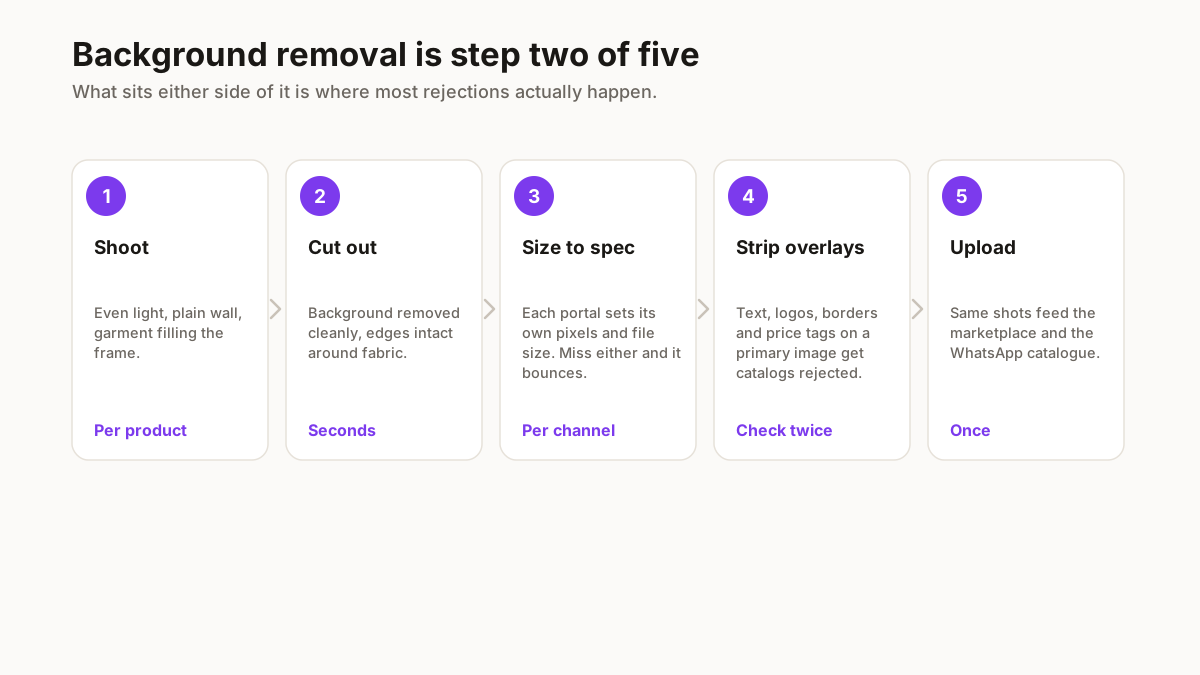
Pixel dimensions and file size, first, and both independently. A portal that wants a specific width will reject an image that is beautiful and the wrong shape, and a general editor has no reason to know what any particular Indian marketplace asks for. That knowledge is the gap, not the cutting-out quality.
Then it checks the primary image for anything that is not the product. Text, logos, watermarks, borders, price stickers and collages all get catalogs rejected, and a background remover will happily leave your watermark exactly where you put it because removing it was never the job you asked for.
Aspect ratio catches people out separately from dimensions. A square crop and a portrait crop of the same photograph both look correct in isolation, and only one of them fills the box the marketplace displays. The other gets letterboxed, which looks amateur beside listings that got it right.
None of this makes a background remover a bad tool. It makes it one step of a process that has four or five, and the rejections tend to come from the steps after it.
When is a general editor the right choice?
When the background is genuinely the only problem. If your listings are live, passing QC and converting, and you simply want a cleaner cut-out than you are getting, a dedicated background remover does that one job very well and there is no reason to change tools.
It is also the right choice for anything outside the marketplace flow entirely — a poster, a social graphic, a photograph for a printed lookbook. Those have no portal spec to meet, and general editors give you far more creative control than anything built around a fixed output.
The case changes when listings keep bouncing. A rejection is information about which step failed, and if the answer is repeatedly the dimensions or something left on the primary image, more editing power is not the fix. Knowing the spec is.
Worth reading the rejection reason properly before deciding either way. Sellers frequently change tools over a problem the panel had already named precisely.
Related free seller tools
Frequently Asked Questions
Is there an Indian alternative to PhotoRoom?
StitchMagic covers the same job for marketplace sellers, built around Indian requirements — exact Meesho, Myntra, Flipkart and Amazon sizes, and the QC rules that cause rejections here.
Why do my edited photos still get rejected on Meesho?
Usually branding or ratio instead of editing quality. Meesho rejects logos, watermarks, promotional text and price tags on primary catalog images, and expects square at 1000x1000.
Which marketplace needs a different image ratio?
Myntra wants 3:4 portrait while Meesho, Flipkart and Amazon want square. Listing across all four from one shoot means producing different crops per channel.
Is PhotoRoom better at background removal?
On fine edges — hair, jewellery chains, sheer fabric — often yes. If that is your product, use it for the cut-out and bring the result here for marketplace sizing.
Do my photos get uploaded to a server?
Not with StitchMagic. Processing runs in the browser using Canvas and WebGL, so files never leave your device, which also means it works on a weak connection.
Is a background remover enough for marketplace listings?
Only if the background is the whole problem. Portals also check pixel dimensions, file size and aspect ratio independently, and reject primary images carrying text, logos, borders or price stickers — none of which a background remover has reason to touch.
When should I use a general photo editor instead?
For anything outside the marketplace flow — posters, social graphics, print — where there is no portal spec to meet and creative control matters more. Also when your listings are already passing QC and you simply want a cleaner cut-out.
We make one of these tools, so read the concessions above as the honest part. Where PhotoRoom is the better fit, this page says so.