Jewellery Background Remover — Professional Product Photos in Seconds
Upload your jewellery photo and get a clean white background in seconds. Our AI is trained specifically for jewelry products — it handles reflective surfaces, thin chains, and intricate filigree work that generic tools miss. Free to use, no sign-up required.
Doing more photos today?
One tap. We'll tell you what your drop costs and how long it takes.
Upload your jewellery photo and get a clean white background in seconds. Our AI is trained specifically for jewelry products — it handles reflective surfaces, thin chains, and intricate filigree work that generic tools miss. Free to use, no sign-up required.
Real Jewellery, Real Results
See how StitchMagic handles the trickiest jewelry scenarios. From delicate necklaces to faceted diamonds, our AI preserves every detail.
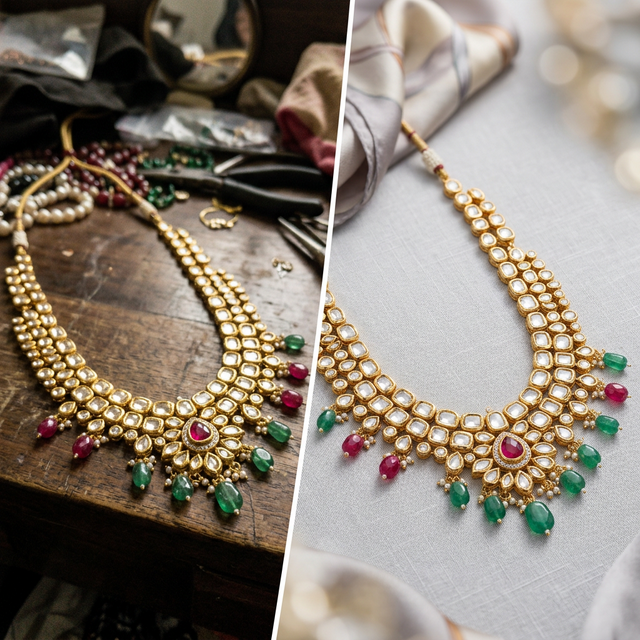
Gold Necklace
Removes the dark velvet background while preserving the lustrous reflection and delicate chain links that make gold jewelry sparkle.
Diamond Ring
Maintains the semi-transparent facets and light refraction of diamonds while isolating the metal band and prongs with pixel-perfect accuracy.
Silver Earrings
Handles intricate designs, hollow loops, and mirror-like finishes without erasing interior negative space or polished surface reflections.
Why Generic Tools Fail for Jewelry
Standard background removers are trained on people and simple objects. Jewelry requires a different approach.
Reflective Metals
Generic AI mistakes the shiny reflection on polished gold or silver as part of the background, cutting it out and leaving the piece looking flat and broken.
Thin Chains
A 1mm gold chain looks like noise to standard models. They erase entire chain segments, leaving buyers confused about what they're purchasing.
Transparent Gems
Diamonds and gemstones have semi-transparent facets. Generic AI either preserves the background inside the stone or erases it completely, ruining the effect.
The StitchMagic Solution
Trained on thousands of jewelry pieces, our AI understands reflections, micro-details, and transparency. Every item comes out perfect for Amazon, Meesho, and WhatsApp catalogs.
How to Photograph Jewellery for Best Results
While our AI handles imperfect photos, following these tips ensures marketplace-ready images on the first try.
| Tip | Description |
|---|---|
| Lighting | Use soft diffused light (no harsh flash). Position a light source 45 degrees from the jewelry to capture sparkle without harsh shadows. A light tent or white fabric diffuser works great. |
| Background | Plain white or light grey sheet works perfectly. Avoid busy patterns, dark colors, or reflective surfaces. Even if you use velvet for in-hand display, our AI will remove it cleanly. |
| Angle | For rings: 45-degree angle to show the band and stone. For necklaces: hang flat or on a stand, front-facing at eye level. For earrings: pair them or show single with scale reference. |
| Focus | Use macro mode (if on phone) to capture fine details. Center the main stone or focal point. Ensure the entire piece is sharp and in frame. Avoid motion blur. |
| Props | Use jewelry stands or display boards to position pieces. Avoid hand-held shots (unless showing fit). Use acrylic risers to add depth and separation from background. |
Platform Requirements at a Glance
Different marketplaces have different image specifications. We've optimized our remover for all major Indian platforms.
| Platform | Image Size | Background | Format |
|---|---|---|---|
| WhatsApp Catalog | 500x500+ | White preferred | JPG/PNG |
| Amazon | 1000x1000 | Pure white (#FFFFFF) required | JPG |
| Meesho | 500x500 | Any (white recommended) | JPG/PNG |
| 1080x1080 | Any (brand consistent) | JPG/PNG |
Our AI automatically outputs in marketplace-ready formats. You can resize and adjust as needed using our image resizer tool.
Engineered for High-End Catalogs
Diamond Facet Preservation
Ensures the semi-translucent nature of diamonds and American diamonds are maintained without blending them into the white background.
Micro-Edge Detection
Identifies strings of pearls, delicate gems, and 1mm chains with pixel-perfect accuracy.
Marketplace Ready White
Automatically replaces your messy desk or velvet display with pure RGB #FFFFFF white, guaranteeing compliance with Amazon and marketplace rules.
Shadow Retention
Optionally retain the sub-surface drop shadow to keep jewelry looking grounded and realistic rather than floating unnaturally.
Frequently Asked Questions
Complementary Tools for Sellers
Complete your product photography workflow with StitchMagic's suite of free tools.
Background Remover
General-purpose background removal for all product types — garments, fabrics, accessories, and more.
Watermark Remover
Remove watermarks, logos, and unwanted text from product photos in seconds.
AI Photo Enhancer
Enhance brightness, contrast, and color saturation to make jewelry sparkle in listings.
Transform Your Jewellery Listings in Seconds
Stop losing sales to poor product photos. Use the AI background remover built specifically for jewelry. Free, fast, and no sign-up required.
Remove Jewellery Background Now