Before you start: what the Meesho login needs
You need three things: the email ID or mobile number registered on your supplier account, its password, and a browser. Meesho’s Google Play developer page lists four apps — the Meesho shopping app and three Valmo logistics apps — and no separate supplier app (checked 3–4 October 2026), so the panel is a web page. A phone browser is fine for orders; a laptop is easier for catalog work with many images.
No account yet? The login screen cannot help. Use Meesho’s sign-up page; Meesho says it needs an active bank account and a GSTIN, or an Enrolment ID / UIN for non-GST sellers (How it works, checked 3–4 October 2026). Our guide to selling on Meesho without GST covers that route.
How to log in to the Meesho supplier panel
Four steps, each with what the screen showed us on 4 October 2026.
- 1
Open the Meesho supplier login page
Go to supplier.meesho.com/panel/v3/new/root/login, or open supplier.meesho.com and press Login. Start Selling on the same page opens sign-up, a different form.
You should see: a white card titled “Login to your supplier panel” with two fields and a grey Log in button.
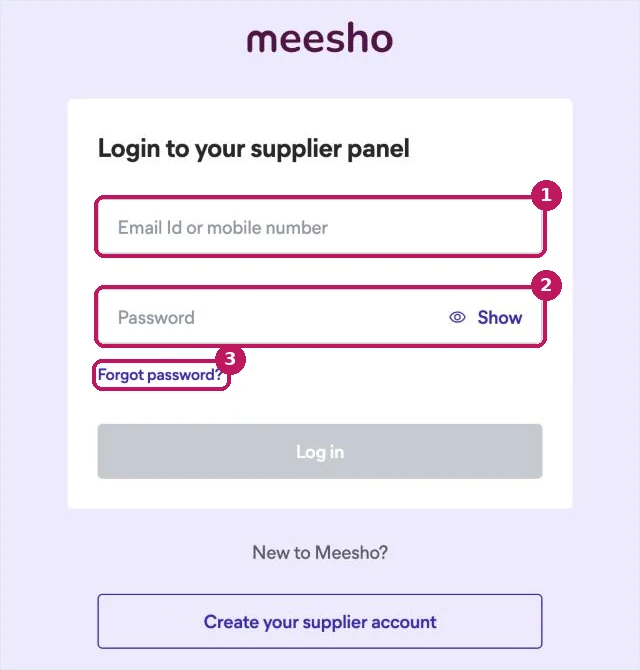
The Meesho supplier login screen, 4 October 2026. 1: email ID or mobile number · 2: password · 3: Forgot password? - 2
Enter your email ID or mobile number (box 1)
The field is labelled “Email Id or mobile number”, so either works — as long as it is the one registered on the supplier account. A second number you own is not the same account.
You should see: the field shows what you typed; nothing is sent yet.
- 3
Enter your password and press Log in (box 2)
Type the password — Show reveals it so you can check for typos — and press Log in. The screen asks for a password, not an OTP; if you were waiting for an SMS code, go to step 4.
You should see: the supplier panel opens. Meesho’s own lesson names its areas Orders, Inventory, Payments, Advertisement, Support, Notices and Settings, among others.
- 4
No password, or forgot it? Press Forgot password? (box 3)
The reset screen, “Forgot login password”, asks for your registered email ID, or offers “Get OTP on your mobile number” if you registered with a phone. This is the only place an OTP appears. Meesho’s learning hub gives the same route for changing a password (Meesho learning hub, retrieved 3–4 October 2026).
You should see: a “Submit email” button, and under it the mobile OTP option.
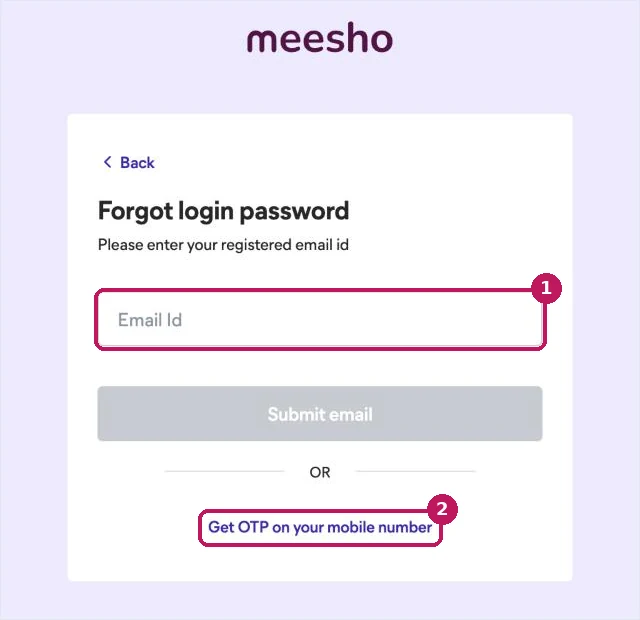
Meesho’s password reset screen, 4 October 2026. 1: reset by email · 2: reset by OTP to your registered mobile.
Meesho seller login: the addresses we tested
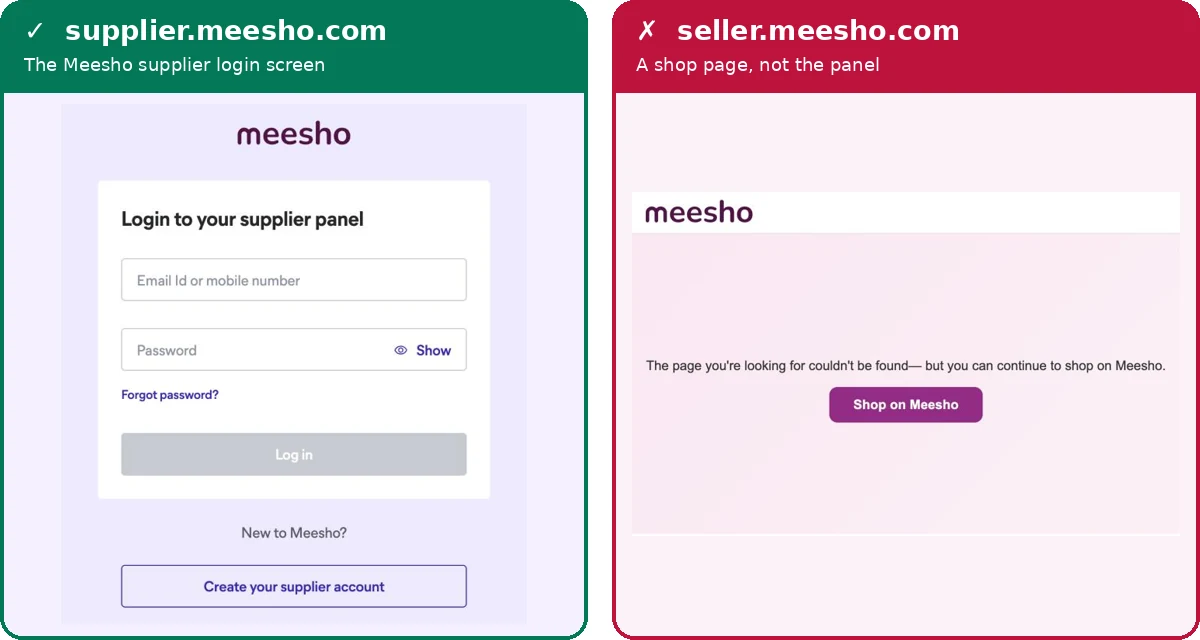
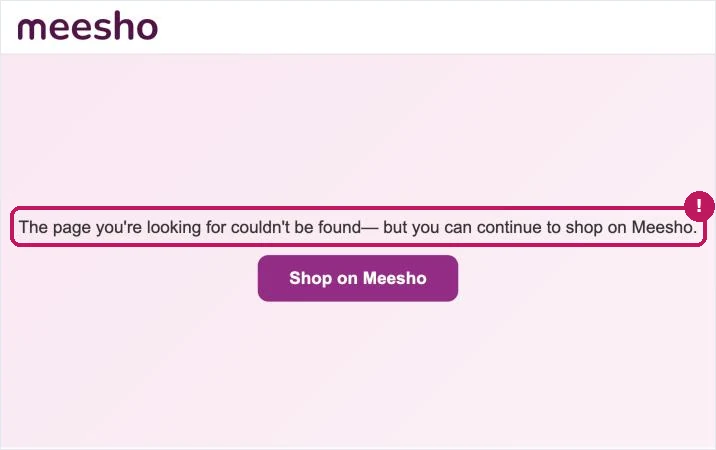
Only supplier.meesho.com reached the login screen in our test. Meesho calls its sellers suppliers, so the panel lives on the supplier subdomain; Flipkart’s seller.flipkart.com makes seller.meesho.com the natural guess, and that address shows a not-found page with a button to shop. There is no error saying the address is wrong, so sellers often think their account is broken.
| Address we tried | What opened | Use it? |
|---|---|---|
| supplier.meesho.com | Meesho’s supplier site; Login goes to the login screen | Yes |
| supplier.meesho.com/panel/v3/new/root/login | The login screen, titled “Meesho Seller Login” | Bookmark this |
| seller.meesho.com | “The page you’re looking for couldn’t be found — but you can continue to shop on Meesho.” | No |
| supplier.meeshosupply.com | Points at meesho.com in DNS; did not open in the browser | No |
| Meesho app on Google Play | The buyer shopping app; no supplier app is listed | Not for sellers |
Loaded from a browser in India on 3–4 October 2026; domains checked on Google and Cloudflare public DNS on 3 October 2026.
One of Meesho’s own lessons still says “Visit supplier.meeshosupply.com and enter your registered email ID and password” (Meesho learning hub, retrieved 3 October 2026). That domain did not open for us. Bookmark the login page itself and skip the guessing.
Meesho supplier login problems and fixes
Most failed logins are an address or identifier mix-up, not a fault in the panel, which is why refreshing does not help.
| What you see | Usually means | Fix |
|---|---|---|
| A shopping page opens | You typed seller.meesho.com | Use supplier.meesho.com |
| An old link does not open | It is supplier.meeshosupply.com from an older guide | Use supplier.meesho.com |
| Waiting for a login OTP | Login takes a password, not an OTP | Forgot password? → Get OTP on your mobile number |
| Details not accepted | A different email or number from the registered one | Try the other identifier you registered with |
| Lost the registered number or email | Login details need changing on Meesho’s side | In the panel: Support → Account → raise a ticket; locked out: sell@meesho.com |
| Need a different GSTIN | Meesho does not allow a GSTIN change | Open a new supplier account with the new GSTIN |
Sources: login and reset screens loaded 3–4 October 2026; account changes and GSTIN rule from Meesho’s learning hub, retrieved 3 October 2026; support address from supplier.meesho.com.
If you are locked out
Changing the registered email or phone is a ticket raised from inside the panel: Support → Account → “I want to change my registered email address” (or phone number), and Meesho emails new login credentials. A GSTIN cannot be changed; Meesho asks for a new account (Meesho learning hub, retrieved 3 October 2026). Locked out completely? Meesho publishes sell@meesho.com under “Meesho Supplier Support Available 24/7” (supplier.meesho.com, checked 3–4 October 2026); inside the panel, tickets go through Support → My Tickets → Raise a Ticket (Meesho learning hub).
We found no supplier phone number on Meesho’s own supplier pages (3–4 October 2026).
Treat a “Meesho supplier care number” from a search result as unofficial. Do not share an OTP or password, install a screen-sharing app, or pay anyone to “release” a payment because a caller asks.
After you log in: list your first Meesho catalog faster
The first real job inside the panel is a catalog. ListMagic, our AI listing agent, is a Chrome extension that fills the Meesho catalog form — title, category, attributes, images and price — and you check it and press Submit yourself. It is free to start.
Two things to sort before the first listing. Images: the Meesho image resizer outputs the size the catalog form takes. Price: Meesho states 0% commission and payment on the 7th day from delivery (supplier.meesho.com, checked 3–4 October 2026); run your own numbers through the Meesho commission calculator or read what Meesho charges.
मीशो सप्लायर लॉगइन: हिंदी में
सप्लायर पैनल का पता है supplier.meesho.com — supplier, seller नहीं। seller.meesho.com खोलने पर शॉपिंग पेज खुलता है; इसका मतलब आपका अकाउंट खराब नहीं है, सिर्फ़ पता गलत है।
लॉगइन: रजिस्टर्ड ईमेल आईडी या मोबाइल नंबर डालें, फिर पासवर्ड। पासवर्ड भूल गए? उसी पेज पर Forgot password? दबाएँ — ईमेल से या “Get OTP on your mobile number” से नया पासवर्ड बनाएँ।
सपोर्ट: पैनल में Support → Raise a Ticket, या sell@meesho.com। इंटरनेट पर मिले “मीशो सप्लायर केयर” नंबरों पर भरोसा न करें। (जाँच: 4 October 2026)
Frequently asked questions
What is the Meesho seller login URL?
supplier.meesho.com; the login screen itself is supplier.meesho.com/panel/v3/new/root/login (checked 4 October 2026). It is supplier, not seller: seller.meesho.com opens a page with a link to shop on Meesho.
Can I log in to the Meesho supplier panel with my mobile number?
Yes. The field on the login screen reads "Email Id or mobile number", followed by a password, so the registered mobile number works as well as the registered email (checked 4 October 2026).
Why am I not getting an OTP for Meesho supplier login?
Because the login screen asks for a password, not an OTP. An OTP appears only on the reset screen: press "Forgot password?" and choose "Get OTP on your mobile number" (checked 4 October 2026).
How do I reset my Meesho supplier password?
Press "Forgot password?" on the login screen, then either enter your registered email ID and press "Submit email", or choose "Get OTP on your mobile number" (Meesho reset screen, checked 4 October 2026).
Is there a Meesho supplier app?
Meesho’s Google Play developer page lists four apps, the Meesho shopping app and three Valmo logistics apps, and no separate supplier app (checked 3 October 2026). Use the supplier panel in a phone or laptop browser.
How do I change the registered mobile number or email on Meesho?
Raise a ticket from inside the panel: Support, then the Account tab, then "I want to change my registered email address" or phone number. Meesho emails new login credentials. A GSTIN cannot be changed; Meesho asks for a new account instead (Meesho learning hub, retrieved 3 October 2026).
What is the Meesho supplier customer care contact?
Meesho lists sell@meesho.com and support tickets inside the panel (Support, then Raise a Ticket). We found no supplier phone number on Meesho’s own supplier pages on 3–4 October 2026, so treat numbers from search results as unofficial.