How to sell on Meesho: seller registration steps
To create a Meesho seller account, click “Start Selling” on supplier.meesho.com and sign up with an active bank account and a GSTIN, or an Enrolment ID / UIN if you are not GST-registered. Our Meesho seller registration, step by step guide walks through every sign-up screen; what follows is the short version. Meesho’s pricing page says registering is free, and its How it works page sets out the path in four stages (both read 11 Oct 2026).
- Open the sign-up page. “Start Selling” on supplier.meesho.com opens the Meesho supplier sign-up page.
- Keep your documents ready. An active bank account in your name, plus a GSTIN or an Enrolment ID / UIN.
- Sign up for free. The form decides which details it asks for on the day.
- Upload your first catalog in the Meesho Supplier Panel.
- Ship orders. Print the label in the panel and hand the parcel to pickup.
- Get paid. Money goes to your bank account on a 7-day payment cycle.
No GST yet? Read sell on Meesho without GST first, since the Enrolment ID route has its own limits. And keep the account in the same name as the bank account. Meesho says payment is “deposited directly in your bank account on the 7th day from order delivery, including Cash on Delivery orders”, so a name mismatch at sign-up turns into a payment that never arrives.
Meesho seller login: where to sign in
Sign in at supplier.meesho.com: the “Login” link opens the Supplier Panel login page, where you enter your email ID or mobile number and your password. Our Meesho seller login and Supplier Panel guide shows each screen and what to do when the page will not open. Skip guessed addresses. seller.meesho.com lands on a Meesho shopper page that says it could not be found, so bookmark the Supplier Panel login page that Meesho’s own site links to.
Login with OTP
The login screen asks for a password, not an OTP. Lost it? Click “Forgot password?” and choose “Get OTP on your mobile number”, or submit your registered email ID instead.
Meesho seller app
There is no separate supplier app on Google Play. Meesho’s developer page lists one app, the shopping app for buyers (checked 11 Oct 2026). Any “seller app” that asks for your panel password is a third party, so stay on the web panel.
Meesho seller support and helpline
Meesho’s seller site says “Meesho Supplier Support Available 24/7”, and the route is a ticket: Support in the left menu, the Help tab first, then Raise a Ticket, and the reply shows in My Tickets (Meesho learning hub, read 11 Oct 2026). To change your login email or phone, raise it from the Account tab. Meesho’s supplier pages show no helpline number (checked 4 Oct 2026), so a “customer care number” from a forum is not an official route.
Meesho seller charges and pricing
Meesho states that it charges 0% commission from suppliers across all product categories, so the price you set is not cut by a sales commission. That does not make every order profitable. Shipping and returns still come out of what each piece earns, and a piece that comes back as a return earns nothing for the trip it already made (commission wording: Meesho How it works, read 11 Oct 2026).
Work out your price per piece before you list, not after the first payment. Meesho charges explained breaks down what is deducted from an order, the Meesho commission calculator shows what you keep at a given selling price, and the price per piece calculator guide turns a wholesale lot into a cost per piece you can price from.
We do not print shipping slabs or fee amounts on this hub, because they change and depend on your product’s weight and category. Take the figure Meesho shows you on the day you price, and recheck it before festival sales when you change prices in bulk.
Listing products on Meesho
Listing on Meesho means filling the catalog form in the Supplier Panel: the category, product details, price, images, and the HSN code and GST rate for each product. A catalog is Meesho’s word for a product listing, often with several colour or design options together. If Meesho’s quality check rejects it, Meesho catalog rejected: fixes lists the common reasons and what to change before you upload again.
Images cause most first-week delays. Check the Meesho image guide for size and what the photos should show before shooting, fix the dimensions in the free Meesho image resizer, or make a clean product image with the Meesho image generator.
For the tax fields, find the HSN code for your product and the rate in GST on clothes. On invoices, a seller with aggregate turnover up to ₹5 crore writes a 4-digit HSN and a seller above ₹5 crore writes 6 digits, from 1 April 2021 (CBIC Notification 78/2020–Central Tax). Upload many products at once with Meesho bulk listing.
Listing from a laptop? ListMagic, our AI listing agent for Meesho, is a Chrome extension that fills the Meesho Supplier Panel catalog form for you, field by field. You check what it filled and press Submit yourself. It needs Chrome on a laptop, not a phone.
Shipping, labels, returns and RTO
Shipping on Meesho starts when an order lands in the Supplier Panel: you pack the piece, print the label Meesho gives you, and hand the parcel to the pickup partner. The Meesho parcel guide covers packing and handover. Meesho packing material covers covers, tape and size, so the parcel does not slip into a heavier weight slab.
Pickups and courier names are in the Meesho delivery partner guide, and the Meesho shipping cost guide shows how weight and size move the charge. Weigh one packed piece before you price. A saree folded into a bigger cover can cost more to send than the same saree packed flat.
Meesho labels print as a full page, which wastes thermal paper. The free Meesho label crop cuts them to label size, the AWB label generator builds a waybill label from your details, and you can crop Amazon labels too, if you sell there.
Returns and RTO
A return is a parcel the customer sends back after delivery; RTO (return to origin) is one that never reached the customer, for example a Cash on Delivery order refused at the door. Both cost you the shipping and the days the stock was away. The Meesho returns for sellers guide covers handling them, and saree sellers can check the Meesho saree returns analysis 2026, our own study of why sarees come back.
Growing your Meesho sales
Meesho orders grow from listings that show up in Meesho search and filters at a price buyers accept. So start with complete catalogs in categories people already buy. The Meesho trending products guide shows how to find them, and the Meesho Ads guide explains when paying for visibility makes sense on a catalog that already gets orders. One catch: Meesho’s seller site says Ads are currently not available for sellers who don’t have a Regular GSTIN (supplier.meesho.com, read 11 Oct 2026). On an Enrolment ID, you grow through listings first.
Outside the panel, Instagram DMs for Meesho sellers shows how sellers turn Instagram enquiries into orders, and Meesho dropshipping covers selling stock you do not hold. If you are choosing between marketplaces, read Meesho vs Flipkart for saree sellers, then the Flipkart seller hub, the Myntra seller hub and other marketplaces; for better photos across all three, see AI product photography for Amazon, Flipkart and Meesho.
Which Meesho guide do you need?
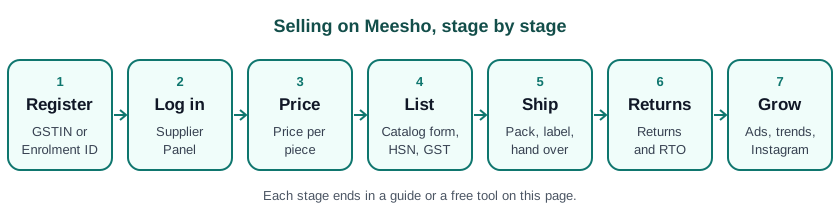
Find the row that matches where you are stuck today and open the page in the second column. Take the Surat saree supplier without GST who wants a first catalog live this week: rows one, four and eight, in that order, before the first parcel goes out.
| Your situation | Go to |
|---|---|
| No GST yet | Sell on Meesho without GST |
| Can’t log in to the Supplier Panel | Meesho seller login and Supplier Panel guide |
| Catalog rejected | Meesho catalog rejected: fixes |
| First listing | ListMagic or Meesho bulk listing |
| Label won’t print at the right size | Meesho label crop |
| A return came back | Meesho returns for sellers |
| Not sure what to sell | Meesho trending products |
| Need a price per piece | Meesho commission calculator |
All Meesho guides on StitchMagic are listed under marketplace sellers. Last checked: 10 Oct 2026.
Fill your Meesho catalog form with ListMagic: a Chrome extension for the Supplier Panel on a laptop; you check every field and press Submit. See how ListMagic works
Frequently asked questions
How do I create a Meesho seller account?
Click “Start Selling” on supplier.meesho.com and sign up with an active bank account and a GSTIN, or an Enrolment ID if you don’t have GST. Meesho says registering is free (pricing page, read 11 Oct 2026); the registration guide walks through each screen.
Can I sell on Meesho without GST?
Yes, Meesho offers registration with an Enrolment ID instead of a GSTIN; see our without-GST guide for the limits. Meesho Ads, for example, are not available without a Regular GSTIN.
How to login Meesho seller account in app?
Meesho has no separate seller app on Google Play, so log in on the web Supplier Panel at supplier.meesho.com with your email ID or mobile number and password. Our Supplier Panel guide shows each screen.
Can I log in to Meesho seller with OTP?
Only through password recovery: the login screen asks for a password, and “Forgot password?” offers “Get OTP on your mobile number”. Use the mobile number registered on the account.
What is the Meesho seller helpline or support number?
Meesho’s supplier pages show no helpline number; support works through tickets. In the Supplier Panel, open Support, check the Help tab, then use Raise a Ticket and follow it in My Tickets.
Is selling on Meesho profitable?
It depends on your price per piece after shipping and returns, since Meesho states 0% commission; check each product in the commission calculator. A product with frequent returns can lose money even when the sale price looks fine.
How to get 100 orders a day on Meesho?
There is no fixed number of steps; orders follow listings that appear in Meesho search and filters at a competitive price. Start with complete listings in trending categories, and add more catalogs in a category that already sells before you spend on Meesho Ads.
Does Meesho charge sellers commission?
Meesho states it charges 0% commission. Its How it works page says this applies across all product categories (read 11 Oct 2026); shipping and returns still affect what you keep.
What do I need to list my first product?
A catalog with images, product details, price, HSN code and GST rate. ListMagic, a Chrome extension, can fill the Supplier Panel catalog form for you to review before you press Submit.
Registered on Meesho? ListMagic, a Chrome extension, fills the Supplier Panel catalog form for you; you review and press Submit.
List Meesho catalogs with ListMagicRelated
Checked by the StitchMagic team on 11 Oct 2026. StitchMagic is a set of free tools and one AI listing agent (ListMagic) for online sellers in India that helps them list faster on Meesho, Flipkart and Amazon.in and sell more. Found an error? Tell us; we correct with a dated note.