What does bulk listing on Meesho actually involve?
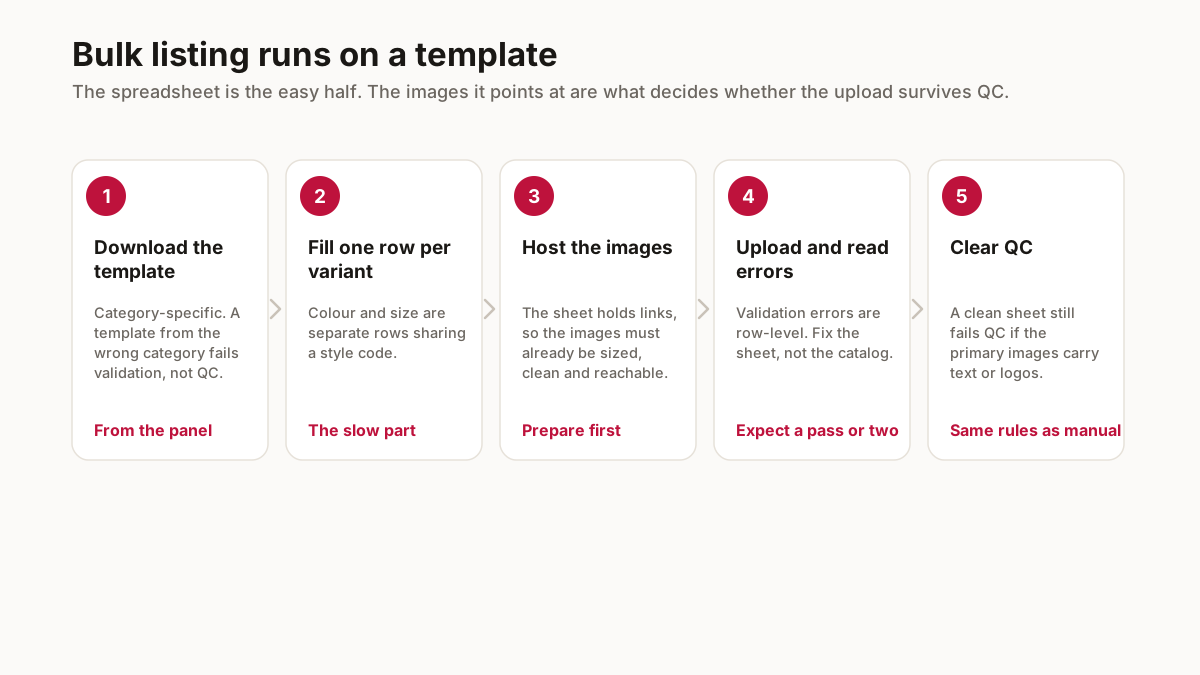
A template downloaded from the supplier panel, filled with one row per product variant, and uploaded. Each row carries the category, attributes, price, stock and the image references.
The spreadsheet is the easy half. The hard half is 200 photos that need to be square, under the size limit, free of branding, and named so each row can find its image.
Sellers who do this well spend their time on file naming and skip most of the errors. Sellers who do not spend it on failed uploads.
How should you prepare the photos first?
Rename by SKU before anything else. A folder where the image is called KRT-RED-L-004.jpg rather than IMG_20260818.jpg removes the single most common bulk error — the right title against the wrong colour.
Resize everything to 1000x1000 in one pass instead of product by product. Doing 200 photos individually is an evening; doing them as a batch is minutes.
Strip branding from the catalog copies while keeping branded versions elsewhere. Bulk uploads fail as a batch, so one branded image in 200 can cost you the whole submission.
What goes wrong in a bulk upload?
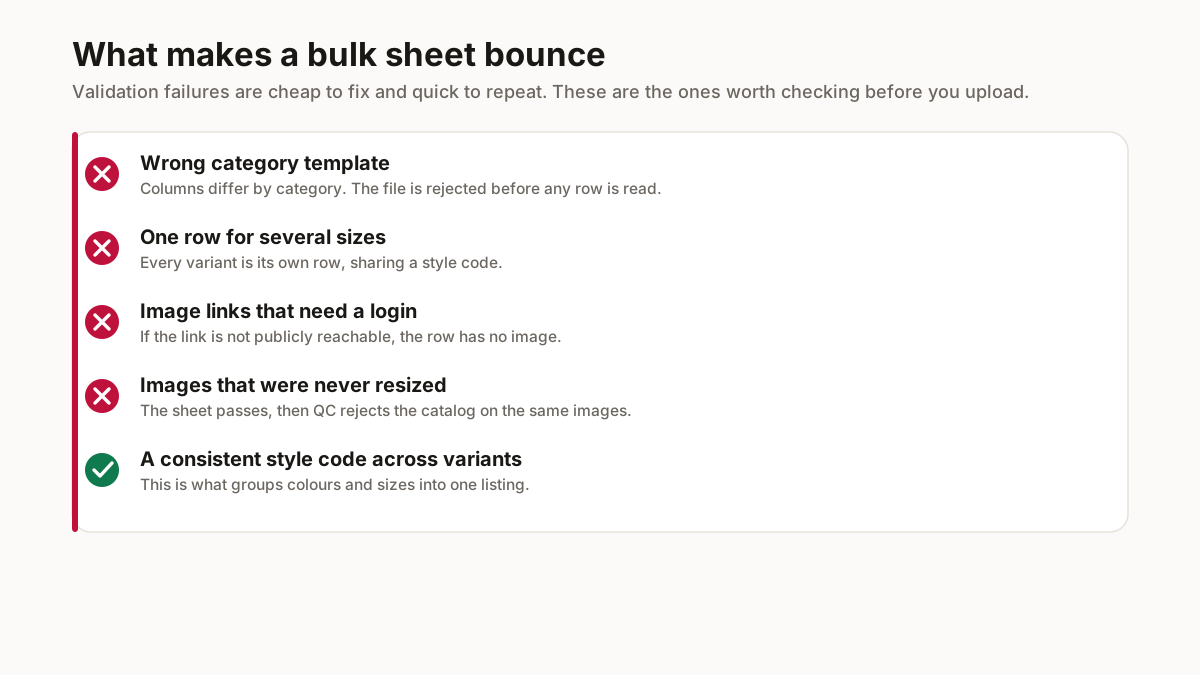
Mismatched image references, mandatory attributes left blank, and price or stock fields formatted as text and not numbers. Those three cause most failed sheets.
Upload a test batch of 5 rows before the full 200. A failure at 5 rows costs a minute to diagnose; the same failure at 200 rows gives you an error list to read rather than an answer.
Keep the sheet after a successful upload. Next season it becomes a template with your own working values in place of a blank download.
What makes bulk listing worth the setup?
Repetition, and only repetition. A seller with five products will finish faster in the panel than in a spreadsheet, and the template only starts paying once you are entering the same attributes over and over across dozens of variants. Below that threshold the setup cost exceeds the saving.
The saving is largest where products share structure. Ten styles in five sizes and three colours is a hundred and fifty rows that differ in three fields, which a spreadsheet handles trivially and a panel handles painfully. Ten unrelated products with different attributes is the opposite case.
It also makes changes cheap. Repricing a whole range, or correcting an attribute you set wrong across every variant, is a column edit and a re-upload rather than a hundred and fifty separate panel visits. That benefit lands months after the initial upload and is the one sellers underrate.
And it forces consistency. Attributes entered by hand across dozens of listings drift — the same fabric described three ways, the same colour named differently — and inconsistency makes a catalogue harder to browse and harder to rank.
What breaks between a valid sheet and a live catalog?
Two separate checks, and passing the first says nothing about the second. Validation looks at the file: correct template, required columns filled, values in the format expected. QC looks at the images the file points to, and applies exactly the same rules a manual upload faces.
So a perfectly clean sheet pointing at images with text on them fails, and it fails after you have done all the spreadsheet work. Preparing the images to spec before building the sheet is the order that avoids this, and it is the opposite of the order most sellers naturally work in.
Image links are the other common break. If the sheet points at a location that requires a login, or that goes away later, the row has no image as far as the platform is concerned. Whatever hosts them needs to be publicly reachable and stable.
Expect a pass or two of validation errors, and read them as row numbers rather than as a verdict on the file. Fixing four rows and re-uploading is normal; rebuilding the sheet from scratch because it was rejected is not.
Related free seller tools
Frequently Asked Questions
How do I bulk list products on Meesho?
Download the catalog upload template from the supplier panel, fill one row per product variant with category, attributes, price, stock and image references, then upload. Preparing the photos is the harder half.
How should I name photos for bulk listing?
By SKU, before anything else. A file called KRT-RED-L-004.jpg not IMG_20260818.jpg removes the most common bulk error, which is the right title against the wrong colour.
Why does my Meesho bulk upload keep failing?
Usually mismatched image references, mandatory attributes left blank, or price and stock formatted as text rather than numbers. Test with 5 rows before submitting 200.
How many products can I bulk upload at once?
The template accepts large batches, but test small first. A failure at 5 rows costs a minute to diagnose; the same failure at 200 gives you an error list and not an answer.
Do I need to resize photos before bulk listing?
Yes — 1000x1000 square, free of branding, under the size limit. Doing 200 individually is an evening; batching them takes minutes.
Is bulk listing worth it for a small catalogue?
Below roughly a dozen products, no — the panel is faster than the setup. The template pays off with repetition, especially where styles share structure: ten styles in five sizes and three colours is 150 rows differing in three fields.
My bulk sheet uploaded but the catalog was rejected. Why?
Validation and QC are separate checks. Validation looks at the file; QC looks at the images the file points to and applies the same rules a manual upload faces. A clean sheet pointing at images carrying text still fails.
Rates, slabs and penalties change. Check the current figures in your supplier panel before pricing — the mechanics above stay stable, the numbers do not.