How to sell on Flipkart: seller registration steps
To register as a Flipkart seller you need a valid email ID, a phone number, a Regular GST number, a bank account, a PIN code, a pickup address and at least one product to sell; sellers of books give PAN details instead of a GST number. That list is Flipkart’s own, from its Flipkart Seller app listing on Google Play (read 11 Oct 2026), which headlines it as the requirements “to Start Selling Online in Just 10 Minutes!”.
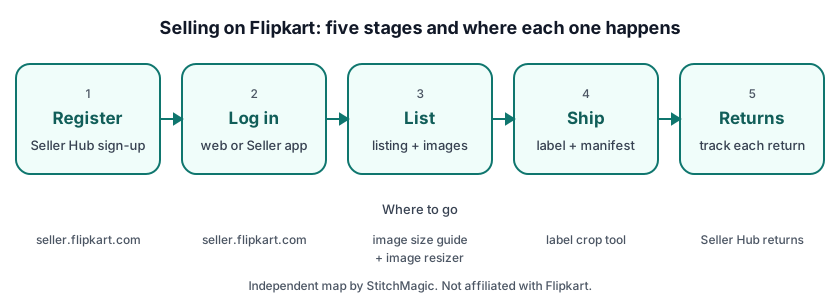
- Open Flipkart Seller Hub. Go to seller.flipkart.com on a laptop, or install the Flipkart Seller app, and start the registration.
- Give your email ID and phone number. These become the contact and login details of the seller account.
- Add your tax details. A Regular GST number for every category except Books; Books sellers enter PAN details.
- Add your bank account. This is where Flipkart pays you for orders.
- Enter your PIN code and pickup address. This is where orders are collected from.
- List at least one product. Flipkart counts a first product among the things you need before you can start selling.
We could not read the registration form itself: seller.flipkart.com and Flipkart’s seller blog load their text in the browser and returned nothing we could check on 10 and 11 Oct 2026. So the order of screens and any sign-up fee are not stated here. If the form or Flipkart’s terms do not mention a fee, ask through Help & Support on seller.flipkart.com rather than trusting a forum answer.
A Meesho saree seller adding Flipkart as a second channel will already have product photos, prices and HSN codes ready, but note the tax difference: Meesho accepts an Enrolment ID, while Flipkart’s list asks for a Regular GST number outside Books. Compare the two channels with our Meesho vs Flipkart notes for saree sellers before you list your full range.
Flipkart seller login, app and support
The Flipkart seller login is on Flipkart Seller Hub at seller.flipkart.com, and the same account opens in the Flipkart Seller app on Google Play. Seller Hub is where you manage the account day to day, so bookmark the official address and type it yourself instead of clicking a login link from a search ad or a chat message.
Login on PC, Chrome and with OTP
On a PC or laptop, Seller Hub opens in any desktop browser such as Chrome, so there is nothing to install. Sign in with the email ID or phone number you registered with. Flipkart’s login screen did not load as readable text for us, so we do not describe an OTP step. Follow what the screen shows, and never read a login code out to someone who calls or messages you.
Flipkart Seller app download
The official app is “Flipkart Seller : Sell Online” on Google Play, published by Flipkart Internet Private Limited, with seller.flipkart.com as its developer website (listing updated 23 Sep 2026). It covers orders and shipments, inventory and payment status from a phone. Check that the publisher is Flipkart before you install. For a PC, use the browser instead of looking for a desktop download.
Flipkart seller support and helpline
Flipkart’s app listing promises 24x7 seller support. The route runs through your own account: log in, then open Help & Support on seller.flipkart.com or in the app. For API and integration questions, Flipkart’s seller FAQ says to “raise a ticket through the seller or partner portal” (read 11 Oct 2026). We print no Flipkart seller helpline or “24x7 support phone number”, because numbers posted on other sites are a common route to account fraud.
Vendor Hub at vendorhub.flipkart.com is a separate Flipkart portal with its own login. If you signed up on seller.flipkart.com, your marketplace seller login is there, not on Vendor Hub. Flipkart’s seller API documentation is also served from seller.flipkart.com, under /api-docs/, which is useful if you later connect an order or inventory tool to your account.
Flipkart seller fees and commission
Flipkart seller fees come from Flipkart, so take the current figures from your Seller Hub account before you price a product. We do not print commission, fixed fee or shipping fee figures on this page because we could not read them from a Flipkart page we can cite with a date.
To see what an order leaves you after fees, enter your selling price and the fee values from your Seller Hub rate card into the Flipkart commission calculator. Work out your margin per piece before you match a competitor’s price, and redo the sum when Flipkart announces a rate card change, because the same product can move from profit to loss on a small fee change.
Listing and images on Flipkart
On Flipkart, a listing is your offer on a product: Flipkart’s listing API reference calls a listing “the fundamental sellable unit in the Flipkart Marketplace” and creates listings against your SKUs (Flipkart listing API reference, retrieved 4 Oct 2026). Your price, stock count and dispatch time sit on the listing, so those are the fields you update most often.
Large catalogues can update price and stock in bulk. Flipkart’s FTP option takes a CSV with columns such as “Your Selling Price”, “Your Stock Count” and “Procurement SLA”, and its scheduler picks the file up every 1 hour (Flipkart listing FTP documentation, retrieved 4 Oct 2026).
Flipkart’s own API reference mentions only an image URL field and no image size rule (retrieved 4 Oct 2026). Our Flipkart image size guide compares the published claims on size, background and angles, and the free Flipkart image resizer fixes a photo in the browser. For the HSN code on your invoice, use our HSN codes for online sellers.
Shipping, packaging and labels
With Flipkart’s standard fulfilment, Flipkart takes care of the delivery; you pack the order, print the label and invoice, mark it Ready to Dispatch and hand it over with the manifest (Flipkart order API overview, retrieved 10 Oct 2026). Under Self Ship, the seller handles logistics instead.
Flipkart’s order documentation lists the standard order states in this order: approved, packing in progress, packed, ready to dispatch, shipped, delivered. Once you request labels and the invoice, the order moves to packing in progress, and Flipkart’s note is to keep packing while the documents are generated; it says this usually takes 5–10 seconds but can take up to 30 minutes under system load (Flipkart order API overview, retrieved 4 Oct 2026).
The label comes as a PDF that can carry the shipping label and the invoice together; the invoice prints only when auto-invoicing is on, and several shipments arrive as one merged PDF (Flipkart order API reference, retrieved 4 Oct 2026). To print on a thermal printer, crop Flipkart shipping labels with our free tool, which runs in your browser and outputs 4 × 6 in labels by default (StitchMagic tool, checked 4 Oct 2026). Box sizes and packing material rules are not in these pages, so follow the packaging help inside Seller Hub.
Flipkart seller returns
A Flipkart return is created against an order item and ends either completed, when the product reaches you, or cancelled, when it is no longer expected back (Flipkart order API overview, retrieved 10 Oct 2026). Check the product as soon as it arrives, because the return record is what you will refer to in any claim.
For Self Ship sellers, Flipkart separates two kinds. A courier return is raised when the buyer cancels while the parcel is still in transit; the seller verifies the delivery status, acknowledges or cancels the return, and makes sure the parcel is not delivered and comes back to the warehouse. A customer return is raised after delivery, and once approved the seller arranges pickup from the customer. An order cancelled between out-for-delivery and delivered counts as a customer return.
Return windows, deductions and claim steps are not in the Flipkart documentation we could read, so open the returns section of Flipkart Seller Hub for those. If you also sell on Meesho, our Meesho returns guide for sellers explains that marketplace’s process separately.
Where to go for each Flipkart task
Use Flipkart’s own site for anything that changes your account, and StitchMagic tools for the preparation work around it. The table maps the seven tasks sellers search for most to the page that handles each one.
| Task | Where |
|---|---|
| Register as a seller | Flipkart Seller Hub (official) |
| Log in | seller.flipkart.com or the Flipkart Seller app on Google Play |
| Check fees on an order | Flipkart commission calculator, with your Seller Hub rate card |
| Image size for listings | Flipkart image size guide |
| Crop shipping labels | Flipkart label crop tool |
| Returns and claims | Returns section of Flipkart Seller Hub |
| Support | Help & Support on seller.flipkart.com or in the Flipkart Seller app; no phone numbers from other sites |
Official links checked 11 Oct 2026. Other marketplaces: Meesho seller hub, Myntra seller hub, and all guides for marketplace sellers.
Frequently asked questions
How to start a Flipkart seller account?
Register on Flipkart Seller Hub at seller.flipkart.com or in the Flipkart Seller app, with your email ID, phone number, Regular GST number, bank account, PIN code and pickup address. Then list at least one product to start taking orders.
What documents do I need to sell on Flipkart?
A Regular GST number and a bank account, plus your email ID, phone number, PIN code and pickup address. Books sellers give PAN details instead of a GST number (Flipkart Seller app listing, read 11 Oct 2026).
Can a normal person sell on Flipkart?
Yes, if you have a Regular GST number, or PAN details when you sell only books. Flipkart’s own list does not name a separate rule for individuals, so check the registration form at seller.flipkart.com if you are unsure.
Is it free to sell on Flipkart?
We could not read a Flipkart page that states the registration terms, so check them on seller.flipkart.com. For per-order fees, use the commission calculator once you have your Seller Hub rate card.
Where is the Flipkart seller login?
At seller.flipkart.com, or in the Flipkart Seller app on Google Play. Vendor Hub (vendorhub.flipkart.com) is a separate portal with its own login.
Where do I download the Flipkart Seller app?
From Google Play: the app is Flipkart’s “Flipkart Seller” app (Sell Online), published by Flipkart Internet Private Limited. On a PC, open seller.flipkart.com in a browser such as Chrome instead; there is nothing to install.
What is the Flipkart seller helpline or support number?
Flipkart routes seller support through Help & Support on seller.flipkart.com and in the app, and advertises 24x7 seller support there. We print no phone number, because numbers on other sites are often fake.
How do I crop a Flipkart shipping label?
Open our free Flipkart label crop tool, add the label PDF from Seller Hub and download the cropped labels; the output is 4 × 6 in by default and the file stays in your browser.
Your Flipkart account is live? ListMagic, the StitchMagic AI listing agent, helps you list faster on Flipkart.
List on Flipkart with ListMagicRelated
Checked by the StitchMagic team on 11 Oct 2026. StitchMagic is a set of free tools and one AI listing agent (ListMagic) for online sellers in India that helps them list faster on Meesho, Flipkart and Amazon.in and sell more. Found an error? Tell us; we correct with a dated note.