AI Photo Editing Online — The Seller's Suite
A complete suite of AI-powered tools built specifically for e-commerce sellers. Remove backgrounds, enhance details, and create catalogs without firing up Photoshop.
Remover
Enhancer
Upscaler
Processing
StitchMagic provides an online AI photo editing suite tailored for e-commerce. Instead of using complex software like Photoshop, sellers can simply upload product photos and let AI automatically fix bad lighting, remove messy backgrounds (producing pure white #FFFFFF for Amazon), and upscale image resolution up to 4K. It runs entirely in your web browser and requires zero graphic design experience.
The Old Way vs The AI Way
Why spend 3 hours editing photos from a supplier when AI can do it in 3 minutes?
XManual Editing Software
- ✕ Pay an expensive monthly subscription for heavy desktop software.
- ✕ Spend 10 minutes carefully tracing the edges of a single product with a pen tool to remove the background.
- ✕ Guess at color curves and exposure settings to try and fix bad lighting.
- ✕ Realize the image is too small for Amazon and abandon the listing.
✓StitchMagic Suite
- ✓ Open your web browser on a phone or laptop. No installation.
- ✓ Upload your catalog. AI traces the complex edges and removes the background in 3 seconds automatically.
- ✓ Click "Auto-Enhance" to let neural networks balance the lighting instantly.
- ✓ Check the "Upscale" box to generate 4K resolution files ready for marketplaces.
One Toolkit for Product Operations
AI Background Remover
Designed for complex fashion edges like jewelry reflectiveness and sheer fabrics. Output to pure white for Amazon compliant listings.
Lighting & Color Enhancer
Fix dark, yellowish, or dull photos taken under poor shop lighting. Restores natural vibrant colors so the product looks appealing.
4K Image Upscaler
Increase the resolution of small, compressed WhatsApp photos by up to 400x to enable hover-to-zoom logic on e-commerce platforms.
Automated Catalog Generation
Don't stop at editing. Take your processed photos and let the system arrange them into a stunning PDF catalog with automatic price tagging.
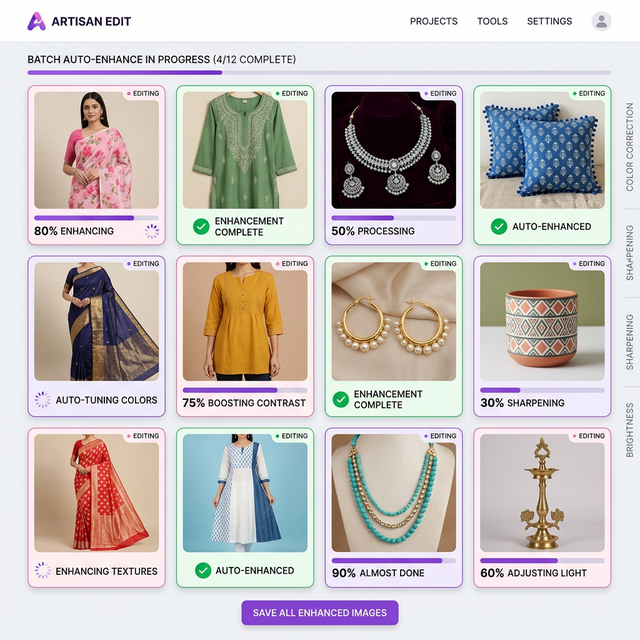
Stop Editing One by One
When your supplier dumps 100 new designs into a WhatsApp group, you don't have time to open 100 files in a photo editor.
StitchMagic utilizes high-throughput cloud processing. Select your entire folder of new inventory, define your rules (e.g., "Remove background to white, enhance lighting, upscale 2x"), and let the server process the entire batch while you handle other parts of your business.
Frequently Asked Questions
Your Complete Online Photo Studio
Stop struggling with generic photo editors. Use AI specifically trained to make apparel and jewelry look flawless.
Open the AI Studio