Generate QR codes from an Excel sheet
Same three steps as any bulk job, and the column layout is the part worth getting right.
1. Paste or upload
One value per line, or two columns out of a spreadsheet. The second column becomes both the caption printed under the code and the filename in the ZIP — which is the difference between a folder you can use and 200 files called qr-1.png.
| Column A — Link or value (what gets encoded) | Column B — Name (caption and filename) |
|---|---|
| stitchmagic.in/catalog/kurtis | Kurti range |
| stitchmagic.in/catalog/sarees | Saree range |
| stitchmagic.in/care/cotton | Cotton care |
Two columns, header row optional. The tool reads the file and asks which column is which, so the order does not matter.
2. Pick what the code does
A plain link, plain text, a WhatsApp chat that opens with your message already typed, or a UPI payment. For the last two you fill your number or UPI ID in once and every code in the run uses it.
3. Download
A print-ready sheet, or a PNG ZIP at full resolution. If you only need one code, the single QR code generator is the quicker page — this one is built for a list.
What sellers actually put in a QR
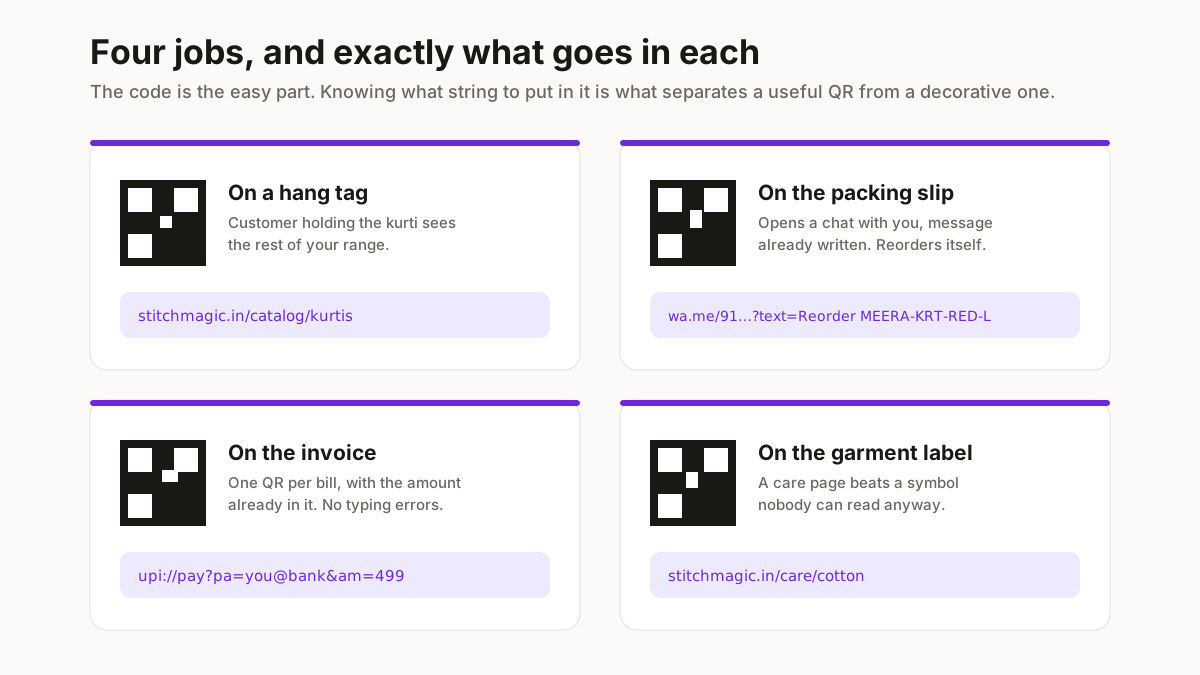
Four jobs that come up constantly, with the exact thing to paste in.
A catalogue link on a hang tag
The customer holding your kurti in a shop scans it and sees the rest of the range. Paste the plain URL — stitchmagic.in/catalog/kurtis — and the tool adds the https for you.
A WhatsApp order link on the packing slip
Scanning opens a chat with you, with the message already written. Pick the WhatsApp type, put your number in the settings, and let each row be the pre-filled message: Hi, I want to reorder MEERA-KRT-RED-L. The order number arrives with the message, so you are not asking for it.
A UPI collect QR on an invoice
Pick UPI, enter your UPI ID and shop name once, and put the amount in each row. A row that is a number becomes the amount; a row that is text becomes the payment note, which is how you get one QR per invoice rather than one for everything.
Care instructions on a garment label
A link to a short page beats a symbol nobody reads. It also lets you fix the wording after the labels are printed, provided the URL stays the same — see the section below on why that matters.
Print size and scan distance
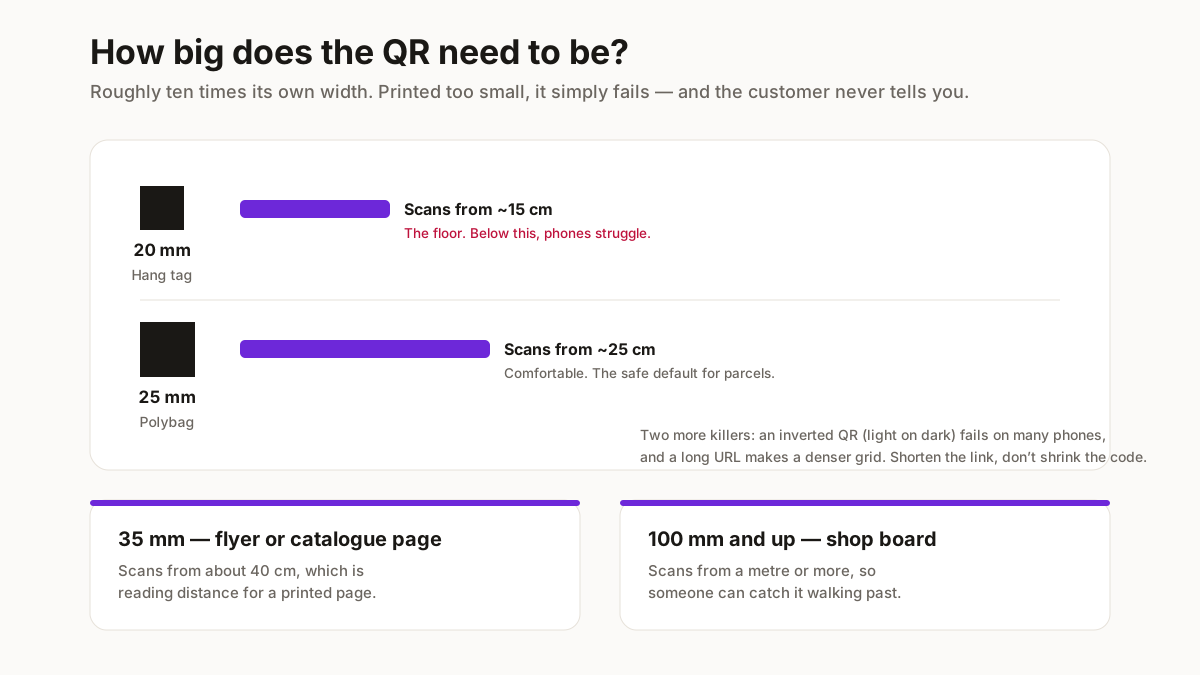
A QR that is too small does not scan, and the failure is silent — the customer just gives up.
| Where it goes | Size | Scans from about |
|---|---|---|
| Hang tag or garment label | 20 × 20 mm | 15 cm — the minimum worth printing |
| Polybag or packing slip | 25 × 25 mm | 25 cm, comfortably |
| A4 flyer or catalogue page | 35 × 35 mm | 40 cm |
| Shop board or standee | 100 × 100 mm and up | A metre or more |
Rule of thumb: a QR scans from roughly ten times its own width. Print smaller than 20 mm and phone cameras start to struggle whatever the light.
Two more things that break scanning and are easy to avoid. Keep the contrast dark-on-light — an inverted QR, light code on a dark background, fails on a lot of phones. And a long URL makes a denser grid with finer cells, so if you are printing small, shorten the link rather than shrinking the code.
Static or dynamic: which this makes
This tool makes static QR codes. The destination is baked into the pattern itself. That means they are free, they work forever, nobody is tracking the scans, and no service can switch off and take your printed tags with it.
It also means the destination cannot be changed after printing. If you put a link on 500 hang tags and then move that page, the tags are dead.
So use a static code — this one — when the destination is stable: your own domain, a WhatsApp number, a UPI ID. Use a paid dynamic QR service when you genuinely need to redirect later, or need scan analytics.
The practical middle route is to point static codes at a URL you control and redirect on your own site. You keep the free, permanent code and you keep the ability to change where it lands.
Related free seller tools
Frequently Asked Questions
Do these QR codes expire?
No. They are static, meaning the destination is encoded in the pattern rather than looked up through a service. There is nothing to lapse and no account behind them, so a tag printed today still works in five years — as long as the page it points at is still there.
How many QR codes can I make at once?
Three hundred in one free run. Past that you can leave a WhatsApp number and the ceiling goes to three thousand. There is no watermark at either level.
Do you see the links I put in?
No. The codes are generated inside your browser and the file is assembled there too, so your list never reaches a server. For a seller whose links are their catalogue, that is the point.
Can I make UPI payment QR codes in bulk?
Yes. Choose the UPI type, enter your UPI ID and payee name once, and each row supplies the variable part — a number becomes the amount, anything else becomes the payment note. That gives you one distinct QR per invoice rather than one generic code.
Why will my QR code not scan?
Usually size: below about 20 mm across, phone cameras struggle. After that the common causes are an inverted colour scheme, which many phones will not read, and a very long URL producing a dense grid that loses detail when printed small. Shorten the link before shrinking the code.
Can I generate QR codes from Google Sheets?
Yes, indirectly and easily. In Sheets use File then Download then either .csv or .xlsx, and upload that here. Or just select the column, copy, and paste it straight into the box — a pasted Sheets column arrives tab-separated and the tool reads it.
Can I add my logo in the middle?
Not in this tool. A centre logo covers part of the pattern and only stays readable at the highest error-correction level, which makes the grid denser and pushes up the minimum print size. For a bulk run destined for small tags, that trade is usually a bad one.
These are static QR codes, generated in your browser. They never expire and nobody tracks the scans — but the destination is fixed once printed, so point them at a URL you control if you might need to move the page later.