Read this before you send anything
Search this and you will find dozens of APKs promising unlimited sending. They work — briefly. Then the number stops being able to send, and everything on it goes: your customer conversations, your catalogue, the number printed on your packaging and hang tags.
The cost of losing a WhatsApp number is not the number. It is every conversation with every customer who has ever ordered from you, and the fact that they cannot reach you and do not know why.
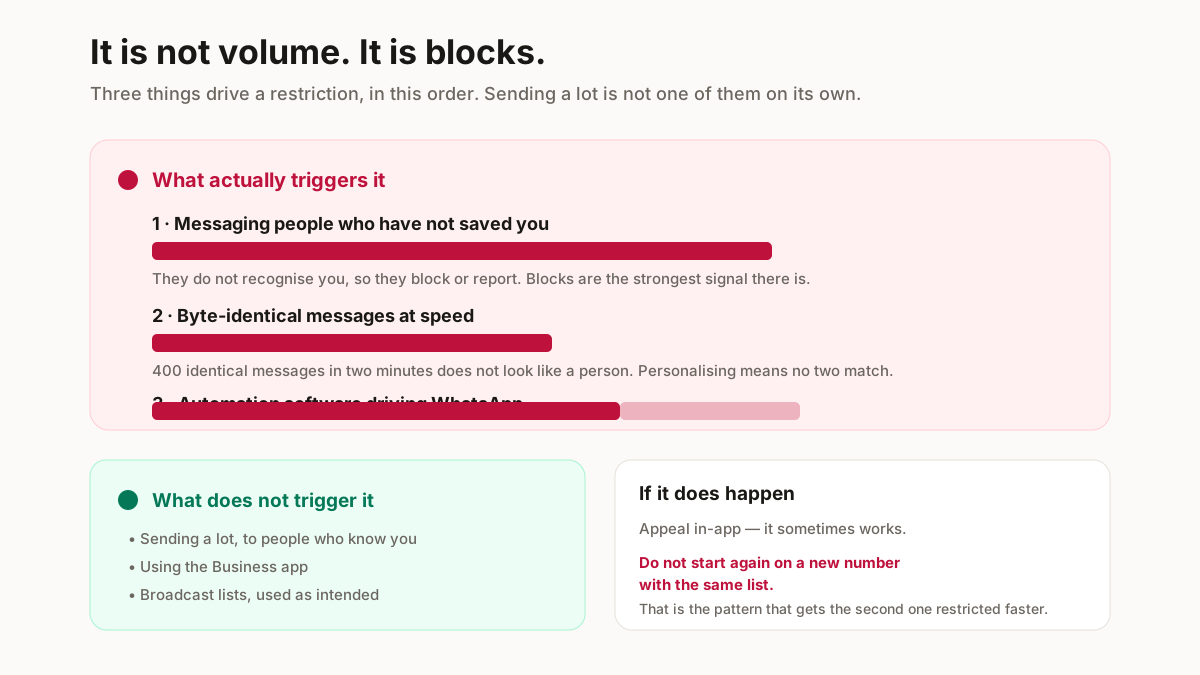
What actually triggers it
Not volume by itself. Three things, in order of how much they matter:
Messaging people who have not saved your number. An unsaved recipient who does not recognise you is far more likely to block or report, and blocks are the strongest signal there is.
Identical messages at speed. A byte-identical message to 400 people in two minutes does not look like a person. Personalising with a name means no two messages match, which is why the tool nags you to use {{name}}.
Automation software. Anything driving WhatsApp on your behalf violates the terms directly, and detection has got considerably better.
The tool on this page does none of these. It cleans your list, personalises the text, splits it at the cap and hands it back. You send.
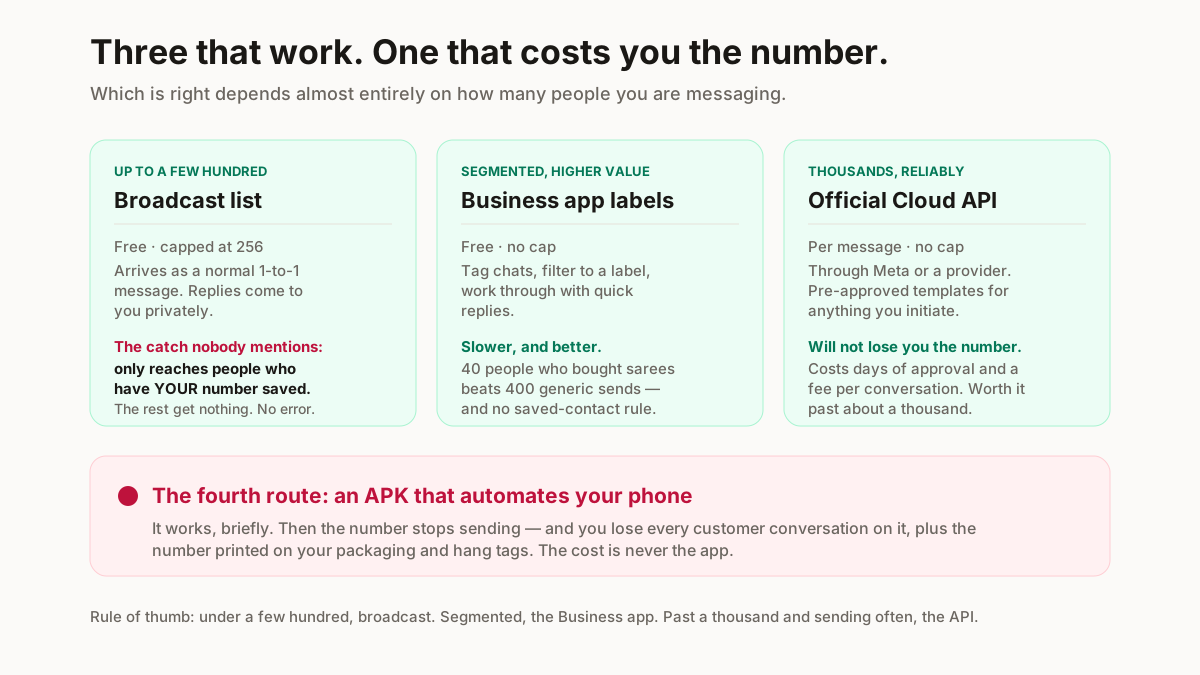
How to send bulk WhatsApp messages: three methods
Three legitimate routes, and which one is right depends almost entirely on how many people you are messaging.
| Broadcast list | Business app + labels | Official Cloud API | |
|---|---|---|---|
| Cost | Free | Free | Per message, plus a provider |
| Cap per send | 256 | One chat at a time | Effectively none |
| Needs your number saved | Yes — both ways | No | No |
| Ban risk | Low | Lowest | None if templates are approved |
| Setup time | Minutes | Minutes | Days, with approval |
| Right for | Up to a few hundred regulars | Segmented, higher-value sends | Thousands, reliably |
Method 1 — Broadcast lists
Built into WhatsApp and WhatsApp Business, free, and the right answer for most small sellers.
You create a list of up to 256 contacts and send once. Each recipient gets it as a normal one-to-one message — they cannot see the others, and if they reply it comes to you privately. It does not look like a broadcast at their end, which is the whole point.
The rule that catches everyone: a broadcast only reaches contacts who have your number saved in their phone. Not saved in yours — saved in theirs. Send to 200 people of whom 60 have saved you, and 140 silently receive nothing. No error, no indication.
Which is why the practical sequence is: give customers a reason to save you (order updates, a catalogue link on the packing slip), then broadcast.
On a phone: WhatsApp → menu → New broadcast, pick your contacts, send. The CSV from the tool above imports into your contacts first so the names are there to pick.
Method 2 — WhatsApp Business app with labels
Not bulk in the strict sense, and often better than bulk.
The Business app lets you tag chats — New customer, Saree buyer, Pending payment — then filter to a label and work through it with quick replies. Slower per message and dramatically higher response, because a segmented message to 40 people who bought sarees beats a generic one to 400.
It also has no cap and no saved-contact requirement, since these are chats that already exist.
Method 3 — The official Cloud API
What you graduate to at genuine volume, and the only route that is built for thousands.
Access comes through Meta or a business solution provider. Messages you initiate must use pre-approved templates, and you pay per conversation. Outside a 24-hour window from the customer’s last message, only templates can be sent at all.
The trade is real: approval takes days, there is a per-message cost, and the template rules are strict. What you get is sending that will not lose you the number.
The honest threshold: under a few hundred contacts, broadcast lists. Segmented and higher-value, the Business app. Past about a thousand and sending regularly, the API — and if that sounds like too much work, that is the signal you are not yet at the volume that needs it.
Message templates that actually get replies
Six that work for Indian fashion sellers. Paste any of them into the box above — the merge tags are already in.
New arrivals
Hi {{name}}, new cotton kurtis just came in — sizes S to XXL, starting ₹549. Want me to send photos?
Ending on a question roughly doubles replies against ending on a price. A reply also opens the conversation window, which matters.
Restock
Hi {{name}}, the black saree you asked about is back in stock. Holding one for you till tomorrow — shall I keep it?
The strongest message on this list, because it is genuinely personal. Send it only to people who actually asked.
Festive offer
{{name}} ji, Diwali collection is live — 10% off till Sunday on everything. Catalogue: [link]
A deadline is what makes this work. “10% off” with no end date gets read next week.
Abandoned enquiry
Hi {{name}}, you were asking about the anarkali last week — still interested? Happy to send more photos or sizes.
COD confirmation
Hi {{name}}, confirming your COD order — ₹899, delivery in 3-4 days. Please keep cash ready. Reply CANCEL if you have changed your mind.
This one pays for itself. A confirmation step cuts refused deliveries, and every refused COD costs you both legs of the freight.
Review request
Hi {{name}}, hope the kurti fits well! If you liked it, a rating really helps a small shop like mine. And if something is off, tell me first and I will fix it.
The second sentence is the important one — it routes complaints to you instead of to a public review.
Put an opt-out in the first message of any campaign. “Reply STOP if you would rather not get these.” A handful will, and those are exactly the people who would otherwise have blocked you.
Broadcast list, group, or status?
Three different things that get confused constantly, and picking wrong is how sellers annoy their best customers.
A broadcast list sends privately to each person. They cannot see each other. Replies come to you alone. This is what you want for anything commercial.
A group puts everyone in one room. They see each other’s numbers, and every reply notifies all 200. Do not put customers in a group. It exposes their numbers to strangers, it is the fastest route to being muted and left, and it turns one reply into 200 notifications.
The exception is a small, genuinely wanted group — a reseller circle that asked to be there.
Status is passive. You post once, and anyone who has saved you may see it. No cap, no ban risk, no interruption — and no guarantee anyone looks. It is the right home for daily new-arrival photos, with broadcast reserved for things that need a response.
Most sellers should use all three: status for browsing, broadcast for offers, one-to-one for closing.
The limits, in one place
The numbers and rules that decide what you can actually do.
256 contacts per broadcast list. A hard cap. More than that means several lists — the tool splits them for you.
Recipients must have your number saved. The single most important rule on this page, and the one that makes people think broadcasts are broken.
No published daily send limit for personal or Business-app use — which is not permission. Limits are behavioural: a number that generates blocks gets restricted regardless of the count.
A 24-hour window on the API. Once a customer messages you, you can reply freely for 24 hours. Outside it, only approved templates.
Opt-in is expected. Someone who bought from you and saved your number has effectively opted in. A list bought from someone else has not, and that is both the fastest way to lose a number and a problem under India’s data protection rules.
If your number does get restricted
You can appeal in-app, and it sometimes works. Do not start again on a new number with the same list — that is the pattern that gets the second number restricted faster than the first.
Related free seller tools
Frequently Asked Questions
Is sending bulk WhatsApp messages legal in India?
Messaging your own customers who have opted in is legal and normal business practice. Buying a contact list and messaging strangers is a different matter — it breaches WhatsApp’s terms and sits badly with India’s data protection rules. The legal question and the ban question have the same answer: message people who expect to hear from you.
Will my number get banned for using this?
Not from this tool, because it sends nothing — it cleans your list, personalises the message and splits it at the 256 cap, and you send from your own WhatsApp. What gets numbers banned is messaging people who have not saved you, sending byte-identical messages at speed, and automation software driving your phone.
Can I send to contacts who have not saved my number?
Not by broadcast — that is the rule that catches everyone. A broadcast only reaches recipients who have your number saved in their phone, and the rest receive nothing with no error shown. The pre-filled chat links on this page do reach unsaved numbers, because each one opens a normal chat that you send yourself.
How many contacts can I use for free?
A hundred per batch here, with no signup. WhatsApp’s own cap is 256 per broadcast list, which the tool splits for you. Both caps are about keeping things responsive and compliant rather than gating anything — the work happens in your browser.
Are bulk WhatsApp sender APKs safe?
No. They automate WhatsApp in breach of the terms, which is the fastest route to losing the number, and many require your login credentials or a modified WhatsApp build. The cost is not the app — it is every customer conversation on that number, plus the number printed on your packaging.
Can I attach a catalogue PDF to a broadcast?
Yes, WhatsApp broadcasts carry documents and images. Keep the file small — a customer on a patchy connection abandons a large download, so compress the images before building the PDF rather than after. Our catalogue maker outputs at a sensible size.
How many messages can I send per day?
There is no published daily limit for personal or Business-app use, and that is not permission. Restrictions are behavioural rather than numeric: a number generating blocks and reports gets limited whatever the count. A few hundred personalised messages to customers who know you is routine; a thousand identical ones to strangers is not.
What is the difference between a broadcast and a group?
A broadcast sends privately to each person — they cannot see each other and replies come to you alone. A group puts everyone in one room where they see each other’s numbers and every reply notifies all of them. Never put customers in a group; it exposes their numbers and is the fastest way to be muted.
This tool sends nothing. It builds your lists and pre-filled chats, and you send from your own WhatsApp — which is the difference between a broadcast and a lost number. WhatsApp’s limits and policies change; the mechanics above are stable, but check the current rules before a large campaign.