Do you need to do this?
Ask first, because a large share of the people who land here do not, and the honest answer saves an afternoon.
An e-way bill covers the movement of goods above a value threshold. Whether one is needed depends on the consignment value, whether the movement is within a state or between states, and your state’s own rules — which differ, and which change.
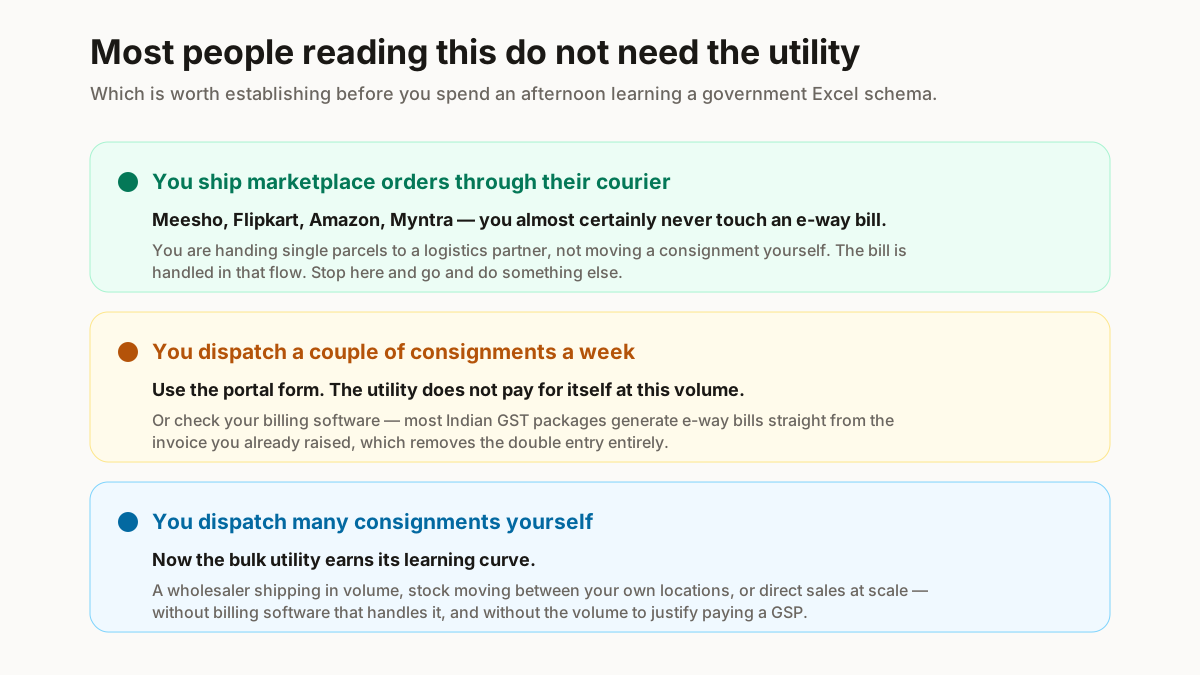
Here is the part that matters for most readers: if you sell on Meesho, Flipkart or Amazon and ship through the marketplace’s courier, the e-way bill is generally handled in that flow instead of by you. You are handing single parcels to a logistics partner, not moving a consignment yourself.
Bulk generation is for a different business — a wholesaler dispatching many consignments, someone moving stock between their own locations, or a seller shipping direct in volume. If that is not you, you can stop reading and get on with something else.
And if it is one or two consignments a week, use the portal form. The utility only earns its learning curve somewhere north of a few dozen at a time.
How the official route works
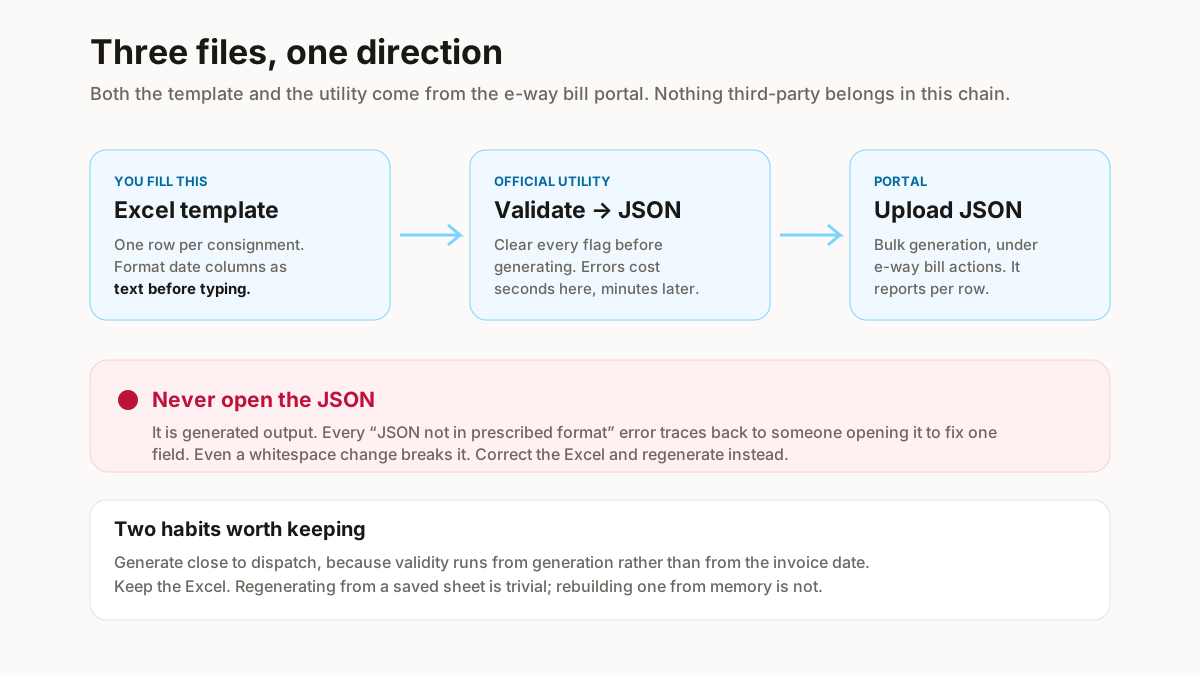
3 files, moving in one direction, and no third-party tool anywhere in it.
The Excel template — downloaded from the e-way bill portal, one row per consignment. The offline utility — also from the portal, which validates the sheet and converts it into a JSON file in the exact format the portal expects. The JSON — which you upload.
The single most important rule follows from that structure: never open or edit the JSON. It is generated output. Every “JSON not in prescribed format” error traces back to someone opening it in a text editor to fix one field. Change the Excel and regenerate instead.
Get both files from the portal itself, each time. A template someone emailed you or a copy from a blog will be a version behind, and the schema changes without announcement.
The Excel template, column by column
This is the part nobody explains, and it is where the time goes.
Transaction and document details
Supply type, sub-type, document type and number, and the document date. The document number must match your invoice exactly — this is what links the e-way bill to the invoice in any later check.
Parties
GSTIN, legal name, address, place, pincode and state code for both the consignor and the consignee. The pincode must be consistent with the state, and a mismatch between them is a common rejection that reads as a vague validation error.
Check the GSTINs before you build the file rather than after — a cancelled or mistyped number fails the whole row, and the bulk GSTIN checker clears a list in seconds.
Item details
Product name and description, HSN code, quantity, unit, taxable value and the tax rates. Fashion HSN codes are usually 6 or 8 digits; take them from your own invoices instead of guessing.
Transport details
Transport mode, distance, transporter details, and the vehicle number where the mode requires it. Two formatting traps live here: vehicle numbers go in unbroken, with no spaces or dashes, and distance has to be plausible for the two pincodes or validation rejects it.
The trap that catches everyone: dates
Excel reformats date columns on its own, silently, and the file it produces then fails with an unhelpful error. Format the date column as text before you type anything into it. This single step prevents more failed uploads than any other on this page.
Converting and uploading
Once the sheet is filled, the rest is mechanical.
Run the validation inside the template first. It flags malformed rows before you generate anything, and fixing them there costs seconds rather than a round trip through the portal.
Then generate the JSON. The utility writes the file; you do not touch it.
Log in to the e-way bill portal and find the bulk generation option under e-way bill actions. Upload the JSON. The portal processes the rows and reports which succeeded and which failed, with a reason per row.
Finally, collect the generated numbers and store them against each consignment. A generated e-way bill that nobody printed or recorded is no use at a check post.
Two operational habits worth having. Generate close to dispatch instead of days ahead, because validity runs from generation. And keep the Excel — regenerating from a saved sheet is trivial, rebuilding one from memory is not.
Errors, and what each one means
The portal’s messages are terse. These are the ones that occur.
| Error | What it means | Fix |
|---|---|---|
| JSON not in prescribed format | The file was edited after the utility made it | Never open the JSON. Change the Excel and regenerate |
| Invalid GSTIN | A typo, or a cancelled registration | Run the list through a checksum check first |
| Invalid HSN code | Wrong length, or not a real code | Fashion HSN is usually 6 or 8 digits |
| Invalid vehicle number | Spaces or dashes in the registration | Enter it unbroken, no separators |
| Invalid pincode | 6 digits expected, or it does not match the state | Check the pincode against the consignee state |
| Invalid date format | Excel silently reformatted the column | Format the column as text before typing dates |
| Distance validation failed | Distance implausible for the two pincodes | Leave it for the portal to compute where allowed |
| Duplicate document number | That invoice already has an e-way bill | Check before regenerating — you may already have it |
Notice the pattern: most of these are formatting problems in Excel rather than anything to do with e-way bills. Getting the column formats right before you type is most of the battle.
If you would rather not touch the utility
Entirely reasonable, and there are three real alternatives.
Your billing software. Most Indian GST billing packages generate e-way bills directly from the invoice you already raised, which removes the double entry that makes the utility tedious. If you are already invoicing in software, check whether this is switched on before learning anything else here.
A GSP. GST Suvidha Providers offer API access and bulk handling as a paid service. Worth it at genuine volume, overkill below that.
Let the courier do it. For marketplace orders this is usually what already happens, and it is why most Meesho and Flipkart sellers never encounter an e-way bill at all.
The utility is the right answer in one specific case: you dispatch many consignments yourself, you do not have billing software that handles it, and you do not have the volume to justify a GSP. That is a real business — it is just a narrower one than the search volume suggests.
Related free seller tools
Frequently Asked Questions
How many e-way bills can I generate in one file?
The bulk utility is built for many rows at once and the practical limit is generous enough that it is rarely what constrains you. What constrains you is validation — one systematic formatting error fails every row. Test with a handful of rows first, confirm they generate, then run the full file.
Is the e-way bill bulk utility free?
Yes. Both the Excel template and the offline conversion utility are published on the e-way bill portal at no cost. Anyone selling you a bulk e-way bill tool is selling convenience on top of a free government utility, which may be worth it for you — but you should know that is what you are buying.
Do marketplace orders need an e-way bill?
Usually not from you. When you ship a Meesho, Flipkart or Amazon order through the marketplace courier, the movement is handled in that flow instead of by you generating a bill per parcel. Bulk generation is for wholesalers and sellers dispatching consignments themselves.
Why does my JSON keep failing with "not in prescribed format"?
Almost always because the JSON was opened and edited after the utility generated it. Even a whitespace change breaks it. Treat the JSON as output only — make every correction in the Excel template and regenerate the file.
Can I cancel e-way bills in bulk?
Cancellation is more restricted than generation, and is time-limited after a bill is generated. Check the portal for the current cancellation window and options rather than assuming bulk cancellation mirrors bulk generation — it does not.
What if the vehicle changes during transit?
The vehicle details can be updated against an existing e-way bill instead of the bill being regenerated. Do it before the goods move on the new vehicle. This is a per-bill update, not something the bulk utility handles.
Why does my date column keep failing validation?
Excel reformats date columns automatically and the reformatted value no longer matches what the utility expects. Format the column as text before typing dates into it. This is the single most common cause of a bulk file failing and the easiest to prevent.
Thresholds, distance rules, validity periods and the template schema all change, and none of them are stated as fixed figures here on purpose. Take the current rules and both files from the official e-way bill portal at the time you generate — not from this page, and not from a template someone emailed you.