How to sell on Flipkart: what you need to register
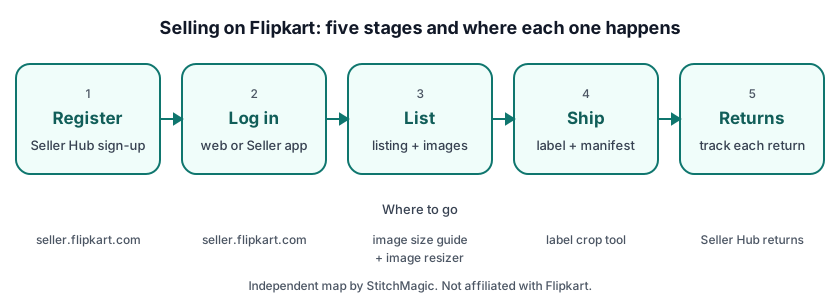
To register as a Flipkart seller you need a valid email ID, a phone number, a Regular GST number, a bank account, a PIN code, a pickup address and at least one product to sell; sellers of books give PAN details instead of a GST number. That list is Flipkart’s own, from its Flipkart Seller app listing on Google Play (read 11 Oct 2026). Keep these ready before you start:
- Email ID and phone number: the contact and login details of the seller account.
- Regular GST number: for every category except Books; Books sellers give PAN details.
- Bank account: where Flipkart pays you for orders.
- PIN code and pickup address: where orders are collected from.
- At least one product: Flipkart lists a first product among the things you need to start selling.
Start the sign-up at seller.flipkart.com on a laptop or in the Flipkart Seller app, and follow the screens in the order Flipkart shows them. Check Flipkart’s seller terms on Seller Hub for any fee before you agree to them; if something is unclear, ask through Help & Support rather than a forum.
A Meesho saree seller adding Flipkart will already have photos, prices and HSN codes ready, but note the tax difference: Meesho accepts an Enrolment ID, while Flipkart’s list asks for a Regular GST number outside Books. Compare the two channels in our Meesho vs Flipkart notes for saree sellers.
Flipkart seller login, app and support
The Flipkart seller login is on Flipkart Seller Hub at seller.flipkart.com, and the same account opens in the Flipkart Seller app on Google Play. On a PC, Seller Hub opens in any desktop browser such as Chrome, so there is nothing to install. Bookmark the official address and type it yourself instead of clicking a login link from a search ad or a chat message, and never read a login code out to someone who calls you.
Flipkart Seller app download
The official app is “Flipkart Seller : Sell Online” on Google Play, published by Flipkart Internet Private Limited, with seller.flipkart.com as its developer website (listing updated 23 Sep 2026). It covers orders and shipments, inventory and payment status from a phone. Check that the publisher is Flipkart before you install.
Flipkart seller customer care and helpline
Flipkart’s app listing promises 24x7 seller support, and the route runs through your own account: log in, then open Help & Support on seller.flipkart.com or in the app. For API and integration questions, Flipkart’s seller FAQ says to “raise a ticket through the seller or partner portal” (read 11 Oct 2026). We print no Flipkart seller helpline or customer care number.
Vendor Hub at vendorhub.flipkart.com is a separate Flipkart portal with its own login. If you signed up on seller.flipkart.com, your marketplace seller login is there, not on Vendor Hub.
Flipkart seller fees and commission
Flipkart seller fees come from Flipkart, so take the current figures from the rate card in your Seller Hub account before you price a product. We print no commission, fixed fee or shipping fee figures here, because we could not read them on a Flipkart page we can cite with a date.
Enter your selling price and the fee values from your rate card into the Flipkart commission calculator to see what an order leaves you, and redo the sum whenever Flipkart changes its rate card.
Listing and images on Flipkart
On Flipkart, a listing is your offer on a product: Flipkart’s listing API reference calls a listing “the fundamental sellable unit in the Flipkart Marketplace” and creates listings against your SKUs (retrieved 4 Oct 2026). Your price, stock count and dispatch time sit on the listing, so those are the fields you update most often.
Flipkart’s API reference mentions only an image URL field and no image size rule (retrieved 4 Oct 2026). Our Flipkart image size guide compares the published claims on size, background and angles, and the free Flipkart image resizer fixes a photo in the browser. For the HSN code on your invoice, use our HSN codes for online sellers.
Shipping, labels and returns
With Flipkart’s standard fulfilment, Flipkart takes care of the delivery; you pack the order, print the label and invoice, mark it Ready to Dispatch and hand it over with the manifest (Flipkart order API overview, retrieved 10 Oct 2026). Under Self Ship, the seller handles logistics instead.
The label comes as a PDF that can carry the shipping label and the invoice together; the invoice prints only when auto-invoicing is on, and several shipments arrive as one merged PDF (Flipkart order API reference, retrieved 4 Oct 2026). To print on a thermal printer, crop Flipkart shipping labels with our free tool, which runs in your browser and outputs 4 × 6 in labels by default (StitchMagic tool, checked 4 Oct 2026). For box sizes and packing rules, follow the packaging help inside Seller Hub.
A Flipkart return is created against an order item and ends either completed, when the product reaches you, or cancelled, when it is no longer expected back (Flipkart order API overview, retrieved 10 Oct 2026). Return windows, deductions and claim steps are in the returns section of Flipkart Seller Hub; check each product as soon as it arrives, because the return record is what you refer to in a claim. If you also sell on Meesho, see our Meesho returns guide for sellers.
Where to go for each Flipkart task
Use Flipkart’s own site for anything that changes your account, and StitchMagic tools for the preparation work around it.
| Task | Where |
|---|---|
| Register as a seller | Flipkart Seller Hub (official) |
| Log in | seller.flipkart.com or the Flipkart Seller app on Google Play |
| Seller support | Help & Support on seller.flipkart.com or in the Flipkart Seller app; no phone numbers from other sites |
| Check fees on an order | Flipkart commission calculator, with your Seller Hub rate card |
| Image size for listings | Flipkart image size guide |
| Crop shipping labels | Flipkart label crop tool |
| Returns and claims | Returns section of Flipkart Seller Hub |
Official links checked 11 Oct 2026. Other marketplaces: Meesho seller hub, Myntra seller hub, and all guides for marketplace sellers.
Frequently asked questions
What is the Flipkart customer care number for sellers?
Flipkart routes seller support through Help & Support after you log in at seller.flipkart.com or in the Flipkart Seller app, and its app listing promises 24x7 seller support (read 11 Oct 2026). We print no phone number, because numbers on other sites are often fake.
How to start a Flipkart seller account?
Register on Flipkart Seller Hub at seller.flipkart.com or in the Flipkart Seller app, with your email ID, phone number, Regular GST number, bank account, PIN code and pickup address, and at least one product to sell.
What documents do I need to sell on Flipkart?
A Regular GST number and a bank account, plus your email ID, phone number, PIN code and pickup address. Books sellers give PAN details instead of a GST number (Flipkart Seller app listing, read 11 Oct 2026).
Is it free to sell on Flipkart?
Check Flipkart’s seller terms on seller.flipkart.com before you agree to them; we could not read a Flipkart page that states them. For per-order fees, use the commission calculator with your Seller Hub rate card.
Where is the Flipkart seller login?
At seller.flipkart.com, or in the Flipkart Seller app on Google Play. Vendor Hub (vendorhub.flipkart.com) is a separate portal with its own login.
Where do I download the Flipkart Seller app?
From Google Play: the app is “Flipkart Seller : Sell Online”, published by Flipkart Internet Private Limited. On a PC, open seller.flipkart.com in a browser such as Chrome instead; there is nothing to install.
Your Flipkart account is live? ListMagic, the StitchMagic AI listing agent, helps you list faster. Start on the Free plan.
List on Flipkart with ListMagicRelated
Checked by the StitchMagic team on 11 Oct 2026. StitchMagic is a set of free tools and one AI listing agent (ListMagic) for online sellers in India that helps them list faster on Meesho, Flipkart and Amazon.in and sell more. Found an error? Tell us; we correct with a dated note.