Which kind of watermark do you have?
This decides everything, and almost no tool tells you before taking your money.
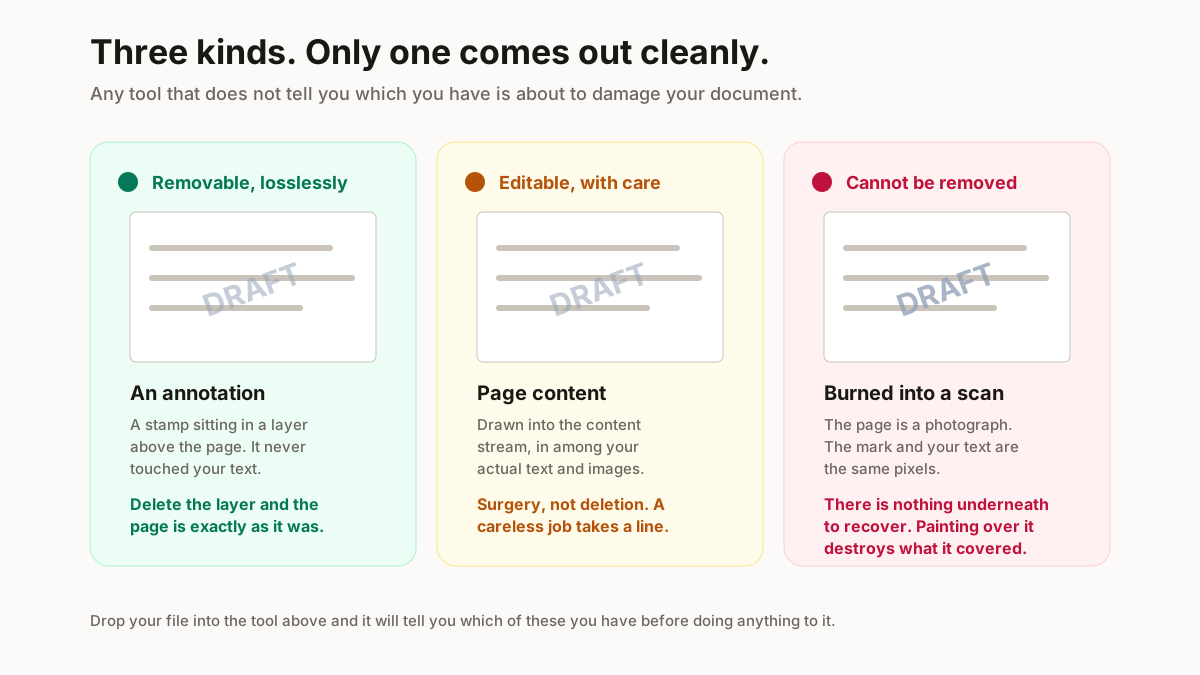
Three PDFs turn up again and again in a seller’s week: a wholesale price list from a supplier, a GST invoice, and a catalogue of 40 images going out on WhatsApp. Each one carries a different kind of mark, and which kind you have decides whether this takes 2 minutes or cannot be done at all.
An annotation
Added as a stamp, sitting in a layer above the page. It has nothing to do with your content and removing it is lossless — the text underneath is untouched because it was never touched to begin with. This is the case the tool above handles.
Part of the page content
Drawn into the page’s content stream, in among your actual text and images. It can be edited out with a proper PDF editor, but it is surgery instead of deletion, and a careless job takes a line of your text with it.
Burned into a scan
The page is a photograph. The watermark is pixels, sitting in the same grid as every letter. It cannot be removed — it can only be painted over, and painting over it destroys whatever it was covering.
If a site promises to clear a watermark from a scanned page, it is going to hand you a document with a grey rectangle where a sentence used to be. That is worse than the watermark.
How to remove a watermark from a PDF
Two routes, and the right one depends on the answer above.
With this tool, if it is an annotation
Drop the file, read what it reports, and press remove. It strips every annotation from the document and hands the PDF back. Worth knowing: that takes out comments and form fields too, because they are annotations as well. If your document has review comments you want to keep, use a PDF editor and delete the stamp specifically.
With Acrobat, if it is page content
Acrobat has a watermark tool of its own under Edit, and where the watermark was added by Acrobat in the first place it will remove it in one step. Credit where it is due — for that specific case it is better than anything free.
Where the mark came from somewhere else, Acrobat’s Edit PDF mode lets you select the object and delete it, which works often enough to try.
What to do when neither works
Go back to whoever produced the document and ask for a clean copy. It is unglamorous advice and it is faster than any workaround, particularly for a supplier rate card or a template you paid for.
How to remove a watermark in Word
Word makes this easy and then hides an exception that catches everyone.
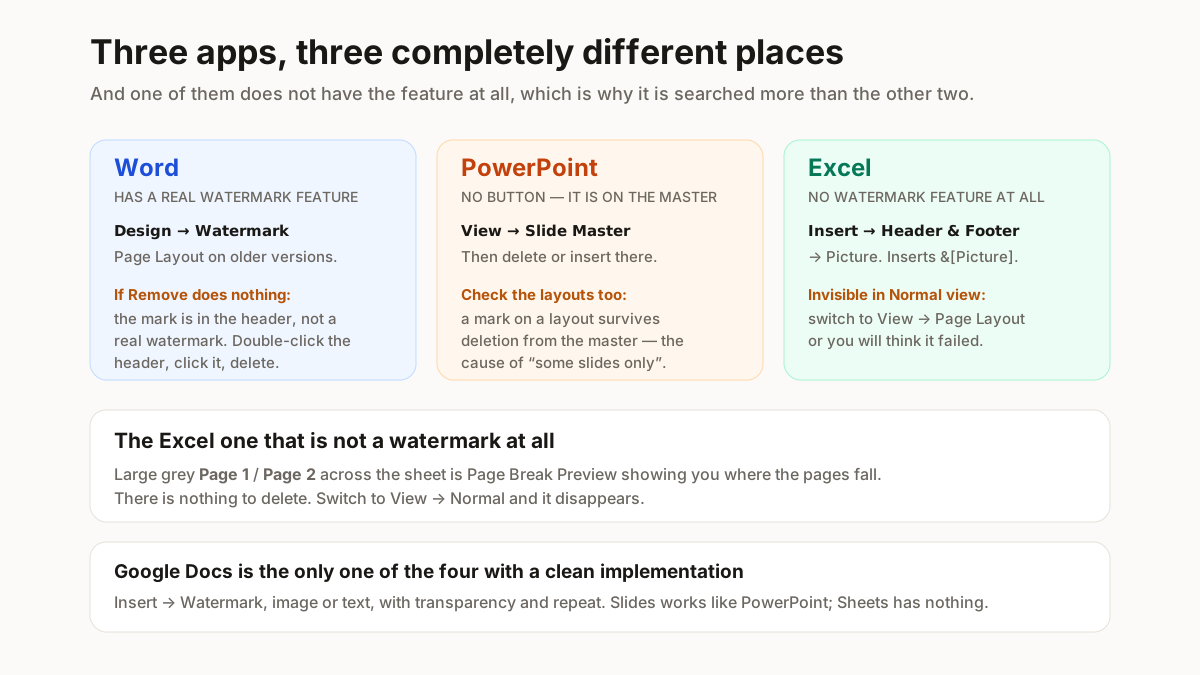
The normal route, 3 steps: Design → Watermark → Remove Watermark. On older versions it lives under Page Layout instead of Design. That clears a watermark that was inserted as a watermark.
When Remove Watermark does nothing
This is the part nobody explains. If the mark was placed into the header as a picture or WordArt — which is exactly what happens when it came from a template, or from a PDF conversion — the Watermark menu does not know about it and the button appears to do nothing.
The fix, 3 steps: double-click in the header area to open it, click the mark directly, and delete it. If your document has section breaks, repeat it in each of those sections, because headers do not carry across — a 40 pages price list split into 4 sections needs it 4 times.
That single step resolves the overwhelming majority of “I clicked Remove Watermark and it is still there” cases.
PPT watermark remover: how to do it in PowerPoint
PowerPoint has no Remove Watermark button, which is why this is searched so often. The mark is almost always on the slide master, and that is why deleting it on a slide does not work.
The slide master route
View → Slide Master. The master sits at the top of the left-hand pane with its layouts indented beneath it. Click the watermark on the master and delete it, then check each of the layouts — on a 12 slides deck that is 12 places a mark can survive deletion from the master. Close Master View when you are done.
If it is on individual slides
Some decks have it pasted onto every slide instead. Select it on one slide, note where it sits, then work through — or use Home → Select → Selection Pane to find the object by name when it will not click.
Removing the Gamma watermark from a deck
Worth its own answer because the fix is not deletion. A Gamma deck exported on the free plan carries a Gamma mark, and it is applied at export rather than being an object you can select in PowerPoint.
So there are two honest routes: export from a paid Gamma plan, which produces the deck without it, or accept it. If you already have the exported PDF and the mark went in as an annotation, the tool at the top of this page may lift it — but the clean answer is the export setting, not a removal tool.
How to remove a watermark in Excel
Excel is the odd one, because Excel has no watermark feature at all. What looks like a watermark is one of 2 other things, and telling them apart is the whole job.
A header or footer image
The usual case. Go to Page Layout view (View → Page Layout), click into the header, and you will see the image code sitting there as text — something like &[Picture]. Delete it and the mark goes.
You cannot do this in Normal view, which is why people conclude it is unremovable. The header is not visible there.
The “Page 1” that is not a watermark
Large grey Page 1, Page 2 text across the sheet is not a watermark and cannot be deleted. It is Page Break Preview telling you where the pages fall. Switch to View → Normal and it disappears.
This trips up a genuinely large number of people, and there is nothing to remove — it is a view setting.
Google Docs, Slides and Sheets
Docs has a real watermark feature: Insert → Watermark, then Remove watermark in the side panel. Straightforward.
Slides and Sheets do not. In Slides, a watermark is an image placed on the theme — open Slide → Edit theme and delete it there, the same logic as PowerPoint’s slide master. In Sheets, it is almost always a background image or a drawing, and there is no watermark setting to look for.
When a watermark cannot be removed cleanly
3 cases, stated plainly, because knowing early saves an afternoon.
Flattened scans. The page is an image; the mark and your text are the same pixels. Nothing recovers what is underneath, because nothing underneath was ever stored.
Marks over text. Even in an editable PDF, a watermark sitting across a paragraph means removing it leaves the paragraph — but any tool that tries to reconstruct the covered characters is inventing them. Check the result, always.
Licensed content. A stock library’s or a paid template’s watermark is there to mark an unlicensed copy. Removing it does not license the file; it just gets you an unlicensed file without the reminder.
The scope of this tool
Documents you own, produced, or are licensed to edit — your own drafts, your own exports, a template you bought. It is not for clearing a stock library’s mark or a photographer’s, and those cases are deliberately not covered anywhere on this page.
Related free seller tools
Frequently Asked Questions
Is this PDF watermark remover free?
Yes, with no signup. It runs entirely in your browser using a client-side PDF library, so there is no upload, no queue and no file-size limit beyond what your own machine can hold in memory.
Do you keep my file?
No, and there is nothing to keep — the file never leaves your device. The processing happens in the browser tab. For a supplier rate card or a signed agreement that matters more than any feature.
Does it work on scanned PDFs?
No, and no tool honestly can. A scanned page is a photograph: the watermark and your text are the same pixels. Anything that claims to remove a watermark from a scan is painting over it and destroying whatever it covered. The tool tells you when your file is this case.
Why did Remove Watermark in Word do nothing?
Because the mark is in the header instead of being a real Word watermark — which is what happens when it came from a template or a PDF conversion. Double-click the header area to open it, click the mark, delete it, and repeat in each section if the document has section breaks.
How do I remove a watermark from a PowerPoint deck?
It is almost on the slide master, which is why deleting it on a slide does nothing. Go to View → Slide Master, delete it from the master, then check each layout underneath — a mark on a layout survives deletion from the master.
How do I remove the Gamma watermark from a deck?
Not by deleting it — the Gamma mark is applied at export on the free plan rather than being a selectable object. The clean fix is exporting from a paid plan. If you already have the exported PDF and the mark went in as an annotation, the tool on this page may lift it.
How do I remove a watermark in Excel?
Excel has no watermark feature, so it is one of 2 other things. If it is a header image, switch to Page Layout view, click into the header and delete the picture code. If it is large grey "Page 1" text, that is Page Break Preview instead of a watermark — switch to View → Normal and it goes.
Will the text underneath be damaged?
Not when the watermark is an annotation, because that layer sits above your content and was never merged with it. When the mark is part of the page content, removal is an edit and you should check the result. When it is a scan, there is no undamaged text to recover.
Use this on documents you own, produced, or are licensed to edit. Removing a stock library’s or a photographer’s watermark does not license the file — and those cases are deliberately not covered on this page.