How to sell on AJIO: registration steps and documents
To create an AJIO seller account, register your business details on seller.ajio.com, wait for AJIO’s partner onboarding team to contact you, and complete your seller profile; you can start selling once AJIO has verified your details and documents. These are the steps AJIO Commerce’s home page and FAQ describe (read 4 and 11 Oct 2026):
- Register your business details on Seller Central. This registers your interest; it does not open a live store.
- Speak to the partner onboarding team, which gets in touch after you register to complete onboarding and agree the commercial terms.
- Complete your seller profile and submit the documents in the table below; selling starts only after they are verified.
- Catalogue your products, one listing at a time or in bulk.
- Process orders under the fulfilment model you agreed, JIT or dropship.
- Get paid into the bank account you configured during registration.
| Document | Notes from AJIO’s FAQ |
|---|---|
| Phone number and email | Used for your seller account and contact from the onboarding team |
| Company details | Your business name and registered details |
| PAN | Personal PAN for a proprietorship; business PAN for a company |
| Bank account with KYC | Address proof and a cancelled cheque; payouts go to this account |
| GSTIN | A regular GST number, not composition |
| CIN and TAN | Listed by AJIO alongside GSTIN; a proprietorship will not have a CIN |
| Trademark or brand authorisation | Brand Trademark Registration Certificate, or a Brand Authorization (retailer/distributor certificate) |
Source: AJIO Commerce FAQ, read 4 and 11 Oct 2026. The note on CIN for proprietorships is ours.
Scan every item before you register, so the onboarding call does not stall on a missing paper.
Who can sell on AJIO
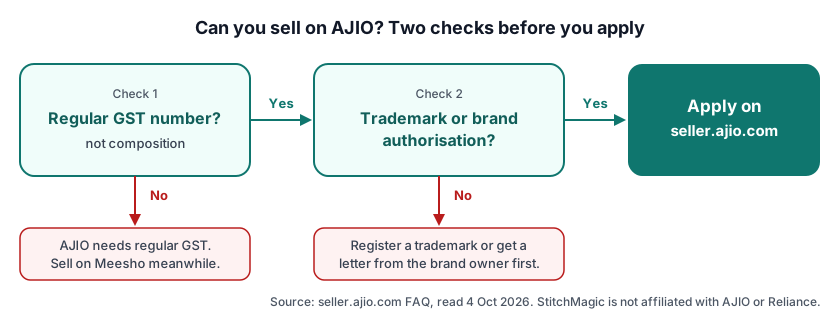
You can sell on AJIO if you hold a regular GST number and either a registered trademark or written authorisation from the brand owner. AJIO Commerce’s FAQ says: “Everyone in India who sells genuine products and is authorized manufacturer or distributor of products is welcome”, and “AJIO Commerce needs regular GST number (NOT composite)”, so a seller under the composition scheme must move to regular GST first (read 4 Oct 2026).
For the brand, AJIO asks for a “Trademark Registry OR Brand Authorization (Retailer/Distributor certificate)”: either the brand is yours and you hold its trademark registration, or you resell a brand whose owner has given you a retailer or distributor certificate. Unbranded stock bought from a wholesale market meets neither test; keep growing on the Meesho seller hub, which accepts a GSTIN or, for non-GST sellers, an Enrolment ID / UIN.
AJIO seller login, app and support
AJIO seller login is on AJIO Commerce Seller Central at seller.ajio.com, the seller portal where you register and then manage catalogue, inventory, pricing and orders. The ajio.com login is your shopper account, a different thing, so do not try your seller details there. We could not read Seller Central’s login screen on 11 Oct 2026, so we do not describe an OTP or password step.
AJIO Commerce names no seller app; it calls Seller Central a “one-stop seller portal”. The “Ajio Business” app on Google Play, from Reliance Retail, is a wholesale buying app for fashion retailers, not a selling app (checked 11 Oct 2026).
For help, AJIO’s FAQ says “AJIO Commerce has a dedicated Seller support team” and, when sign-up gets stuck, to “connect with Seller support team or your respective account manager” (read 11 Oct 2026). The FAQ prints no phone number or support email, and neither do we: an “AJIO seller contact number” copied onto a forum can lead you to people posing as AJIO staff.
AJIO seller fees and commission
AJIO seller fees are “a combination of commission and operating expenses, as agreed during registration”, and AJIO charges them only in relation to a customer order (seller.ajio.com FAQ, read 4 Oct 2026). There is no public rate card, so any AJIO commission figure on a third-party site is that site’s estimate, not AJIO’s.
The FAQ names three fee types: a margin that depends on category, brand and a percentage of the order item value; a shipping cost that depends on items, volume and distance; and GST on both. Your payout is your sales minus the AJIO Commerce margin, on the schedule fixed at onboarding. The FAQ mentions no sign-up fee and also does not say registration is free (read 11 Oct 2026), so ask the onboarding team to confirm both in writing.
Listing on AJIO: JIT or dropship
AJIO lets you start with a minimum of 1 listing and add more in bulk by uploading an Excel or CSV file (seller.ajio.com FAQ, read 4 Oct 2026). Its categories are Fashion, Footwear, Home, Kitchen & Furniture, Luggage, Beauty, Healthcare & Hygiene, Home Improvement and Indian Crafts; some are restricted and need AJIO’s approval first.
AJIO Commerce runs two fulfilment models: JIT, where you ship orders to AJIO’s warehouses for a quality check before dispatch, and dropship, where a logistics partner picks orders up from you. You sign up for either through the partner onboarding team. Our view, not AJIO’s: a small brand packing from one room usually finds dropship simpler, because the pickup comes to you.
Prepare the bulk sheet with our bulk product upload guide and find each product’s HSN code. AJIO’s FAQ publishes no image dimensions, so take them from the catalogue template in Seller Central; our AJIO image size page and the bulk marketplace image resizer help once you have that rule.
AJIO vs Myntra vs Meesho for a new fashion seller
AJIO and Myntra both want a brand; Meesho does not, and it also accepts sellers without GST. Each cell below is quoted or paraphrased from the marketplace’s own seller site, and a dash means the page we read does not state it.
| Criterion | [AJIO](/sellers/ajio) | [Myntra](/sellers/myntra) | [Meesho](/sellers/meesho) |
|---|---|---|---|
| GST | Regular GST only, not composition | GSTN certificate | GSTIN, or Enrolment ID / UIN for non-GST sellers |
| Brand needed | Trademark registration or brand authorisation | Original trademark certificate or authorisation letter / NOC from the brand owner | — |
| Onboarding fee | Not mentioned in AJIO’s FAQ | No onboarding fee or refundable deposit; a one-time growth enablement charge once you start, returned as ad credits | — |
| Commission as published | Agreed at registration; not published | — | 0% commission (Meesho’s claim) |
Sources: AJIO Commerce FAQ (4 and 11 Oct 2026); Myntra partner portal FAQ and disclaimer (3 Oct 2026); Meesho supplier site (3 and 4 Oct 2026). Last verified: Oct 2026.
If you own a registered fashion brand, you can apply to AJIO and Myntra in parallel; our Myntra seller hub covers that application. For Flipkart see the Flipkart seller hub, for smaller channels the other marketplaces page, and every hub sits under our guides for marketplace sellers.
Frequently asked questions
How do I register as an AJIO seller?
Register your business details on seller.ajio.com; AJIO’s partner onboarding team then contacts you to complete onboarding. Once your profile and documents are verified, you catalogue products, process orders and get paid into your bank account.
Where is the AJIO seller login?
On AJIO Commerce Seller Central at seller.ajio.com, the seller portal for catalogue, inventory, pricing and orders. It is separate from the ajio.com shopper login, and AJIO Commerce names no seller app.
What documents are required for AJIO seller registration?
PAN, GSTIN, bank account with KYC (address proof, cancelled cheque), company details, and a trademark certificate or brand authorisation. AJIO’s FAQ also lists phone, email, CIN and TAN (read 4 Oct 2026).
Can I sell on AJIO with composition GST?
No. AJIO’s FAQ says “AJIO Commerce needs regular GST number (NOT composite)”, so move to regular GST first.
What are the AJIO seller registration fees?
AJIO’s FAQ names no sign-up fee; selling fees are a commission and operating costs agreed during registration and charged only on orders. Ask the onboarding team to confirm both in writing.
Can I sell on AJIO without a brand?
Only with a brand authorisation from the brand owner; AJIO asks for a trademark registration or authorisation. Without either, start on Meesho, which does not ask for a brand.
Growing on Meesho while your brand papers for AJIO come through? ListMagic, a Chrome extension, fills the Meesho Supplier Panel catalog form for you; it does not work on AJIO. Free plan to start; Seller Pass ₹99 a month (StitchMagic pricing, checked 16 Oct 2026).
Try ListMagic for Meesho listingsRelated
Checked by the StitchMagic team on 11 Oct 2026. StitchMagic is a set of free tools and one AI listing agent (ListMagic) for online sellers in India that helps them list faster on Meesho, Flipkart and Amazon.in and sell more. Found an error? Tell us; we correct with a dated note.