How to use the product description generator
- Type your product's facts into the six boxes, one feature per line.
- Press Copy prompt and paste it into the AI chat you already use, for example ChatGPT or Gemini.
- Check the answer against the product in your hand and replace every [ADD: …] with your own value.
- Paste the final text into the description on the product details page of Meesho's Add Single Catalog form (Meesho learning hub, retrieved 4 Oct 2026).
What is a product description?
A product description is the text on a listing that tells a buyer what the product is, what it is made of, how it fits and what it is for. It carries the details a photo cannot show, such as fabric, sizes and care. On a clothing listing, the table below is what it should cover, with the tool's kurti example in the middle column.
| Field | Example from the kurti | Where you get it |
|---|---|---|
| Product type | Kurti | Your catalog |
| Fabric | Rayon | Fabric supplier's bill or tag |
| Colour | Mustard yellow | The product |
| Sizes | S to XXL, with measurements | Your size chart |
| Occasion | Daily wear and office | You |
| Features | Straight cut, round neck, three-quarter sleeves | The product |
| Care | [ADD] | Fabric supplier |
| Pack of | [ADD] | You |
Example values from the StitchMagic tool's default kurti, 23 Oct 2026.
The tool has limits. It does not check spelling, it does not know Meesho's category fields, and it does not write the text: it builds a prompt for an AI chat and a template you fill in yourself. For the sizes row, make the measurements in the size chart generator.
How to write a product description that sells
Lead with what it is, then list the facts a buyer checks before ordering: fabric, colour, fit, sizes, occasion, care and what is in the pack. A buyer on a phone reads the first line and scans the rest, so the order matters more than the wording.
- One opening sentence, no greeting. “Mustard yellow rayon kurti for daily wear and office” says more than “Welcome to our store”.
- Facts over praise. Write “floral block print, calf length” instead of “beautiful, premium”; a Meesho buyer can check a fact against the photo, not an adjective.
- Bullets for scanning. Short lines, one fact each, read better on a phone screen than a paragraph.
- Keep it short. Meesho's bulk upload lesson says “Avoid long descriptions while filling out product details to avoid rejection” (Meesho Supplier learning hub, retrieved 4 Oct 2026). We found no word count Meesho publishes, so we do not give one (our check, 23 Oct 2026).
- Check Meesho's policies. Meesho points sellers to the legal and policies section of the Supplier Panel for its listing rules (Meesho how it works, retrieved 4 Oct 2026); read it before you list.
The prompt the tool builds follows the same order and tells the AI to use only the facts you typed, so a missing detail should come back as a gap to fill rather than a guess.
Product description writing: common mistakes
The mistake that costs most is letting an AI chat add facts you never gave it, because the buyer receives the product, not the text. Each row below pairs a mistake with what it looks like and the fix.
| Mistake | What it looks like | Fix |
|---|---|---|
| AI adds facts you never gave | “Pure cotton”, “colour will not fade” | The prompt says use only the facts below; delete anything not true of your product |
| Praise with no fact | “Beautiful, premium quality” | Replace it with the feature |
| Too long | Paragraphs before the first fact | Opening line plus bullets (Meesho: avoid long descriptions) |
| Supplier's text copied as it is | The same words as other listings of that design | Rewrite from your own product's facts |
| Sizes with no measurements | “S, M, L” and nothing else | Add bust and length per size from your size chart |
| “Product Description Error” | A named Meesho QC error | See Meesho catalog rejected |
“Product Description Error” is one of the QC errors Meesho names (QC errors lesson, retrieved 4 Oct 2026); the other rows are our own advice.
If you list many products at once, the description is one column of Meesho's bulk template; our bulk product upload guide covers the sheet, and the Meesho Supplier Panel guide covers the screens.
Product description example and template
For a kurti, the free generator gives the two texts below with its default inputs, exactly as it renders them on 23 Oct 2026. The inputs are Kurti, Rayon, Mustard yellow, sizes S to XXL, daily wear and office, and five features.
The prompt
Write a product description for my Meesho listing. Use only the facts below. Do not add fabric details, measurements, wash care, quality claims or anything else I have not listed. Where a buyer would need a detail I have not given, write [ADD: what is missing] instead of guessing.

Product: Kurti
Fabric: Rayon
Colour: Mustard yellow
Sizes: S, M, L, XL, XXL
Occasion: Daily wear and office
Features:
- Straight cut
- Round neck
- Three-quarter sleeves
- Floral block print
- Calf length

Format:
1. One opening sentence: what the product is, its colour and fabric, and the occasion it suits.
2. Then 5 to 7 short bullet points: fabric, colour, features, sizes, occasion, care, pack contents.
3. Plain, simple English that a buyer can read on a phone. Keep it short.
4. No words like "best", "premium quality", "100%" or "guaranteed". No prices, offers, phone numbers or links.
The template
Mustard yellow rayon kurti for daily wear and office.

• Fabric: Rayon [ADD: how it feels, e.g. soft, light]
• Colour: Mustard yellow
• Features: Straight cut, round neck, three-quarter sleeves, floral block print, calf length
• Sizes: S, M, L, XL, XXL [ADD: bust and length for each size from your size chart]
• Occasion: Daily wear and office
• Care: [ADD: wash care from your fabric supplier]
• Pack of: [ADD: 1, or what is in the pack]
Filled in, the template's last lines become, for example, “Care: hand wash (use your supplier's instruction)” and “Pack of: 1 (your value)”. We have not filled the fabric feel or the measurements here because they belong to your kurti, not ours.
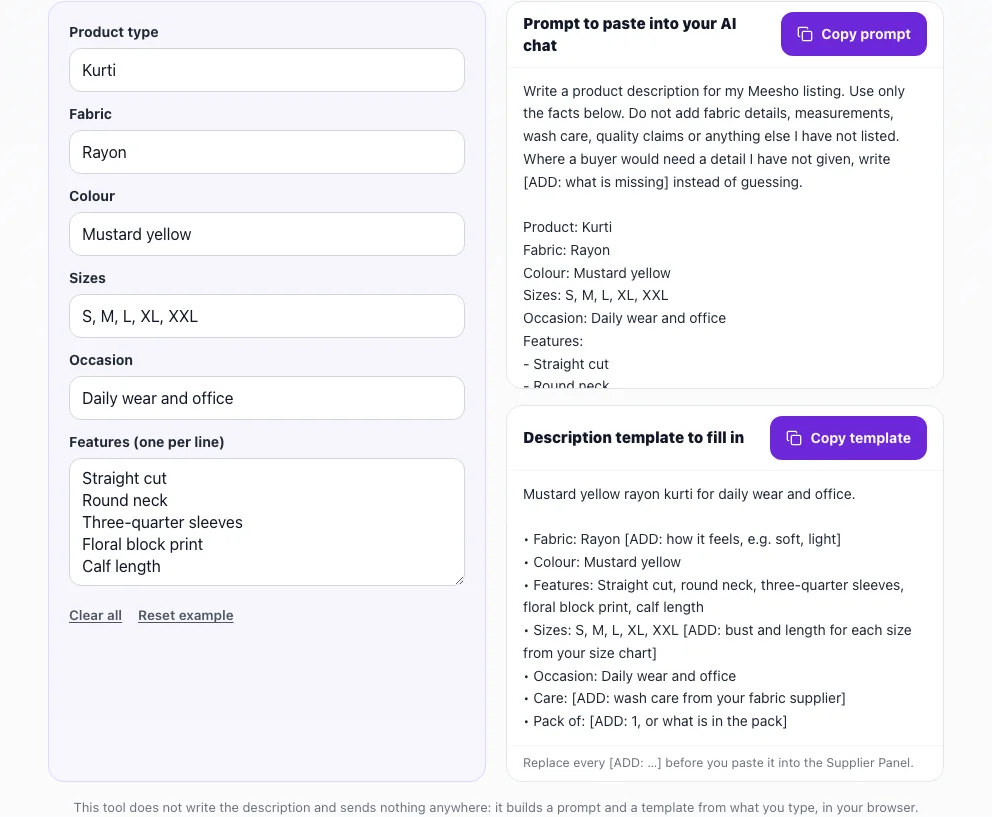
It is free with no sign-up and runs in your browser: nothing you type is saved or sent, and it makes no AI call. More seller tools are on tools for marketplace sellers.