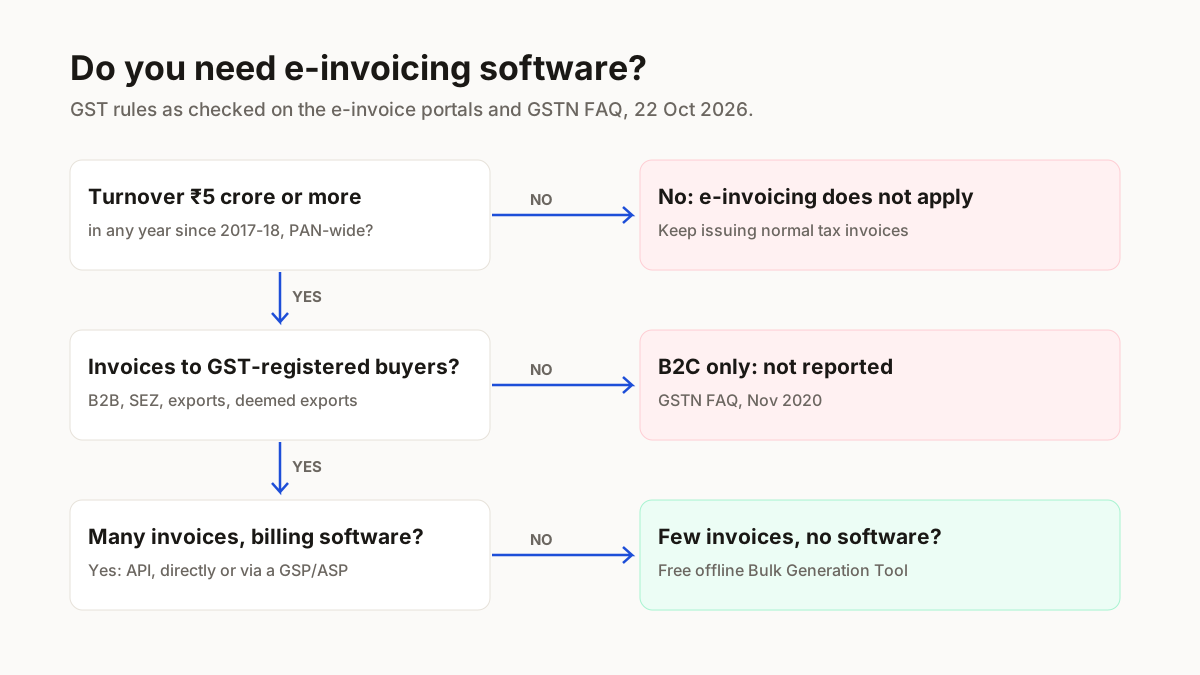
Do you need e-invoicing software?
You need an e-invoicing route only if your aggregate turnover has reached ₹5 crore in any financial year since 2017-18, and even then you need paid software only if you want the IRN to come from your own billing system; the e-invoice portal's free offline utility is the government's answer for businesses without one (GSTN e-invoice FAQ, Nov 2020). The ₹5 crore test is PAN-wide and has applied since 1 August 2023 under Notification 10/2023–Central Tax, listed on the IRIS IRP notifications page.
Only some documents are reported: supplies to registered buyers (B2B), to SEZs, exports and deemed exports. B2C invoices are not reported, per the GSTN e-invoice FAQ (v1.3, 11 Nov 2020). Three sellers, three answers: a ₹3 crore Meesho seller selling only to consumers is outside it twice over; a ₹6 crore Surat wholesaler billing retailers is inside it for those B2B bills; a ₹12 crore seller is inside it and also has the 30-day limit below.
| Way to get an IRN | Suits | Cost |
|---|---|---|
| API, direct to the IRP or through a GSP/ASP | Businesses whose invoices already come from ERP or billing software | Set by your software provider |
| Free offline utility (Bulk Generation Tool) | No ERP or billing software of your own | Free (GSTN FAQ) |
Source: GSTN e-invoice FAQ v1.3 (11 Nov 2020), Q32–Q34; einvoice1.gst.gov.in Tools menu; checked 22 Oct 2026.
What paid e-invoicing software adds is automation: the invoice details go from your billing system to the IRP and the IRN comes back without a JSON file in between. If your billing app already does that, you do not need a second product.
How to generate an e-invoice (IRN) with the free tool
The flow below is from the e-Invoice System and GSTN's FAQ, checked 22 Oct 2026. You need an IRP login, which you set up on the portal; we did not test a login because we have no account there.
- 1
Download the Bulk Generation Tool
On einvoice1.gst.gov.in, open the Tools menu and download Bulk Generation Tools.You should see: The offline utility on your computer; the same menu lists a Verify QR Code App.
- 2
Enter the invoice details and create the JSON
Type each invoice's particulars, the ones Form GST INV-01 asks for, into the utility and create the JSON file. Give 6-digit HSN codes if your AATO is over ₹5 crore.You should see: A JSON file holding the invoices, ready to upload.
- 3
Upload the JSON on the IRP
Log in to the IRP and upload the file.You should see: Per GSTN's FAQ, the IRP returns an IRN for each invoice; we have no IRP account, so we did not see this screen.
- 4
Print the IRN and QR code on the invoice
Take the IRN, a unique 64-character hash, and the QR code carrying it, and put the QR code on the invoice you send.You should see: A valid e-invoice: for a covered business, the document is legally valid only with an IRN.
What we checked on the e-invoice portals (22 Oct 2026)
The free tool and the rules on this page were all on official GST portals on 22 Oct 2026; this is what each one showed us.
| Portal | What it showed |
|---|---|
| einvoice1.gst.gov.in (NIC) | Tools menu with Bulk Generation Tools and Verify QR Code App; notice that 4-digit HSN is not accepted; page last updated 15-12-2022 |
| einvoice6.gst.gov.in (IRIS) | Notification 10/2023–CT row (₹5 crore from 1 Aug 2023); release note of 31 Mar 2025 on the 30-day rule |
| GSTN e-invoice FAQ v1.3 | Free offline utility; B2C not reported; Rule 48(5) on invoices without an IRN |
| Other IRPs seen | einvoice3.gst.gov.in (Cygnet); names only, not a full list |
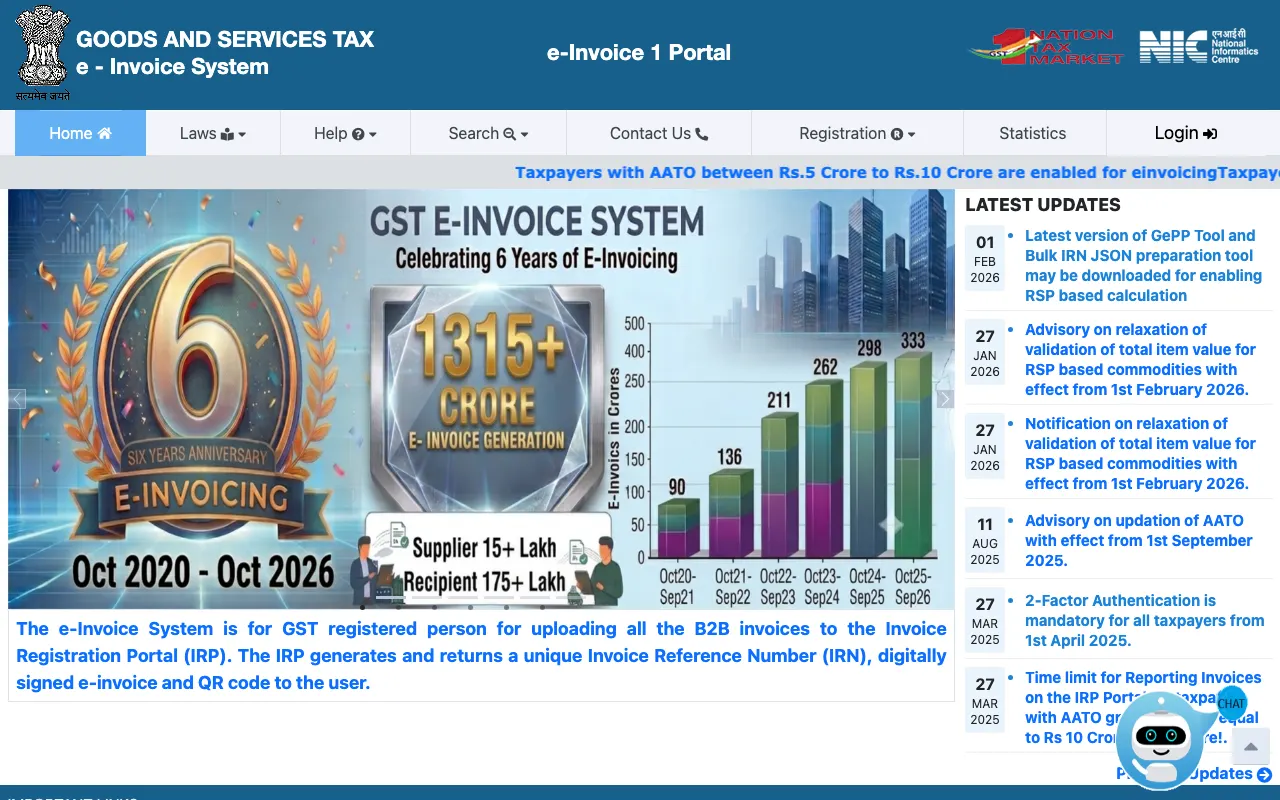
Public pages only, read 22 Oct 2026; no IRP account was used.
E-invoice time limit, HSN and other mistakes
From 1 April 2025, a business with AATO of ₹10 crore or more must report each e-invoice, credit note and debit note to the IRP within 30 days of its date, and the IRP blocks anything later (GST advisory on services.gst.gov.in, via the IRIS release note of 31 Mar 2025).
- Issuing a plain invoice when you are covered. Under Rule 48(5), an invoice not reported to the IRP “shall not be treated as an invoice” (GSTN FAQ, Nov 2020).
- 4-digit HSN codes. The e-Invoice System will not accept them; above ₹5 crore AATO the code must be 6 digits (Notification 78/2020–CT, 15 Oct 2020). Look yours up in the HSN code finder.
- Reporting B2C sales. E-invoicing is not applicable to B2C invoices (GSTN e-invoice FAQ v1.3, Nov 2020), so your Meesho orders to consumers stay out of it.
- Stopping when turnover falls. The test is ₹5 crore in any financial year since 2017-18, so a year at ₹5 crore or more since 2017-18 keeps you covered.
A summary for sellers, not tax advice; check with your GST practitioner before changing how you invoice.
E-invoice template and selling on marketplaces
An e-invoice is not a template you fill: under Rule 48(4) you upload the FORM GST INV-01 particulars to the IRP. You send them through the offline utility or your software, and the IRN and QR code that come back are what make the invoice an e-invoice. For the GST rate on what you sell, see GST on clothes and the HSN code pages; registering the business is covered in Udyam registration, and more guides sit under tools for marketplace sellers.
Selling on Meesho as well?
ListMagic, our AI listing agent, fills the Meesho catalog form for you: title, category, attributes, images and price. Free plan to start; Seller Pass ₹99 a month (StitchMagic pricing, checked 16 Oct 2026).
Try ListMagic