What you need for udyam registration online
Udyam needs no documents uploaded: an Aadhaar number, plus PAN and GSTIN where they apply. For a proprietorship that is the proprietor's Aadhaar. A partnership uses the managing partner's Aadhaar and an HUF the karta's; a company, LLP, cooperative society, society or trust gives its PAN and GSTIN (where GST applies) along with the authorised signatory's Aadhaar. PAN, and GSTIN where the CGST Act makes it applicable, have been required since 1 April 2021 under S.O. 1055(E). No document is uploaded.
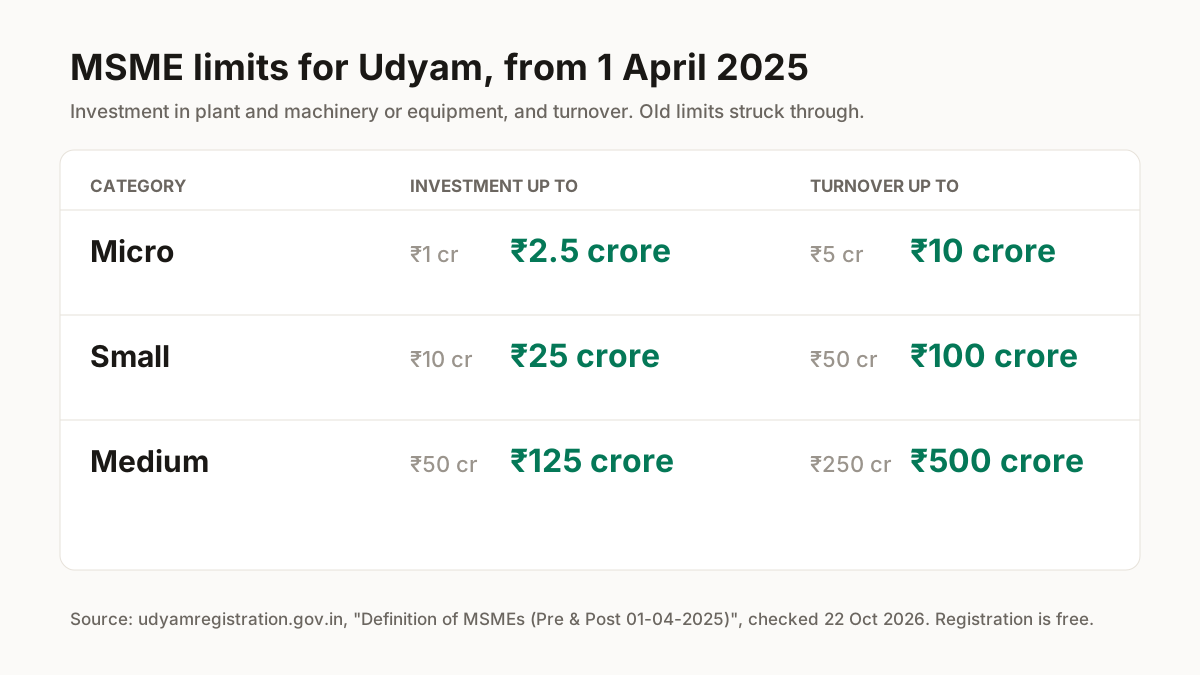
Traders can register. A circular posted on the portal on 2 July 2021 added retail and wholesale trade to the activities Udyam accepts, so a Meesho reseller who buys and resells is not shut out. Which category you fall in depends on investment and turnover. From 1 April 2025 a micro enterprise has up to ₹2.5 crore investment and ₹10 crore turnover, a small one up to ₹25 crore and ₹100 crore, and a medium one up to ₹125 crore and ₹500 crore.
| Category | Investment up to (old → new) | Turnover up to (old → new) |
|---|---|---|
| Micro | ₹1 crore → ₹2.5 crore | ₹5 crore → ₹10 crore |
| Small | ₹10 crore → ₹25 crore | ₹50 crore → ₹100 crore |
| Medium | ₹50 crore → ₹125 crore | ₹250 crore → ₹500 crore |
Source: Udyam portal, Ministry of MSME, table “Definition of MSMEs (Pre & Post 01-04-2025)” and the notification listed on its Circulars & Orders page; checked 22 Oct 2026.
Udyam registration form, step by step
Start from udyamregistration.gov.in. The form has six stages, in this order, as the portal showed them on 22 Oct 2026. If you already hold a Udyog Aadhaar (UAM), pick “UAM Migration to Udyam” on the home page instead of New Registration; the portal requires EM-II and UAM holders to re-register.
- 1
Open New Registration
On the home page menu, choose New Registration. Holders of an old Udyog Aadhaar pick UAM Migration to Udyam instead.You should see: The Udyam Registration form opens on its first stage, Aadhaar Verification.
- 2
Verify your Aadhaar
Enter the Aadhaar number and verify it with the OTP. Use the proprietor's, managing partner's or karta's Aadhaar, or the authorised signatory's for a company.You should see: The form accepts the OTP and moves to PAN Verification.
- 3
Verify the PAN
Enter the enterprise's PAN. Investment and turnover figures linked to PAN and GST are taken from government databases, so you do not type them from your books.You should see: The form moves on to Basic Details.
- 4
Fill Basic Details
Fill in the enterprise details this stage asks for. Your application must carry a mobile number you will keep: the certificate login later sends its OTP to the mobile in the application.You should see: The form moves on to Official Address.
- 5
Give the Official Address
Enter the official address of the enterprise.You should see: The Plant/Unit Details stage opens next.
- 6
Add Plant/Unit and Other Details, then submit
Add each unit, then complete Other Details and submit. One registration can list several activities, manufacturing or service or both.You should see: You get a permanent Udyam registration number and the certificate is issued online.
Udyam certificate download and verification: what we checked on the portal
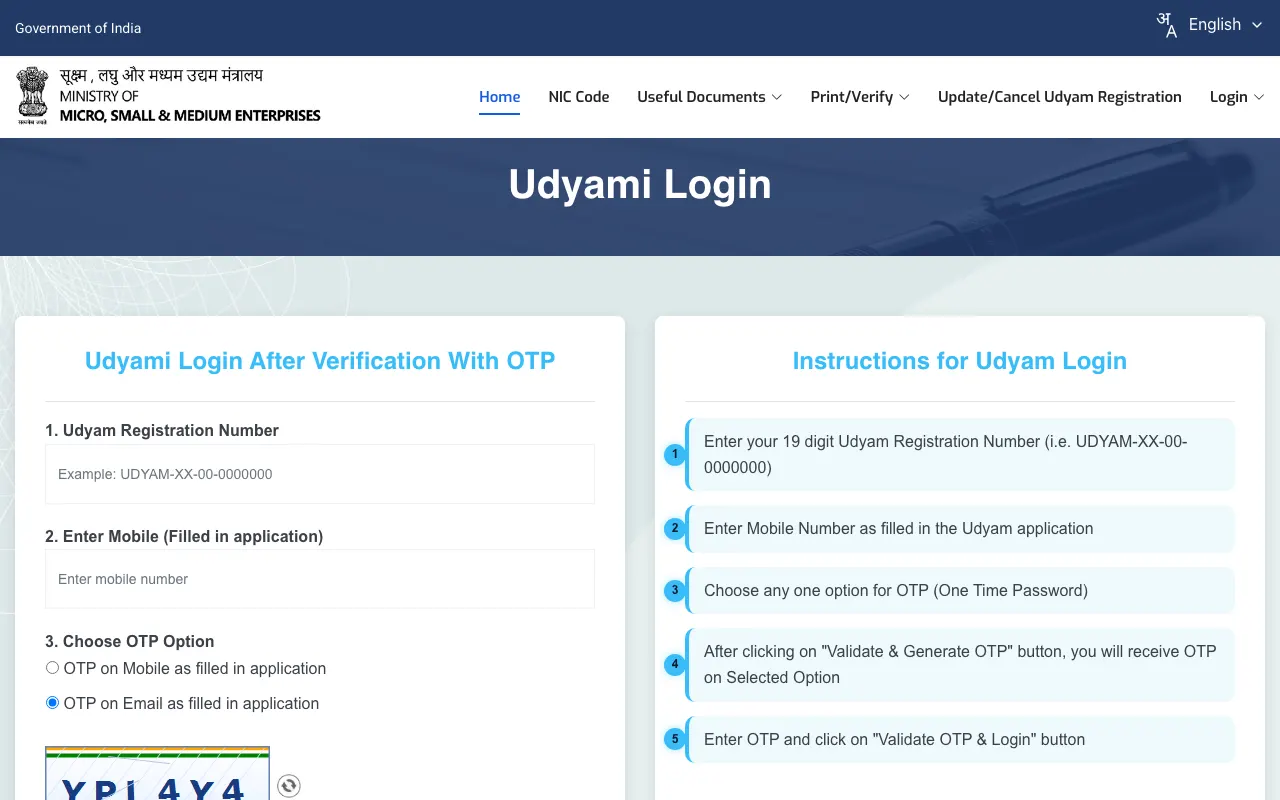
To download your Udyam certificate, open Print/Verify → Print Udyam Certificate and log in with your 19-character Udyam number, the mobile number you gave in the application and an OTP sent to that mobile or your email. The number looks like UDYAM-XX-00-0000000. We opened the public print, verify and forgot-number options on udyamregistration.gov.in on 22 Oct 2026; this is what each one asks for.
| Task | Menu on the portal | What it asks for |
|---|---|---|
| Print or download the certificate | Print/Verify → Print Udyam Certificate | Udyam number, application mobile, OTP on mobile or email |
| Verify a number | Print/Verify → Verify Udyam Registration | Menu named on the portal |
| Find a lost number | Forgot Udyam/UAM Number | OTP on the application mobile or email; it returns every number registered |
| Change or cancel | Update/Cancel Udyam Registration | Separate menu item on the portal |
| Old Udyog Aadhaar | Print UAM Certificate · Verify Udyog Aadhaar | Menus named on the portal |
A Udyam certificate shown through DigiLocker is accepted, under a circular posted on 1 January 2025. The portal's dashboard counted 5,50,13,462 Udyam registrations on 22 October 2026, of which 5,43,79,814 were micro.
Source: Udyam login page instructions, portal menus and dashboard; checked 22 Oct 2026. Logged-out pages only; we did not file a registration.
Udyam registration fees, fake sites and common mistakes
Udyam registration has no fee. The portal's own banner reads “Beware of Fake Sites” and says nobody except the government portal and single-window systems may register an MSME (checked 22 Oct 2026). A site that charges to “register” or “print” your certificate is not the portal, however official its name looks.
- “Enter your 16-digit number”. Some sites still say this. The Udyam number is 19 characters, UDYAM-XX-00-0000000, for example UDYAM-XX-00-0000000.
- Using the old limits. Pages that say micro means under ₹1 crore investment and ₹5 crore turnover are out of date; from 1 April 2025 it is ₹2.5 crore and ₹10 crore.
- Filing a second registration. One enterprise may hold only one Udyam registration. Selling kurtis and also stitching to order? Add the second activity to the same number.
- Thinking traders cannot register. Retail and wholesale trade were added by the circular posted on 2 July 2021.
- Letting the application mobile lapse. The certificate login sends its OTP to the mobile in the application, so keep that SIM active.
Using your udyam registration as an online seller
No marketplace rule we can cite asks a seller for Udyam, so treat it as your own MSME record rather than a sign-up document. What sellers usually sort out next is GST (see selling on Meesho without GST), the right HSN code for each product, and a brand name worth protecting through trademark registration. If you export, the IEC code guide covers DGFT. More seller guides sit under tools for marketplace sellers.
Registered? Get your products listed on Meesho
ListMagic, our AI listing agent, fills the Meesho catalog form for you: title, category, attributes, images and price. Free plan to start; Seller Pass ₹99 a month (StitchMagic pricing, checked 16 Oct 2026).
Try ListMagicउद्यम रजिस्ट्रेशन: हिंदी में
उद्यम रजिस्ट्रेशन पूरी तरह मुफ़्त है, किसी को कोई फ़ीस नहीं देनी होती, और यह सिर्फ़ udyamregistration.gov.in पर होता है। इसके लिए सिर्फ़ आधार नंबर चाहिए, कोई दस्तावेज़ अपलोड नहीं होता। सर्टिफ़िकेट डाउनलोड करने के लिए Print/Verify में जाकर 19 अक्षरों वाला उद्यम नंबर, आवेदन वाला मोबाइल नंबर और OTP डालें। पुराना उद्योग आधार है तो “UAM Migration to Udyam” से दोबारा रजिस्टर करें (पोर्टल, 22 अक्टूबर 2026)।