Reading a Flipkart shipping label
Four blocks, and only one of them is load-bearing.
The AWB barcode
The Air Waybill number, as a barcode with the digits underneath. This is the label. Everything else is human convenience — the AWB is what the courier scans at pickup, at every hub, and at delivery, and it is what a tracking query resolves against. If it does not scan, the parcel stops.
Courier and routing code
Which partner is carrying it and the destination hub code. Useful when a parcel is misrouted and you are trying to work out where it went, and otherwise ignorable.
Delivery address
Read by a human at the last mile. Worth checking it is fully inside your crop — a clipped pincode is a returned parcel.
Order and SKU details
Your reference for packing the right thing. This is where a readable SKU code earns its keep: a packer reading MEERA-KRT-RED-L off the label knows what to put in the box without opening a spreadsheet.
Downloading labels from the seller panel
Labels are generated once an order is ready to dispatch, and downloaded per batch rather than one at a time.
Select the orders you are packing, download their labels, and you get a single PDF with one page per order. That batch shape is what makes the cropping worth automating — forty orders is one file, and cropping it by hand in a PDF reader is forty separate operations.
Print before you pack, not after
A practical habit rather than a rule. Print the batch first, lay the labels out, then pack against them. Packing first and labelling afterwards is how the wrong SKU ends up in the right box, and a mis-shipped order costs both legs of the freight plus the rating.
Do not photocopy or reprint from a photo
Each generation loses contrast and the AWB barcode is the first thing to degrade. If a label is damaged, regenerate it from the panel rather than copying the one you have.
Printing a Flipkart label so it scans
A label that reads perfectly on screen and fails at the hub costs the delivery and usually the customer too. Five checks cover almost all of it.
| Do this | Because |
|---|---|
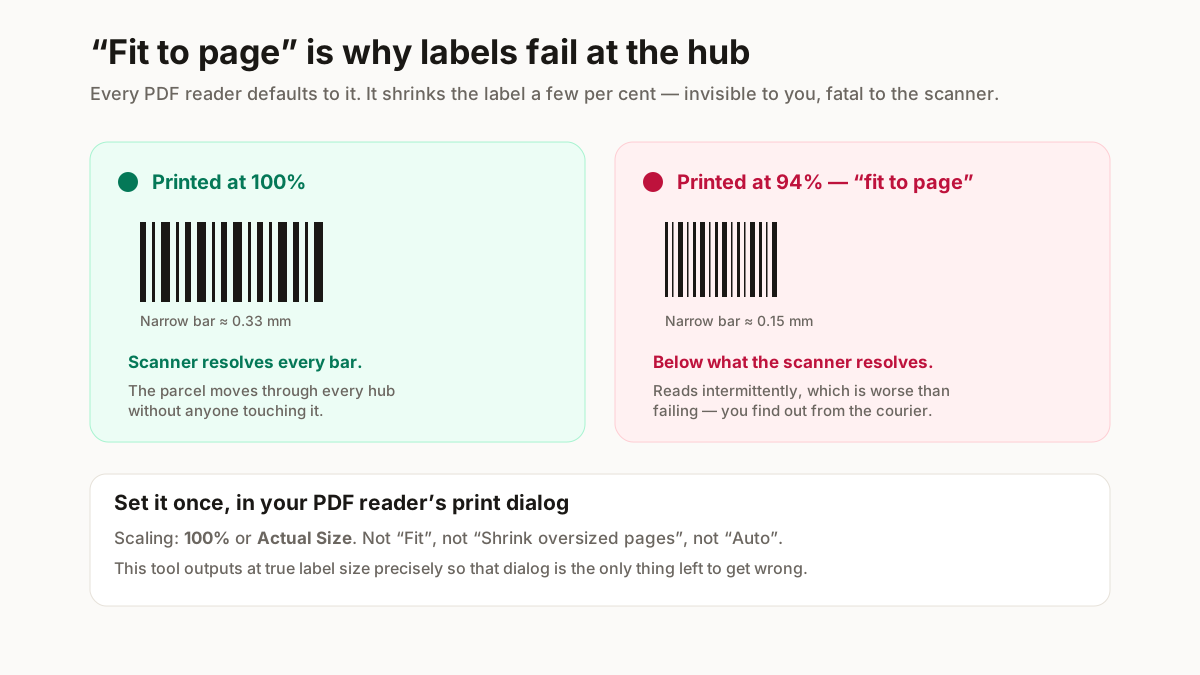
| Print at 100%, never "fit to page" | Scaling shrinks the barcode modules below what the hub scanner resolves. This is the single most common cause of a rejected parcel. |
| Thermal, not inkjet, if you can | Inkjet smudges in transit and in humidity. A thermal print survives a monsoon delivery; an inkjet one often does not. |
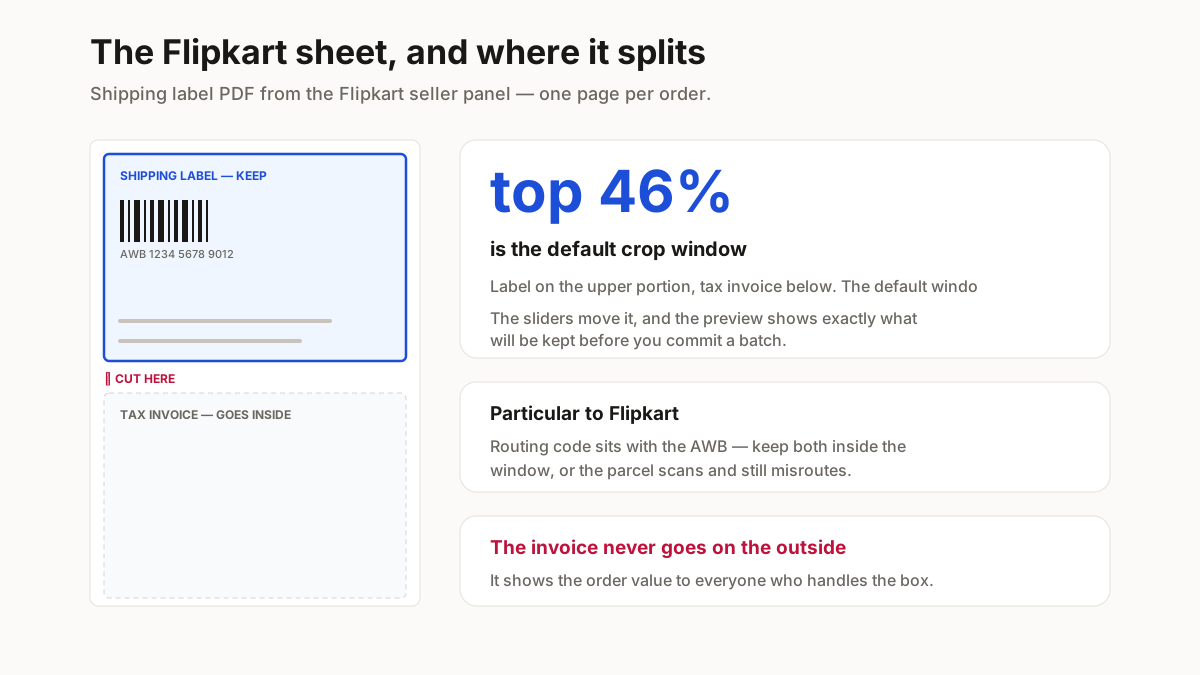
| Check the barcode is fully inside the crop | A barcode clipped at the edge scans as nothing. The preview shows the exact window before you commit a batch. |
| Keep the quiet zone | Barcodes need clear space either side. Cropping tight to the bars is the same as damaging them. |
| Do not photocopy labels | Each generation loses contrast, and the AWB barcode is the first thing to become unreadable. |
Print at 100%. “Fit to page” is the default in every PDF reader, and the shrink it applies is small enough that you will not notice it and large enough that a scanner will.
The one particular to Flipkart: the sheet carries a routing code alongside the AWB, and pickup staff sort against it by eye. A crop that preserves the barcode but clips the routing code will scan cleanly and still be misrouted — which takes far longer to diagnose than an outright rejection, because nothing appears to have gone wrong.
Why this runs in your browser
A shipping label is not a neutral document. It carries your customer’s full name, complete address and phone number — for every order on the sheet.
Uploading a morning’s labels to a free online cropper hands a stranger a list of your customers, with contact details, in a format built for direct marketing. Most of those sites are ad-funded and none of them tell you what happens to the file.
This one does the work on your own machine. The PDF is read into the browser tab, cropped there and written back out. Nothing is uploaded, so there is nothing to retain, leak or sell.