Barcode for clothing: the two types a seller can use
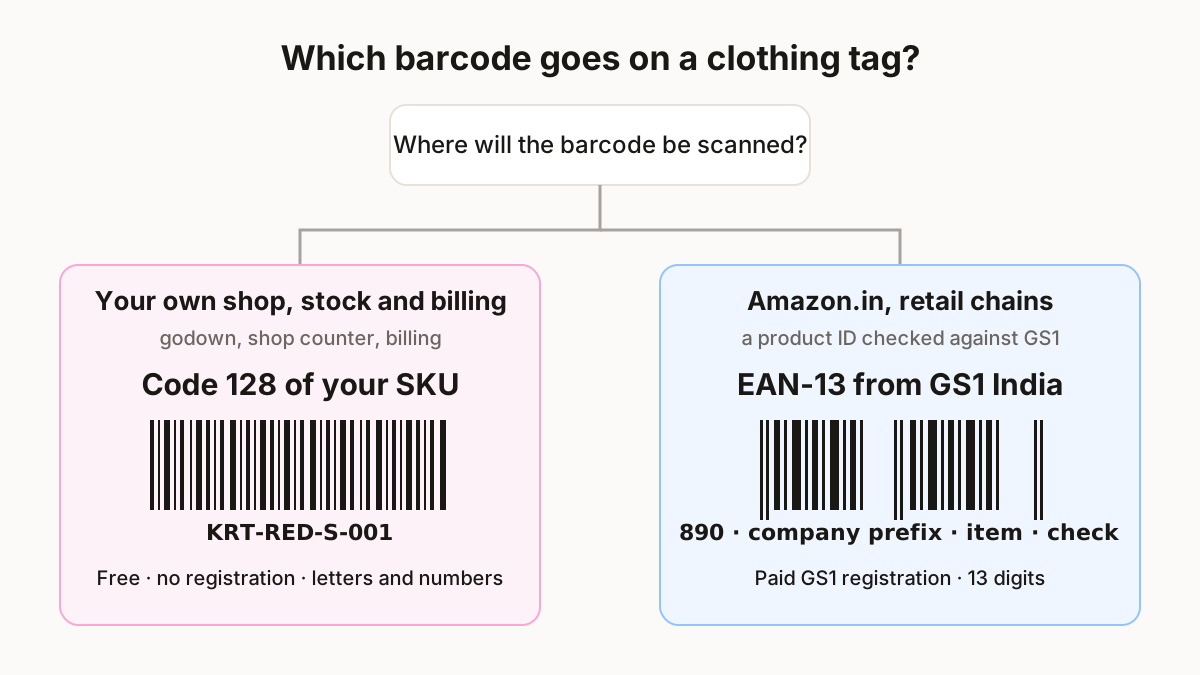
A barcode on a clothing tag carries either your own SKU or a GS1 product number, and which one you need depends on who scans it. A SKU is your internal code; GS1 India puts it this way: SKUs are “internal product identifiers used by companies for inventory management” and “not standardised”, while a GTIN “serves as a unique identifier, making every product distinguishable worldwide” (GS1 India on GTINs). The SKU itself is explained in SKU meaning.
- Your own SKU as a Code 128 barcode for counting stock, picking orders and billing at your counter. You choose the code, you print it, no one registers it.
- An EAN-13 from GS1 India when someone outside your business needs a recognised product ID. GS1 India says it is “the only organisation in India authorised to issue barcodes beginning with ‘890’” (GS1 India, EAN-13).
For Amazon.in the rule is written down: it accepts UPC, EAN, ISBN or GTIN, says “GS1 India is the only authorized body for issuing UPCs and EANs that Amazon accepts” and that its systems “regularly verify your product ID against the GS1 database”. A brand owner without barcodes can apply for a GTIN exemption (Amazon seller blog, 11 Aug 2025). This page covers Amazon.in’s written rule only; check the Meesho or Flipkart listing form for a barcode field before you buy GS1 numbers for them.
Code 128 vs EAN-13 for garments
| Code 128 (your SKU) | EAN-13 (GS1 India) | |
|---|---|---|
| What it holds | Letters and numbers, any length | Exactly 13 digits: company prefix (890… in India), your item number, check digit |
| Who issues it | You | GS1 India, after registration, documents and fees |
| Unique | Inside your business only | Worldwide |
| Amazon.in product ID | No | Yes, checked against GS1 |
| Best for | Stock, packing, billing, size labels | Amazon.in listings and buyers who ask for a GTIN |
Sources: GS1 India blog posts on EAN-13 and GTINs; Amazon.in seller blog; StitchMagic bulk barcode generator. Checked 10 Nov 2026.
Code 39 also works for stock labels, but it only takes A–Z, 0–9 and a little punctuation, so a SKU with lower-case letters will not fit. If you already hold GS1 numbers, you can print them as EAN-13: our generator recalculates the 13th check digit and lists any row it corrected.
One barcode per size and colour
Every size and colour is a separate variant, so it needs its own SKU and its own barcode. One kurti design in red and blue, sizes S to XL, is 2 × 4 = 8 variants and 8 barcodes:
| SKU on the tag | Colour | Size |
|---|---|---|
| KRT-RED-S-001 | Red | S |
| KRT-RED-M-002 | Red | M |
| KRT-RED-L-003 | Red | L |
| KRT-RED-XL-004 | Red | XL |
| KRT-BLU-S-005 | Blue | S |
| KRT-BLU-M-006 | Blue | M |
| KRT-BLU-L-007 | Blue | L |
| KRT-BLU-XL-008 | Blue | XL |
SKUs from the StitchMagic SKU rule (category-colour-size-number) with its default inputs.
All 8 fit on one A4 sheet of 24 labels, with 16 labels left for the next design. When a lot arrives with several pieces of each size, repeat each SKU once per piece in your sheet so every garment gets a tag.
Barcode tag sizes and printing
Choose the label by how long your code is: the longer the SKU, the wider the label it needs to scan. These are the sizes the StitchMagic generator lays out:
| Sheet or roll | Label size | Good for |
|---|---|---|
| A4, 24 labels | 63.5 × 33.9 mm | Hang tags and longer SKUs (opens by default) |
| A4, 40 labels | 45.7 × 25.4 mm | Medium SKUs on swing tags |
| A4, 65 labels | 38.1 × 21.2 mm | Short codes only |
| Thermal roll | 50 × 25 mm | Label printers at the counter |
Source: StitchMagic bulk barcode generator label presets, read 10 Nov 2026.
The check that matters is bar width. Our tool warns when the thinnest bar falls below 0.25 mm; on a 203 dpi thermal printer one dot is 25.4 ÷ 203 = 0.125 mm, so 0.25 mm is just 2 dots. If you see the warning, move to a bigger label or shorten the SKU.
Listing these garments on Meesho?
ListMagic, our AI listing agent, fills the Meesho catalog form for you: title, category, attributes, images and price. Free plan to start; Seller Pass costs ₹199 a month.
Try ListMagicHow to make barcode tags for clothes, step by step
- List every variant in a sheet: one row per size and colour, with its SKU in the first column and, if you like, a caption such as the price or size in the second.
- Open the bulk barcode generator and paste the two columns, or upload the .csv or .xlsx file.
- Pick Code 128 for SKUs (or EAN-13 if you hold GS1 numbers).
- Pick the label sheet or roll you bought, and fix any thin-bar warning before you print.
- Print one test sheet, scan a few labels with the scanner you will use, then print the rest. The first 500 rows are free in one go.