What can I export from India?
Before you export anything, check the item's export policy on DGFT: the policy menu holds “ITCHS Based Import & Export Policy”, and the services menu holds “Restricted Exports” (dgft.gov.in, menu names checked 22 Oct 2026). Look your item up in both before you buy stock or quote a buyer.
Both are arranged by product code, so find your HSN code first with the HSN code finder or the HSN code pages. A kurti seller, for example, checks the code for a cotton kurta set, not the word “kurti”.
Three decisions come before any form, and no portal makes them for you: who buys (a business abroad, or shoppers through a marketplace such as Amazon Global Selling), how you get paid, and who moves the goods. Settle them first, because the registrations below tie to the firm and the bank account that will receive the money. Udyam registration is a separate MSME record, covered in its own guide.
How to start an export business in India, step by step
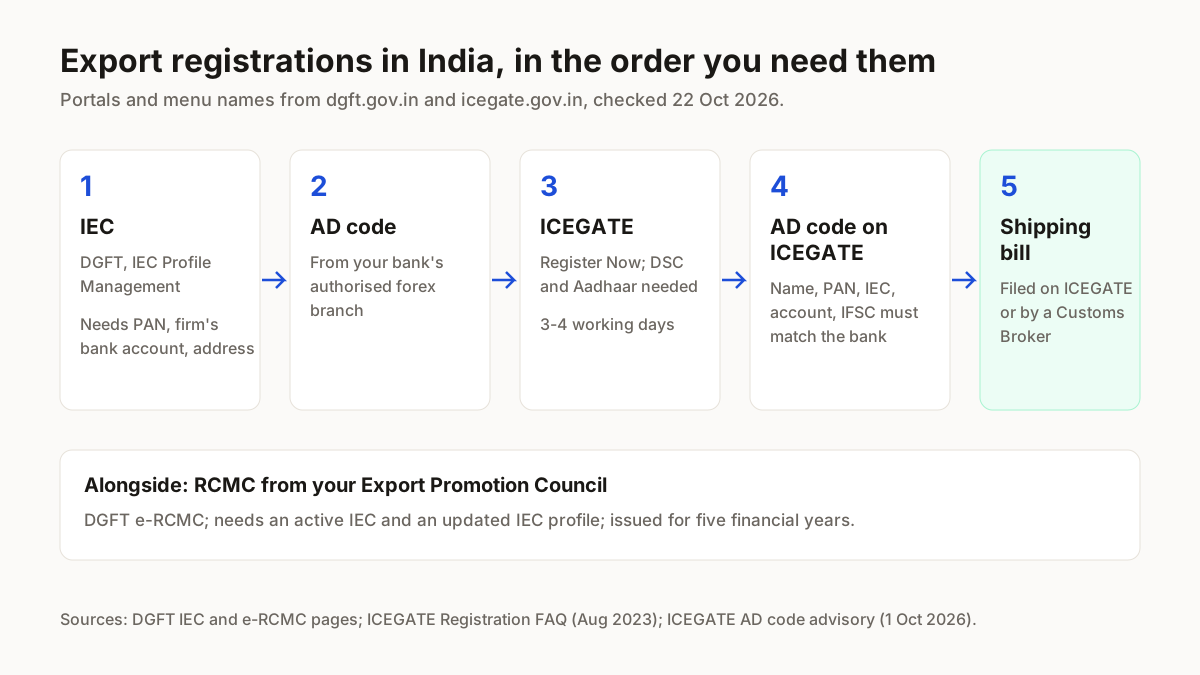
The order below is the one the portals expect, checked 22 Oct 2026. We have no DGFT or ICEGATE login, so each “you should see” line repeats what the portal says happens.
- 1
Check the export policy for your item
On dgft.gov.in, open “ITCHS Based Import & Export Policy” and search your product's code; then check “Restricted Exports” under services.You should see: The policy entry for your code, and whether the item appears under Restricted Exports.
- 2
Set up the firm and get the IEC
DGFT says “No export or import shall be made by any person without obtaining an IEC unless specifically exempted”. The firm can be a proprietorship, partnership, LLP, limited company, trust, HUF or society, and it needs a PAN, a bank account in its own name and a valid address before you apply on IEC Profile Management. Services exporters need an IEC only to claim Foreign Trade Policy benefits. The fee and documents are in our IEC fee and documents guide.You should see: An IEC for the firm; DGFT notes the address may be physically verified when the IEC is issued.
- 3
Get the AD code from your bank
Ask the bank that holds the firm's account for the AD Code of its authorised foreign-exchange branch.You should see: An AD Code issued by your bank and mapped to your account and authorised branch, which ICEGATE checks later.
- 4
Register on ICEGATE
ICEGATE registration is mandatory for filing online: ICEGATE calls it “a pre-requisite for filing of all customs related documents (bill of entry, shipping bills et al.) online” (Registration FAQ, Aug 2023, checked 22 Oct 2026). Apply through “Register Now” on icegate.gov.in, with the email and mobile number registered with GSTN and DGFT and your name exactly as on PAN.
A DSC and an Aadhaar card are mandatory for validation; uploads must be colour JPG or PDF under 1500 KB; a saved draft stays valid for 15 days. Then, under Services > Registration, use “Integrate GSTIN” and “Matching IEC GSTIN”.
You should see: Processing takes 3-4 working days, and the user ID and password arrive at your registered email (ICEGATE Registration FAQ).
- 5
Register the AD code on ICEGATE
Add the AD Code to your ICEGATE account. Entity name, PAN, IEC, account number, IFSC and AD Code must match across ICEGATE, DGFT and the bank's records.You should see: ICEGATE verifies the details with your bank by API (advisory of 1 Oct 2026).
- 6
Get an RCMC from your Export Promotion Council, if you need one
An RCMC is your registration with the Export Promotion Council for your product; DGFT's page does not say every exporter needs one, so check with the council if you want its membership or export-promotion benefits. Apply on DGFT's e-RCMC service with an active IEC, an updated IEC profile, and a linked Digital Signature token or Aadhaar e-Signature, and declare your main line of business.You should see: An RCMC issued for five financial years, valid from 1 April of the licensing year in which it was issued.
- 7
File the shipping bill
On ICEGATE's Electronic Filing menu, file by Webform, Web Upload, Service Centre, the RES Package or SMTP/E-mail, and sign with your DSC; or have a Customs Broker registered on ICEGATE file it for you.You should see: A shipping bill on the customs system for the consignment.
Where each export registration happens (checked 22 Oct 2026)
Four official places run these steps: DGFT, your bank, ICEGATE, and your Export Promotion Council through DGFT. We built this table from the portals themselves on 22 Oct 2026, so each row names the menu you will click.
| Step | Where (portal and menu) | What you need | Official source |
|---|---|---|---|
| Export policy check | DGFT: ITCHS Based Import & Export Policy; Restricted Exports | Your product's HSN code | dgft.gov.in |
| IEC | DGFT: IEC Profile Management | PAN, firm's bank account, valid address | dgft.gov.in |
| AD code | Your bank's authorised forex branch | Account in the firm's name | ICEGATE advisory, 1 Oct 2026 |
| ICEGATE registration | icegate.gov.in: Register Now | DSC, Aadhaar, email and mobile on GSTN and DGFT | ICEGATE Registration FAQ |
| AD code on ICEGATE | ICEGATE account; verified with the bank by API | Matching name, PAN, IEC, account, IFSC | ICEGATE advisory, 1 Oct 2026 |
| RCMC | DGFT: e-RCMC | Active IEC, updated profile, DSC or Aadhaar e-Sign | dgft.gov.in |
| Shipping bill | ICEGATE: Electronic Filing | ICEGATE login or a Customs Broker | icegate.gov.in |
Sources: dgft.gov.in IEC, e-RCMC and policy pages; ICEGATE Registration FAQ (Aug 2023) and AD code advisory (1 Oct 2026); all checked 22 Oct 2026.
Why ICEGATE rejects your AD code, and other export mistakes
ICEGATE fails an AD code when the bank's records and yours disagree; its advisory of 1 Oct 2026 lists the reasons below, and the fix is to re-check your entries and then go to the bank (ICEGATE advisory, checked 22 Oct 2026).
| Problem | Fix |
|---|---|
| Wrong account number or IFSC | Re-check both against the bank's records |
| AD Code invalid or not mapped to the account | Ask the bank to map it to the account and authorised branch |
| PAN or IEC mismatch | Use the same entity name, PAN and IEC on DGFT, ICEGATE and the bank |
| PAN and IEC under different customer IDs at the bank | Ask the bank to bring them under one customer ID |
| Outdated KYC | Update KYC at the branch, then retry |
| Inactive, dormant or frozen account, or wrong branch | Reactivate the account, or use the authorised forex branch's AD Code |
Source: ICEGATE advisory on AD Code and Incentive bank account verification, 1 Oct 2026.
- Uploads that do not meet ICEGATE's format. Documents must be in colour, JPG or PDF, under 1500 KB (ICEGATE Registration FAQ).
- A name that differs from PAN. ICEGATE asks for the name exactly as on PAN.
- Following an old RCMC guide. Some guides still describe RCMC under the 2015-20 Foreign Trade Policy; today you apply, renew and amend it on DGFT's e-RCMC service.
- Letting the draft lapse. A saved ICEGATE draft reference is valid for 15 days.
Online export business in India: selling abroad on Amazon
Yes, you can export online through Amazon Global Selling: Amazon says you register “by submitting your identity proof, address proof and credit or debit card (international transactions enabled)”, then list your products and ship them with your own logistics, Amazon's support or FBA (sell.amazon.in, checked 22 Oct 2026). Its FAQ accepts Aadhaar, a passport or a driving licence as ID, and a bank or credit card statement as business address proof.
Amazon's page names different numbers of marketplaces in different places, so check the list on the page for the country you want. Its listing guide sets its own image rules, covered in Amazon product photography; air-shipment paperwork carries an AWB number, explained with our AWB label generator. More guides for growing sellers sit under tools for marketplace sellers.
Still growing at home on Meesho?
ListMagic, our AI listing agent for the Meesho Supplier Panel, creates your catalog listings (title, category, attributes, images, price) while you work through the export paperwork. Free plan to start; Seller Pass ₹99 a month (StitchMagic pricing, checked 16 Oct 2026).
Try ListMagic