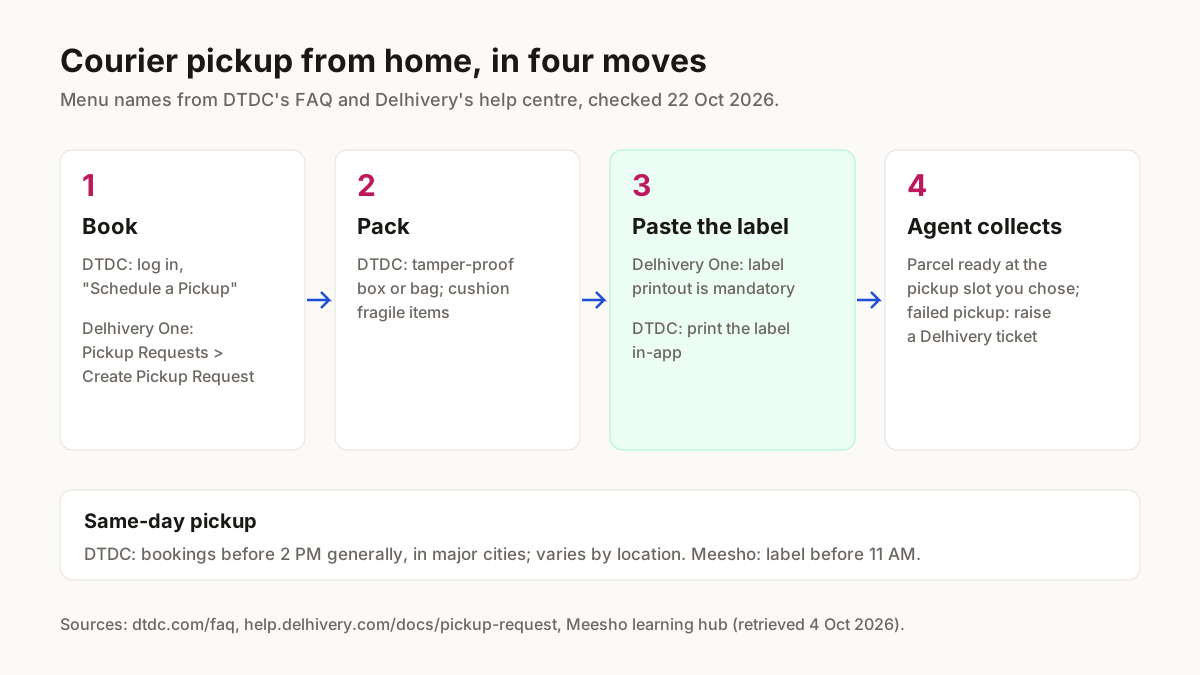
Free courier pickup from home: who collects
DTDC's personal-courier page offers a free pickup from your home, and its app schedules doorstep pickups across 100+ cities (dtdc.com, checked 22 Oct 2026). India Post is narrower: its free collection from your premises is for eligible corporate and bulk customers, and 24 Speed Post lists free pickup for bulk and corporate customers too.
Shiprocket arranges the pickup from its dashboard or app, and its home-pickup page names no charge for it. Delhivery's personal-courier pages did not load for us on 22 Oct 2026, so check pickup terms on delhivery.com before booking a one-off parcel; the Delhivery steps below are for Delhivery One business accounts.
| Courier | Home pickup on its own page | Who it is for | Where to book |
|---|---|---|---|
| DTDC | “Schedule a free pickup from your home” | Personal senders; app pickups in 100+ cities | dtdc.com or the DTDC app |
| Delhivery One | Pickup request after the order is booked | Business accounts | Delhivery One portal |
| India Post | Free collection, on-call or regular | Eligible corporate and bulk customers | Speed Post; others at the counter |
| Shiprocket | “a matter of just a few clicks” from the dashboard | Sellers shipping their own orders | Shiprocket dashboard or app |
Source: each courier's own page, checked 22 Oct 2026.
Keep three things ready before you book: the packed parcel, the pickup address with its PIN code, and the label where the courier asks for one. Delhivery One makes the printed label mandatory on the box; DTDC lets you print it in its app. Not sure which courier fits the parcel? Our comparison of courier services in India sets out how each one bills weight.
How to send courier from home: booking steps by courier
We read these steps on each courier's help pages on 22 Oct 2026. We have no screenshots of the logged-in booking screens, so each “you should see” line repeats what the courier says happens, not what we saw.
- 1
DTDC courier pickup from home
- Open dtdc.com or the DTDC app and log in to your account.
- Select “Schedule a Pickup”.
- Enter the shipment details and the pickup and delivery addresses.
- Pay digitally and print your label in the app, or drop the parcel at one of 16,500+ Customer Access Points instead.
DTDC warns that “www.dtdc.com is DTDC's only official website”; book there, not through a lookalike.
You should see: A booked pickup; DTDC says “Our team will collect it at your doorstep” (DTDC FAQ and personal-courier page, checked 22 Oct 2026).
- 2
Delhivery One pickup request (business account)
A pickup request is Delhivery One's instruction to collect booked orders from one of your saved pickup locations; a pickup slot is the time window you choose for it.
- Add your address once: Settings > Pickup Locations > Add New Pickup Location. The facility name must be unique, the contact number is verified by OTP, and you pick a pickup time slot and working days (all seven by default).
- Book the order on Delhivery One; a pickup request can only follow a booked order.
- Go to Orders > Forward Orders > Ready to Ship, or to Pickup Requests > Create Pickup Request.
- Select the pickup location, the pickup date and the preferred slot.
- Print the label from the Delhivery One portal and stick it on the box; Delhivery calls this mandatory.
You should see: A pickup request for that location, date and slot (Delhivery help: pickup request; pickup locations, updated 10 Jul 2026).
- 3
India Post collection for bulk senders
Eligible corporate and bulk customers can have parcels collected from their premises through an on-call or a regular collection service. If you do not qualify, book Speed Post at the counter; selected offices in major cities take bookings 24 hours a day. Terms are on India Post's Speed Post Parcel page.
You should see: Collection from your premises if your account is eligible; otherwise a counter booking (indiapost.gov.in, checked 22 Oct 2026).
- 4
Through an aggregator (Shiprocket)
- Click “Ship Now” on the order and choose a courier.
- Let the AWB be assigned, then schedule the pickup.
- For many orders, select them and use Bulk Actions; couriers are assigned by priority.
You should see: A scheduled pickup; for bulk orders Shiprocket says “all labels for your orders will be downloaded automatically” (Shiprocket home pickup).
Doorstep pickup for Meesho and Amazon orders
Meesho orders and Amazon Easy Ship orders come with the marketplace's own pickup, so you book no courier for them. On Meesho, download the label before 11 AM for a same-day pickup, and print the manifest for orders in the “Ready to ship” tab before the pickup agent reaches you (Meesho learning hub, retrieved 4 Oct 2026).
A worked example: a kurti seller downloads her Meesho label at 10:30 AM. That is inside the 11 AM rule, so it qualifies for Meesho's same-day pickup; a label downloaded at 11:30 AM does not. Her own-website orders are a separate clock: a boxed parcel booked on DTDC at 1:30 PM in a major city falls inside DTDC's general 2 PM same-day cut-off, while one booked at 3 PM should be expected the next day. More on Meesho's side is in Meesho delivery partner and pickup.
On Amazon Easy Ship, go to Orders > Manage Orders > Easy Ship, click “Schedule Pick-up”, enter the package weight and dimensions, choose a slot and print the label on 4×6 inch sticky label paper (Amazon staff post, Seller Forums, retrieved 4 Oct 2026). The order is then picked up from your location by an Amazon Logistics delivery associate (sell.amazon.in Easy Ship). To fit that label to a 4×6 sheet, use the Amazon label crop tool.
Courier pickup failed: what to check
For a same-day pickup, book DTDC before 2 PM, which DTDC says is generally the cut-off in major cities though it varies by location, and download a Meesho label before 11 AM (dtdc.com FAQ, checked 22 Oct 2026; Meesho learning hub, retrieved 4 Oct 2026). The table puts each courier's own rule next to the problem it causes.
| Problem | Courier's own rule | Fix |
|---|---|---|
| Agent came, parcel not ready | Delhivery: a failed pickup goes to a ticket with Delhivery Support | Pack before the slot opens; raise the ticket if the pickup failed |
| No label on the box | Delhivery One: label printout is mandatory | Print from the portal and stick it on before the slot |
| Booked too late for today | DTDC: generally before 2 PM in major cities | Book in the morning, or expect the next day |
| Item refused | DTDC: hazardous materials, currency and perishables may be restricted | Check the list before you book |
| Meesho parcel not collected today | Meesho: label before 11 AM for same-day | Download labels first thing in the morning |
Sources: dtdc.com/faq and help.delhivery.com, checked 22 Oct 2026; Meesho learning hub, retrieved 4 Oct 2026.
Packing matters to DTDC as well: it asks for a tamper-proof box or bag, with fragile items cushioned well. Seal the flyer or box so any tampering shows, and pad glass bangles or a framed print before they go in.
Labels and packing before the agent arrives
For your own orders the label is yours to make: the AWB label generator prints one from the order details, and the shipping cost calculator works out the chargeable weight before you book. If the parcel is a Meesho order, packing a Meesho parcel covers what Meesho expects. Shipping abroad needs papers first, set out in how to export from India; more guides are under tools for marketplace sellers.
Getting Meesho orders to pack?
ListMagic, our AI listing agent for the Meesho Supplier Panel, builds each catalog listing (title, category, attributes, images, price). Free plan to start; Seller Pass ₹99 a month (StitchMagic pricing, checked 16 Oct 2026).
Try ListMagic