How to sell on Snapdeal: seller registration steps
To become a Snapdeal seller, register on Snapdeal’s onboarding page at seller.snapdeal.com with your mobile number, email, GST and bank details, then add your store details such as the pickup address, and list your products with brand details. Those are Snapdeal’s own steps (read 10 and 11 Oct 2026). The address opens Snapdeal’s “Seller Onboarding” screen on setu.snapdeal.com, which is the same official sign-up.
- Enter your mobile number on seller.snapdeal.com. The onboarding page verifies it with an OTP sent by SMS, then asks you to set a password.
- Register yourself: basic details such as mobile number, email, GST and bank details.
- Store details: your pickup address and other store information.
- List your products: add each product with its brand details, and start selling.
- Payments: Snapdeal says you get paid 8 days after the customer receives the order.
The same page headlines “Start Selling on Snapdeal at 0% Commission*”, and its conditions are not printed there, so check the charges for your category inside the seller panel before you price a piece. We have no Snapdeal fee figures we can cite. Our Snapdeal image size guide covers the photos before you upload them.
Snapdeal seller login, app and support
The Snapdeal seller login is the “Login” button next to “already a user?” at the top of seller.snapdeal.com (setu.snapdeal.com), where you sign in with the mobile number and password you set at registration. A forgotten password is reset by an OTP sent to your mobile. Google also shows a seller sign-in on authorize.snapdeal.com, but that address returned “not found” on 10 Oct 2026, so start from seller.snapdeal.com.
The seller app is Snapdeal Seller Zone on Google Play, with review replies signed by Snapdeal Limited. It sends alerts for new orders, returns and payments and lets you raise queries from the phone, synced with the web panel, but the listing was last updated on 5 Aug 2021 (checked 11 Oct 2026), so treat the web panel as your main tool. For support, raise a query from your seller account; we print no helpline number, and you should never read your password or OTP out to a caller.
JioMart seller: registration, login and support
To become a JioMart seller, start at the JioMart Seller Portal on identity.seller.jiomart.com, which Reliance Retail runs for both sign-up and seller login; JioMart’s own name for its seller hub is “Seller Portal”. If you are not yet registered, the portal asks you to write to seller.onboarding@jiomart.com; registered sellers write to Seller.Support@jiomart.com from their registered email ID (read 10 and 11 Oct 2026).
The Seller Portal also lists the Seller Enablement Network (SEN) at sen.jiomart.com under its services. On 10 Oct 2026 jiomart.com/seller showed “page not found” and sen.jiomart.com failed its security certificate check, so use identity.seller.jiomart.com as your starting point.
We do not print JioMart fees, the document list or an invitation-code answer: JioMart’s fee page and FAQ did not open for us on 10 Oct 2026, and third-party figures are not JioMart’s own words. Ask the onboarding address which documents and fees apply to your category, and keep the reply. For photos, see our JioMart image size guide.
Shopsy seller
Shopsy is Flipkart’s own shopping app, “launched by Flipkart in July 2021”, so a Shopsy seller is a seller on Flipkart’s marketplace rather than on a separate company’s platform. Flipkart counts “over 1.4 million sellers on the platform, including Shopsy sellers” (Flipkart Stories, 2 Apr 2026, read 10 Oct 2026).
Flipkart’s announcement does not say how a seller joins Shopsy, and we could not open a separate Shopsy seller page on 10 Oct 2026. Start from Flipkart Seller Hub and ask its Help & Support whether your listings can appear on Shopsy. Our Flipkart seller hub covers Seller Hub registration, login, labels and returns.
IndiaMART seller account
An IndiaMART seller account is created on IndiaMART’s seller portal at seller.indiamart.com, whose page title offers “Free Registration”; the same portal shows Lead Manager, BuyLeads and Messages once you are in. IndiaMART says it connects 88 lakh suppliers with 23.4 crore buyers (IndiaMART About us, read 10 Oct 2026).
In our reading, IndiaMART fits a seller whose buyers are shops, resellers or companies that send an enquiry before they order, a different job from a Meesho catalog a shopper buys in one tap. Its seller pages showed no registration steps or paid-plan price we could read, so take those from the portal. Our IndiaMART catalog guide covers photos and descriptions for a listing.
Snapdeal vs JioMart vs Meesho: what each asks for
Snapdeal asks for GST and bank details at sign-up and brand details at listing, while Meesho asks for a bank account and a GSTIN, or an Enrolment ID / UIN if you are not GST-registered. Both advertise 0% commission on their own seller pages. JioMart’s requirements could not be read from its portal, so its column is blank rather than guessed.
| Criterion | Snapdeal | JioMart | Meesho |
|---|---|---|---|
| GST needed | GST and bank details asked at registration | — | GSTIN, or Enrolment ID / UIN for non-GST sellers |
| Brand needed | Brand details asked at the listing step | — | — |
| Onboarding fee | — | — | — |
| Published commission | “0% Commission*” (conditions not on the page) | — | 0% commission |
Sources: Snapdeal seller onboarding page (seller.snapdeal.com), JioMart Seller Portal and Meesho supplier site (supplier.meesho.com), read 3–10 Oct 2026. “—” means the marketplace’s own page did not state it. Last verified: Oct 2026.
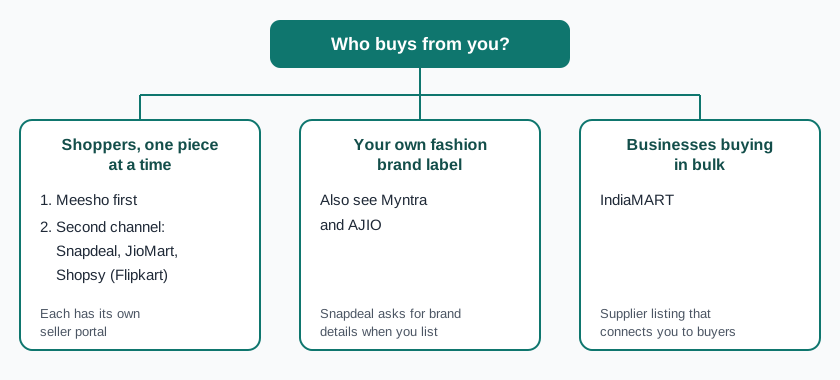
For a Meesho supplier, the deciding numbers on a second channel are your own: margin per piece after its category fees, and your return rate once the first orders come back. Start from the Meesho seller guide; if your label is your own brand, also read our Myntra seller hub and AJIO seller hub, and see all guides for marketplace sellers.
Frequently asked questions
How to start selling on Snapdeal?
Register on seller.snapdeal.com with your mobile number, email, GST and bank details, then add your store and pickup address. After that, Snapdeal’s page says to list your products with brand details and start selling (read 10 Oct 2026).
What is setu.snapdeal.com?
It is Snapdeal’s seller onboarding and login screen: seller.snapdeal.com opens it, and its “Login” button next to “already a user?” is the seller sign-in (read 10 and 11 Oct 2026). authorize.snapdeal.com returned “not found” when we checked on 10 Oct 2026.
What is the commission fee for selling on Snapdeal?
Snapdeal shows the fees for your category in the seller panel; we do not list figures we cannot verify. Its onboarding page headlines “0% Commission*” but does not print the conditions behind the asterisk (read 10 Oct 2026).
How to become a seller in JioMart?
Start from the JioMart Seller Portal at identity.seller.jiomart.com. If you are not registered yet, the portal asks you to write to seller.onboarding@jiomart.com; ask there which documents and fees apply to your category.
What is a Shopsy seller account?
Shopsy is Flipkart’s app, launched in July 2021, and Flipkart counts Shopsy sellers among the sellers on its platform (Flipkart Stories, 2 Apr 2026). Ask Flipkart Seller Hub support how your listings can appear on Shopsy.
How do I create an IndiaMART seller account?
Go to seller.indiamart.com, IndiaMART’s seller portal, whose page title offers free registration. The portal did not show its sign-up steps in a form we could read, so follow the screens there.
Is Meesho still your main channel? ListMagic, a Chrome extension, fills the Meesho Supplier Panel catalog form for you; it does not work on Snapdeal, JioMart, Shopsy or IndiaMART. Free plan to start; Seller Pass ₹99 a month (StitchMagic pricing, checked 16 Oct 2026).
Try ListMagic for Meesho listingsRelated
Checked by the StitchMagic team on 11 Oct 2026. StitchMagic is a set of free tools and one AI listing agent (ListMagic) for online sellers in India that helps them list faster on Meesho, Flipkart and Amazon.in and sell more. Found an error? Tell us; we correct with a dated note.