Amazon seller registration and Seller Central login
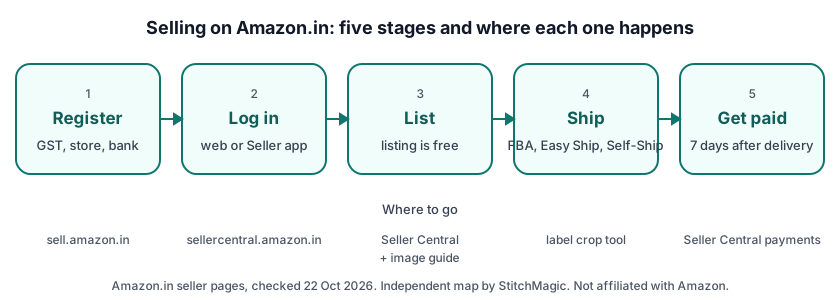
To register as an Amazon.in seller you need your business details, an email address and phone number, and your tax registration details (PAN and GST); Amazon’s seller FAQ says the account takes about 15 minutes to set up (checked 22 Oct 2026). The registration guide lists the screens in this order:
- Start at sell.amazon.in or sellercentral.amazon.in: name, mobile number, email and password, with an OTP on the phone.
- Enter your GST number and verify it.
- Enter your store name and your pickup address.
- Choose your shipping method.
- Add your bank account and select the default tax rate.
- List your products and launch your store.
Can you sell on Amazon without GST? Only if you sell GST-exempt goods: Amazon says “You can only sell GST-exempt products without a GST number by providing PAN details”, and other products need a valid GST number (registration guide, checked 22 Oct 2026). The form has an option for this, “I only sell tax-exempted products such as books”. Meesho, by contrast, accepts sellers without a regular GSTIN (supplier.meesho.com, 3 Oct 2026).
Seller Central Amazon login and the Amazon Seller app
The Seller Central Amazon login is at sellercentral.amazon.in: existing sellers select “Log in” and enter their email address or phone number and password (Amazon’s Seller Central page, checked 22 Oct 2026). From the dashboard you list products, handle shipping, track sales and payments, open Seller Programs and read customer feedback.
Amazon calls the Amazon Seller app “the mobile version of Seller Central”. Download it from the Apple App Store or Google Play; Amazon says “Sellers in India can download this app at no additional cost” (checked 22 Oct 2026). We print no Amazon seller helpline number.
Amazon seller central individual plan and seller fees
Amazon.in’s seller pages we checked name no individual plan: its registration guide, fees page and seller FAQ mention no individual or professional selling plan (checked 22 Oct 2026). The Individual plan ($0.99 per item sold) and the Professional plan ($39.99 a month) are on sell.amazon.com, for Amazon’s US store.
If a video tells you to pick the individual plan, it is showing the US sign-up on sell.amazon.com. Amazon.in says “We charge you when you get an order. Listing on Amazon.in is free.” (seller FAQ, checked 22 Oct 2026).
Amazon seller fees and commission
Amazon.in charges four kinds of fee when you sell: a referral fee by category, which “Starts at 0%”, a closing fee by price range, a weight handling fee for shipping, and other fees for some fulfilment channels and optional programmes (fees and pricing, checked 22 Oct 2026).
| Fee | What it is based on |
|---|---|
| Referral fee | Product category; a percentage of the selling price, starting at 0% |
| Closing fee | Price range of the product, charged every time it sells |
| Weight handling fee | Item weight and distance; not charged to Self-Ship sellers |
| Other fees | Certain fulfilment channels and optional programmes or services |
Source: sell.amazon.in/fees-and-pricing, checked 22 Oct 2026. Names only; rates change by category, so take them from the fee page or your Seller Central account.
Amazon says you are eligible to be paid for an order 7 days after it is delivered (seller FAQ, checked 22 Oct 2026). The fee calculator linked above works out what one order leaves you.
Listing, images and shipping on Amazon.in
Amazon.in asks for a product ID (UPC, EAN, ISBN or GTIN) on a listing unless you hold a GTIN exemption, and Amazon says GS1 India is the only authorised body in India for the UPCs and EANs it accepts; brand owners without barcodes can apply for that exemption (Amazon seller blog, 11 Aug 2025). For the tax code on your invoice, see our HSN code pages.
For many products at once, Amazon’s seller blog describes Inventory → Add products via upload and an inventory file with a Data Definition sheet and a Template sheet (blog of 27 Apr 2016; the menu label may have moved since). For photos, Amazon’s seller blog asks for a white background image “at least 1006 pixels” so buyers can zoom, plus several angles (read 22 Oct 2026); the bulk marketplace image resizer sizes a batch.
Shipping on Amazon: FBA, Easy Ship and Self-Ship
Amazon.in offers three ways to deliver: with FBA “Amazon will store your products”, pack and deliver them; with Easy Ship you store and pack, and an Amazon agent delivers; with Self-Ship you deliver through your own staff or a third-party carrier (sell.amazon.in shipping, retrieved 4 Oct 2026).
Easy Ship suits a seller who packs at home: your orders are picked up from your location by an Amazon Logistics delivery associate. In Orders > Manage Orders > Easy Ship, click “Schedule Pick-up”, enter the package weight and dimensions, choose a slot and print the label on 4×6 inch sticky label paper (Amazon staff post, Seller Forums, retrieved 4 Oct 2026). For Self-Ship parcels, see courier pickup from home.
Amazon seller programmes: Karigar, Saheli and more
Amazon Karigar is Amazon’s programme for handmade products: it is for individual artisans, weavers, cooperatives, NGOs and government emporiums whose products “should not be machine made”, joining is “without any additional cost”, and its reduced referral fee is 8% or less depending on the category (Amazon Karigar, checked 22 Oct 2026). New sellers apply through its Apply Now form.
- Amazon Saheli: “Specialized support for women-owned business products”.
- Amazon Global Selling: “Sell your products to customers around the world”; the export papers come first, in how to export from India.
- Amazon Business: “Sell in bulk to businesses (B2B Selling)”.
- Local Shops on Amazon (“Sell in your neighbourhood”) and Amazon Brand Registry (“Get protection for your brand”), quoted from Amazon’s programmes page, checked 22 Oct 2026.
Where to go for each Amazon seller task
Use Amazon’s site for anything that changes your account, and StitchMagic tools for the preparation.
| Task | Where |
|---|---|
| Register as a seller | Registration guide |
| Log in | sellercentral.amazon.in |
| Seller app | Google Play or the App Store |
| Fees on an order | Amazon seller calculator |
| Bulk listing | Bulk product upload guide |
| Barcodes | Bulk barcode generator; GS1 India for EAN/UPC |
| Product images | Amazon product photography |
| Easy Ship labels | Amazon label crop tool |
| Karigar (handmade) | Karigar page |
Official links checked 22 Oct 2026. Other marketplaces are in the related guides below.
Also selling on Meesho?
ListMagic, our AI listing agent, works in the Meesho Supplier Panel, not on Amazon: it creates your Meesho catalog listings for you. Free plan to start; Seller Pass ₹99 a month (StitchMagic pricing, checked 16 Oct 2026).
Try ListMagicFrequently asked questions
Does Amazon Seller Central India have an individual plan?
Amazon.in’s seller pages name no individual or professional plan; those plans belong to the US store on sell.amazon.com.
Can I sell on Amazon without GST?
Only if you sell GST-exempt goods, such as books, and give your PAN; other products need a valid GSTIN.
Where is the Seller Central Amazon login?
At sellercentral.amazon.in: choose Log in and enter your email or phone number and password.
How much does it cost to sell on Amazon.in?
Listing is free; Amazon charges referral, closing and weight handling fees when you get an order (no weight handling fee on Self-Ship).
When does Amazon pay sellers in India?
Amazon says you are eligible to be paid 7 days after the order is delivered.
How do I become an Amazon Karigar seller?
Apply through the Apply Now form on Amazon’s Karigar page; it is for new sellers of handmade products.
Know your selling price? See what Amazon’s fees leave you on each order.
Work out your Amazon fees per orderRelated
Checked by the StitchMagic team on 22 Oct 2026. StitchMagic is a set of free tools and one AI listing agent (ListMagic) for online sellers in India that helps them list faster on Meesho, Flipkart and Amazon.in and sell more. StitchMagic is not affiliated with Amazon. Found an error? Tell us; we correct with a dated note.