Requirements for starting an online business in India
To start an online business in India you need a PAN, a bank account, and either a GSTIN or an Enrolment ID from the GST portal. The GST portal manual says “PAN is mandatory for registration with GST” (GST registration manual, checked 30 Oct 2026). Meesho, Flipkart and Amazon.in each list a bank account.
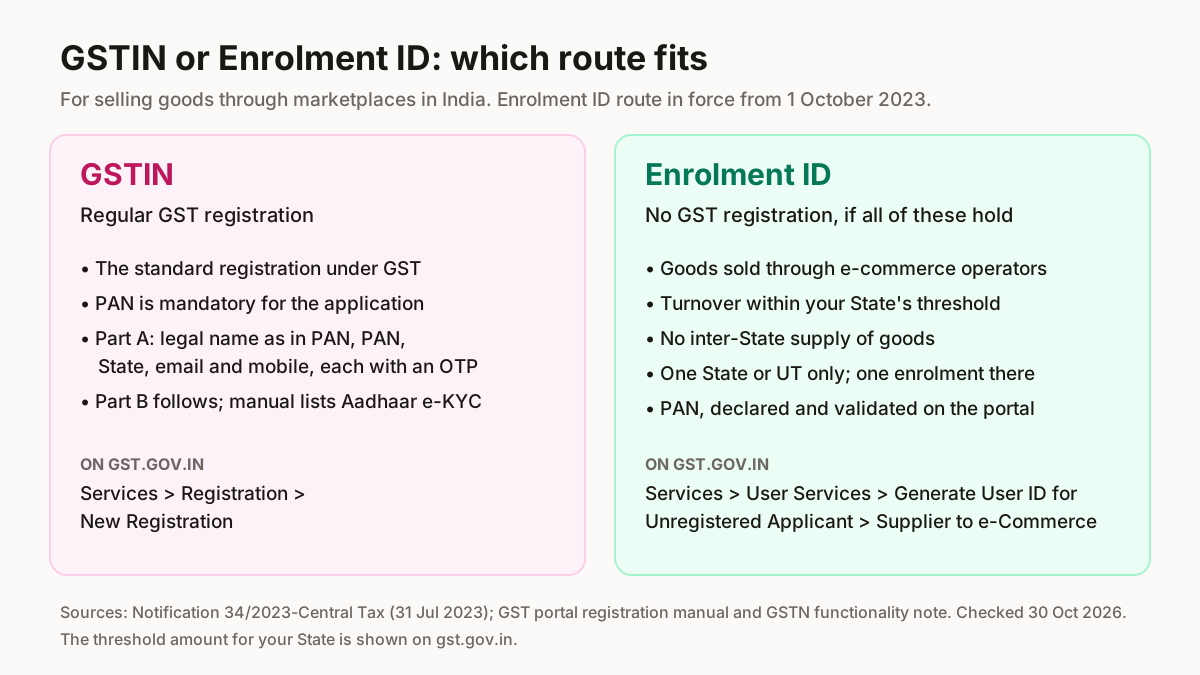
The Enrolment ID route comes from Notification 34/2023-Central Tax, dated 31 July 2023 and in force from 1 October 2023. It exempts a person selling goods through an e-commerce operator from GST registration while turnover stays within their State's threshold under section 22(1), if: no inter-State supply of goods; no e-commerce sales in more than one State or UT; a PAN; PAN, place of business and State declared and validated on the common portal before the first sale; one enrolment number per State.
| Route | Who it is for | Where on gst.gov.in |
|---|---|---|
| GSTIN | Any seller; PAN mandatory | Services > Registration > New Registration |
| Enrolment ID | Goods through e-commerce operators, within the threshold, one State, no inter-State supply, with a PAN | Services > User Services > Generate User ID for Unregistered Applicant > To Apply as a Supplier to e-Commerce |
Source: Notification 34/2023-Central Tax (31 Jul 2023, in force 1 Oct 2023); GST portal manuals and the GSTN functionality note; checked 30 Oct 2026. Later amendments not checked.
Most first-time sellers start as a sole proprietor, under their own PAN. Udyam registration is free and needs only an Aadhaar number (udyamregistration.gov.in, 22 Oct 2026), but no marketplace list we read asks for it (Udyam registration guide). Marketplaces also collect TCS on your sales under section 52, 0.5% (0.25% CGST + 0.25% SGST/UTGST, or 0.5% IGST) from 10 July 2024 under Notification 15/2024-Central Tax (PIB, retrieved 4 Oct 2026). See money and tax for sellers.
How to start an online business, step by step
Seven steps in the order the portals need them, as the official pages read on 30 Oct 2026.
- 1
Decide what you will sell and where you will source it
Pick one product line you can restock, and a supplier, before you register anywhere. Ideas: small business ideas you can start online. Stock: wholesale suppliers and online wholesale websites.You should see: A product, a supplier and a buying price per piece.
- 2
Keep PAN and a bank account ready
PAN is mandatory for a GSTIN, and the Enrolment ID route needs one too. Meesho, Flipkart and Amazon.in each ask for a bank account at sign-up.You should see: PAN and payout bank details ready for both forms.
- 3
Get a GSTIN, or an Enrolment ID if you qualify
For a GSTIN, open gst.gov.in → Services > Registration > New Registration. Part A asks for the legal name as in PAN, the PAN, State and district, and the signatory's email and mobile, each with its own OTP; Part B follows; the manual also lists Aadhaar e-KYC. For an Enrolment ID, go to Services > User Services > Generate User ID for Unregistered Applicant > To Apply as a Supplier to e-Commerce. Which you need depends on the notification's conditions and your turnover against your State's threshold, shown on gst.gov.in.You should see: An enrolment number once your PAN is validated, or a GSTIN application moving into Part B.
- 4
Choose where you sell
Meesho accepts a GSTIN or an Enrolment ID / UIN; Flipkart's list says “Regular GST number”, not needed for Books; Amazon.in says GST is mandatory unless you sell only GST-exempt goods. So a home seller who meets the notification's conditions can start on Meesho with an Enrolment ID, but needs a GSTIN for Amazon.in. Also: selling on WhatsApp, Myntra, AJIO and other marketplaces.You should see: One marketplace whose GST rule you already meet.
- 5
Open the seller account
Amazon.in's order: name, mobile, email and password; GST number and verification; store name, pickup address, shipping method, bank account, default tax rate; then list and launch. It says set-up takes 15 minutes (sell.amazon.in FAQ, 22 Oct 2026). Meesho asks for an active bank account and a GSTIN or Enrolment ID / UIN. Screen by screen: selling on Meesho, selling on Flipkart, selling on Amazon.in.You should see: A seller account with bank and GST details saved.
- 6
List your first products and price for the fees
Find each product's code with the HSN code finder, then price for the named fees: Meesho states a 0% commission on all categories (3 Oct 2026); Amazon.in names a referral fee that “starts at 0%”, a closing fee and a weight handling fee, not charged on Self-Ship (fees page, 22 Oct 2026). Use the Meesho commission calculator or Amazon seller calculator.You should see: Live listings with HSN codes and prices that cover the fees.
- 7
Ship and get paid
On Amazon.in, choose FBA (Amazon stores, packs and delivers), Easy Ship (you store and pack, an Amazon agent picks up and delivers) or Self-Ship (you deliver through your own or a third-party carrier). Meesho pays on the 7th day from delivery, Cash on Delivery orders included (3 Oct 2026); Amazon.in makes you eligible for payment 7 days after delivery (22 Oct 2026). Own orders: cheapest couriers for small sellers.You should see: First order shipped; payout on the platform's cycle.
What Meesho, Flipkart and Amazon.in ask for, side by side
Of the three, Meesho is the one whose sign-up accepts an Enrolment ID; Flipkart asks for a Regular GST number except for Books, and Amazon.in asks for GST unless you sell only GST-exempt goods. All three list a bank account. A dash means the platform's page gave nothing.
| Requirement | Meesho | Flipkart | Amazon.in |
|---|---|---|---|
| GST | GSTIN, or Enrolment ID / UIN | “Regular GST number”; not for Books | Mandatory unless only GST-exempt goods |
| PAN | — | Books only | Tax Registration Details (PAN and GST) |
| Bank account | Yes | Yes | Yes |
| Fee to list | 0% commission | — | “Listing on Amazon.in is free” |
| Payout | 7th day from delivery | — | 7 days after delivery |
Sources: supplier.meesho.com/how-it-works (3 Oct 2026); Flipkart Seller app listing on Google Play (11 Oct 2026); sell.amazon.in registration guide and FAQ (22 Oct 2026). Last verified: October 2026.
Three examples from the table. A home seller with an Enrolment ID can list on Meesho, though Meesho Ads is “not available for sellers who don't have a Regular GSTIN” (supplier.meesho.com, 11 Oct 2026). The same seller needs a GSTIN for Amazon.in unless every product is GST-exempt. A seller of books can register on Flipkart without GST, with PAN details instead.
Common mistakes when starting an ecommerce business
The most common mistake is getting the GST question wrong in either direction. Several top results date from 2014 to 2019, years before the October 2023 notification, so check each rule on its official page.
- Assuming every online seller needs a GSTIN on day one, or that none does. Fix: if you meet every condition of the notification, an Enrolment ID is enough.
- Using an Enrolment ID to sell into other States. Fix: conditions (i) and (ii) of the notification rule it out.
- Signing up on Flipkart or Amazon.in with only an Enrolment ID. Fix: their own pages ask for GST, apart from Books on Flipkart and GST-exempt goods on Amazon.in.
- Paying an agent for Udyam. Fix: the portal says it is free.
- Pricing without the fees and TCS. Fix: count the named fees and the 0.5% TCS (PIB, 2024) first; see GST on clothes.
- Trusting an old guide for onboarding. Fix: read the marketplace's own page; supplier.meesho.com (3 Oct 2026) says sellers without a Regular GSTIN can sell.
List faster on Meesho once your account is open
After step 5 on Meesho, the slow part is the catalog form. ListMagic is a Chrome extension for the Meesho Supplier Panel that creates the listing for you: title, category, attributes, images and price. StitchMagic is a set of free tools and one AI listing agent (ListMagic) for online sellers in India that helps them list faster on Meesho, Flipkart and Amazon.in and sell more. No GSTIN yet? Read selling on Meesho without GST.
Account open? Get your first Meesho catalog listed
Create your next listing from the Meesho Supplier Panel. Free plan to start; Seller Pass ₹99 a month (StitchMagic pricing, checked 16 Oct 2026).
Try ListMagicOnline business kaise shuru kare (Hinglish)
Online business kaise shuru kare? PAN aur bank account ready rakhiye, phir gst.gov.in par GSTIN lijiye; sirf apne State mein marketplace se goods bechte hain aur threshold ke andar hain, to Enrolment ID kaafi hai (1 October 2023 se). Meesho Enrolment ID leta hai; Flipkart aur Amazon.in zyada tar GST maangte hain. Phir account kholiye aur listing banaiye.